
LinkedIn Lead Gen Forms: Best Practices for SaaS Teams

Most SaaS teams judge LinkedIn Lead Gen Forms by one metric: CPL. If the form generates cheap leads, the campaign looks successful. If CPL rises, teams usually assume something is wrong with the creative, targeting, or bid strategy.
But CPL only measures the cost of a form submission. It does not show whether the lead matches your ICP, becomes an SQL, books a demo, or turns into pipeline. This is where many SaaS teams misread Lead Gen Form performance: they optimize for the lowest-cost conversion while sales works through contacts that were unlikely to convert from the start.
At Aimers, we view LinkedIn Lead Gen Forms SaaS campaigns through a pipeline lens rather than a lead volume lens. Below, we break down the three layers that shape lead quality before an SDR ever picks up the phone: targeting, offer strategy, and form design. We'll also explore how to measure performance using cost per SQL, attribution, and CRM data instead of relying solely on CPL and form submissions.
Why LinkedIn Lead Gen Forms Often Prioritize Volume Over Quality
LinkedIn Lead Gen Forms significantly reduce friction between a click and a form submission. Users aren’t redirected to an external landing page, and form fields are partially pre-filled automatically from their profile. In reports, the campaign may look successful: more form completions, lower CPL, and faster data collection.
The problem starts further down the funnel. A campaign with a Lead Generation objective is optimized for form completion, not for SQL rate, opportunity creation, or revenue. A high CVR on LinkedIn does not always mean high lead quality.
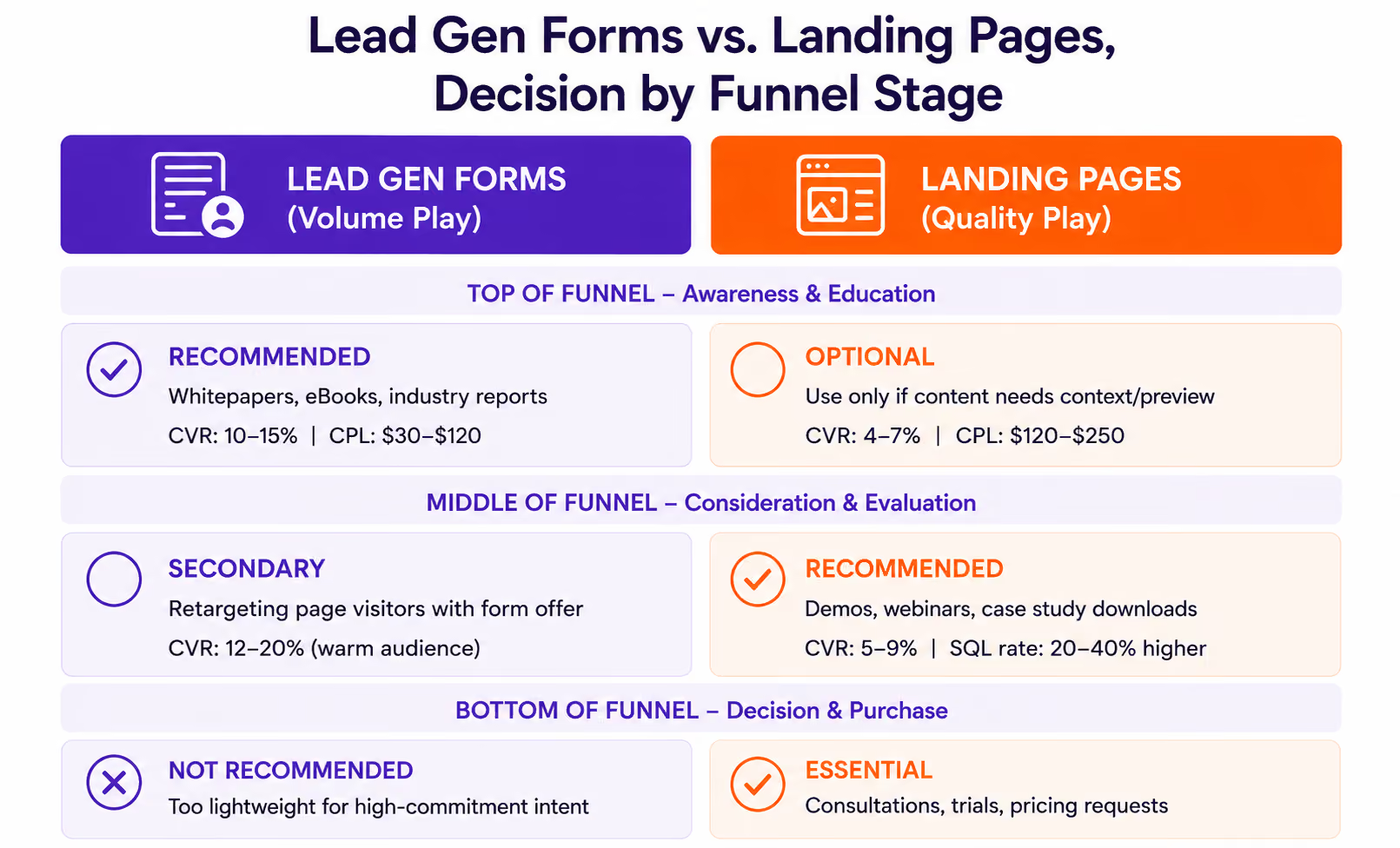
The difference is visible in the benchmarks. According to data frequently cited by LinkedIn and its partners in their materials, Lead Gen Forms have an average conversion rate of 13%, compared to 4–6% for external landing pages. However, the SQL rate for landing pages can be 20–40% higher because additional friction filters out weaker leads before they submit a form. Why is this important for SaaS?
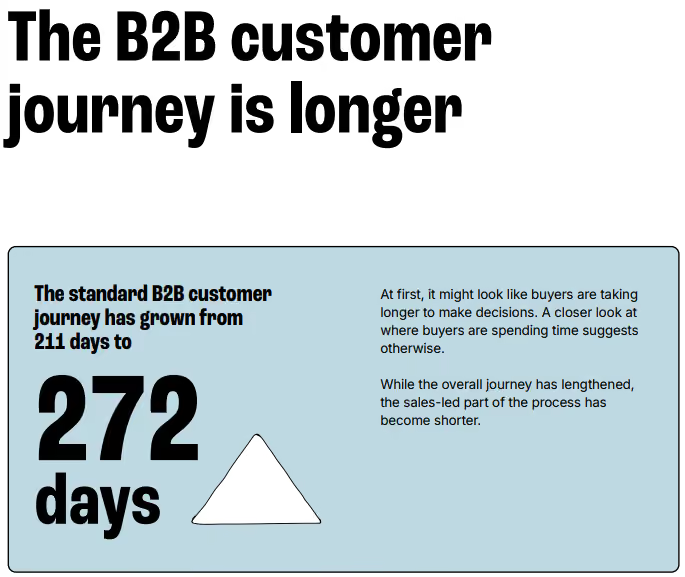
The average MQL-to-SQL conversion rate in B2B SaaS is 15–21%. Even with a strong setup, most leads will not become sales-qualified. Furthermore, the average B2B customer journey in 2025 is 272 days, which is 61 days longer than in 2024.
In other words, a weak lead in the SaaS funnel does not just increase CPL. It enters the CRM, takes up SDR time, goes into the nurture pipeline, and can remain in the system for months. If you optimize only the form rather than the quality of incoming leads, the team will see more activity, but not necessarily a larger pipeline.
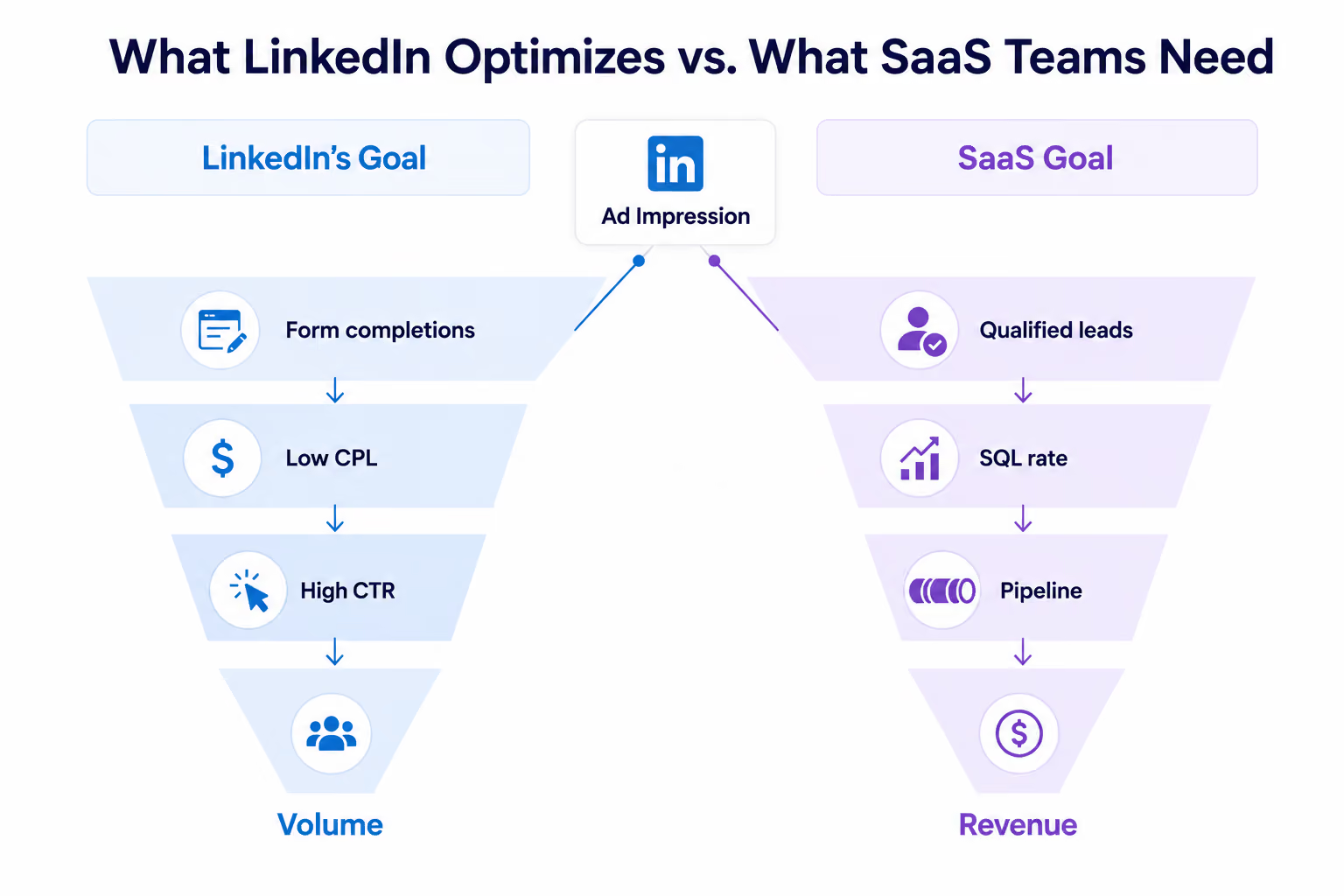
Much of the standard lead form best practices advice focuses on lowering CPL through fewer fields, simpler offers, and broader audiences. While this may increase volume, it doesn’t solve the problem for a SaaS team if the campaign’s goal is to generate a qualified pipeline.
The main question is how to compensate for the format’s built-in bias toward volume across the LinkedIn lead generation funnel. This requires filtering at three levels: targeting, the offer, and the form itself. These steps occur at different moments: before the click, during the decision-making process, and when filling out the form.
Auto-Fill Mechanics and the Data Quality Trade-Off
To improve Lead Gen Form quality, it helps to understand why the format can underperform. The reason is tied to the format’s key advantage: auto-fill.
At the mechanics level, how do LinkedIn Lead Gen Forms work comes down to auto-fill. When a user opens the form, LinkedIn automatically pulls data from their profile, including their name, email address, job title, company, company size, and location. Users do not need to visit a website or manually enter information. This is why Lead Gen Forms can achieve a conversion rate (CVR) of around 13%: the path from click to submit is as short as possible.
However, the fewer actions required of the user, the less information the advertiser receives about their intent. The “work email” field is populated with the address provided by the user in their LinkedIn profile. It could be a corporate email address or a personal address. LinkedIn does not verify whether the email address belongs to the user’s current company.
Although Lead Gen Forms allow advertisers to validate work emails by blocking free domains such as Gmail or Yahoo, enabling this setting reduces submission volume. Fewer people will submit the form, but the list will be cleaner. For SaaS, this is a normal trade-off if the campaign’s goal is to generate a qualified pipeline, not just CPL.
Similar issues exist with the job title and company size fields. This data is pulled from the user’s profile, so its accuracy depends on how regularly they update their LinkedIn profile. However, there are no direct studies showing how often these fields become outdated or how much they affect CRM data quality.
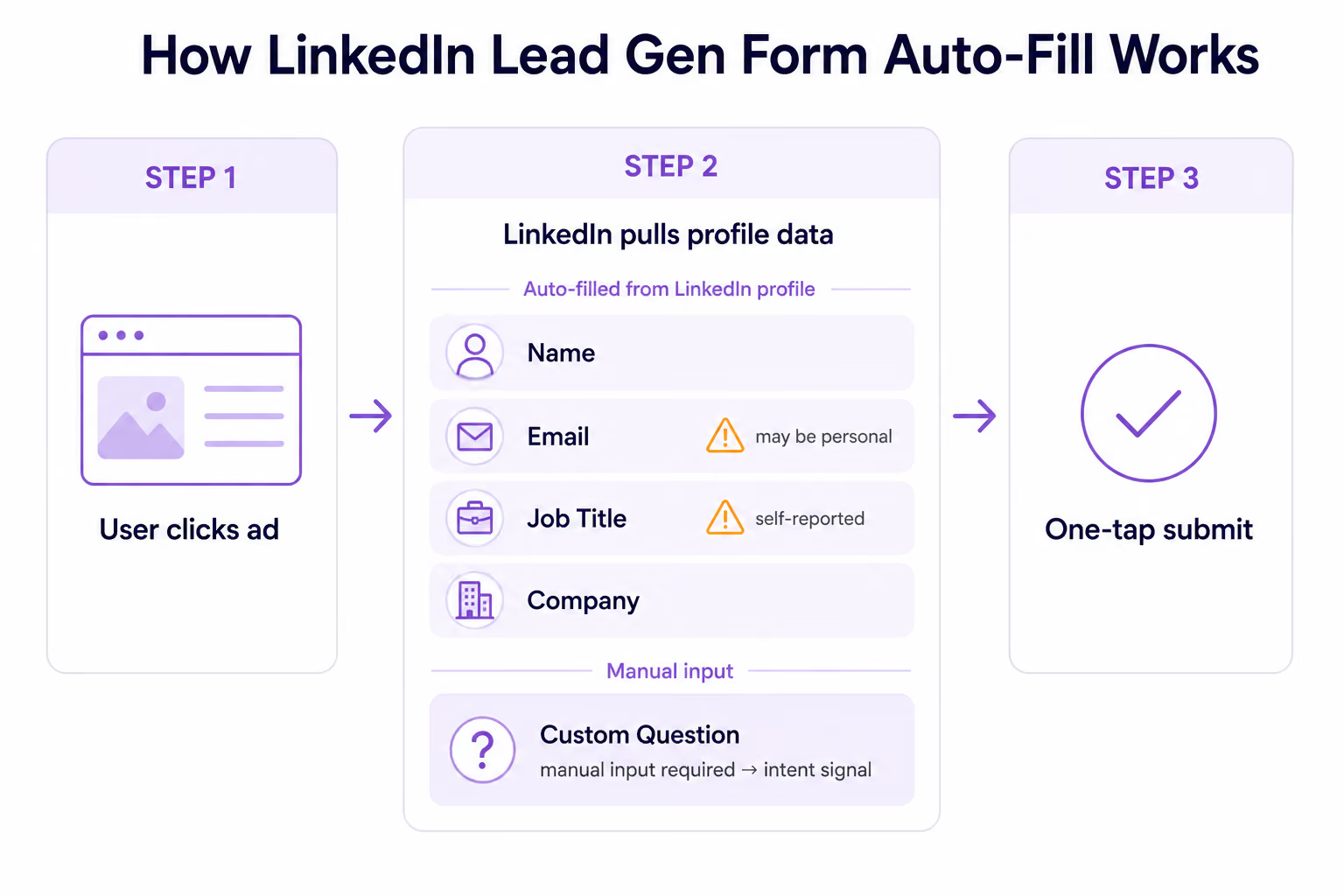
Key takeaway: Auto-fill increases the conversion rate but weakens the intent signal. A user who reads the landing page, reviews the case study, and spends a few minutes filling out the form demonstrates a different level of intent than someone who submits a nearly pre-filled form in two clicks.
Custom questions are the only Lead Gen Form field type that requires users to enter or select something manually. Unlike auto-fill fields, these questions require users to take action, such as selecting an option, providing context, or entering a response manually. Therefore, they add the first intentional signal to the form.
How to Add Intent Signals to Your Lead Gen Form
A Lead Gen Form alone cannot distinguish between a high-quality lead and a random submission. However, it can create the right level of friction. An uninterested user is more likely to stop, while an interested user will continue. For SaaS, Lead Gen Form best practices should treat custom questions as a qualification layer, not just an extra field.
LinkedIn allows you to add up to three custom questions in multiple-choice or open-ended formats. According to LinkedIn, adding even a single custom question reduces the submission rate by 3–4%. However, in SaaS, this isn’t necessarily a loss. Often, it acts as a filter that removes low-intent leads before they enter the CRM.
The strongest LinkedIn Lead Gen Form examples for SaaS usually include questions that verify ICP fit or purchase readiness. For example:
- “What’s your biggest challenge with [problem category]?” – Helps determine how relevant the problem is to the user
- “When are you looking to implement a solution?” – Categorizes leads by timeline
- “How many people are on your team?” or “What’s your company size?” – Helps verify account size alignment
- “What’s your primary goal for [use case]?” – Helps understand exactly what the user wants to achieve and gives the sales team additional context before the first contact;
Multiple-choice questions are particularly useful for B2B SaaS because their answers can easily be integrated into a CRM. They can be linked to lead scoring, routing, and prioritization, eliminating the need for manual review of each submission. For instance, a lead who selects “Ready to implement in the next 30 days” and works for a company with 200 or more employees could be automatically placed in the high-priority queue.
LinkedIn recommends using a total of three to four fields in the form. For SaaS qualification, a working combination typically looks like this: Two to three auto-fill fields (work email, job title, and company name) and one custom question as an intent gate. This combination helps maintain CVR while giving sales enough context for the first conversation.
Another option to test is placing the custom question first in the field order. This may lower the CVR, but it can help filter out low-intent submissions earlier because uninterested users close the form immediately. We recommend trying this approach as an experiment, not as a universal best practice.
Offer as an Intent Filter: Designing for Self-Selection
In LinkedIn lead generation ads SaaS campaigns, custom questions filter users inside the form, while the offer filters them earlier by determining who is likely to click on the ad. As a result, the same Lead Gen Form can generate leads of vastly different quality depending on the offer behind the submission.
Offer Type Shapes Lead Intent
The difference is visible in CPL. Gated content and webinar registrations are typically significantly cheaper than demo requests or sales inquiries.
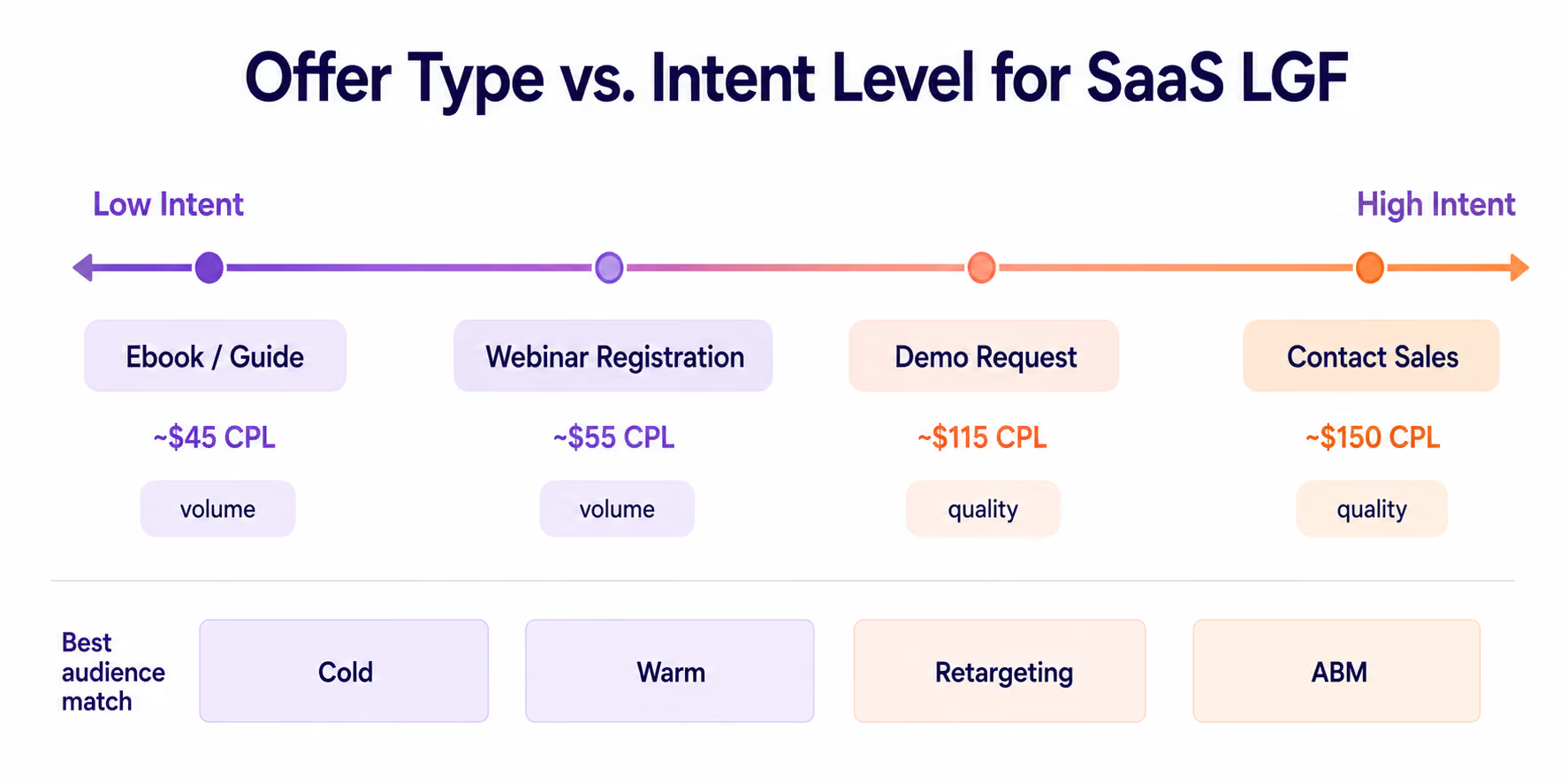
Cost is only part of the issue. When evaluating LinkedIn ads costs, each offer also needs to be judged by the level of readiness it attracts. For example, someone who downloads a "SaaS Benchmark Report" is likely in the research stage. They’re gathering context and comparing approaches. Someone who submits a form with a "Get a Custom Demo" CTA is closer to having a sales conversation. These are different types of leads. If you treat them the same, you’ll waste SDR time on non-targeted contacts.
In our experience, demo offers to a cold audience often yield poor results, even if the CPL looks acceptable. In one case study, demo campaigns targeting cold traffic without prior engagement had an 80% no-show rate. After switching to audiences with at least two prior touchpoints, the no-show rate dropped to 15%. Demos are more effective when offered to users who have already seen the product or interacted with the brand.
Specific Offers Improve Self-Selection
Another way to improve pre-click filtering is to tailor the offer more specifically. Among practical LinkedIn ads examples, the strongest offers usually make the ICP, use case, or spend level clear before the user clicks. For example, “Free LinkedIn Ads Audit” attracts too broad an audience. "LinkedIn Ads Audit for SaaS Teams Spending $20K+/Month," on the other hand, immediately sets the context and filters out those for whom the offer isn't suitable. While the volume of applications may decrease, quality usually improves due to pre-click self-selection.
For mid-funnel SaaS offers, it's often a compromise between reach and lead quality. Typical examples include:
- ROI calculators
- Tool audits
- Benchmark reports for a specific role or use case
These offers are useful enough to attract serious buyers and specific enough to filter out casual interest. Because there are no direct public benchmarks for this point, it should be framed as a practical observation.
One common mistake is showing a TOFU offer to a warm retargeting audience. If someone has already visited the site or interacted with the content, they need the next step, not another generic checklist. In such cases, the team wastes a warm contact on an offer that doesn’t move the user further down the funnel.
Targeting: Filtering Lead Quality Before the Form
With LinkedIn lead generation forms, lead quality starts with targeting. No form or offer can compensate for targeting the wrong audience. This quality layer works before the user even sees the ad.
For B2B SaaS, basic ICP targeting is usually based on three sets of parameters.
- Job function. This helps reach the right roles, such as marketing, IT, finance, or operations
- Seniority. Filters out users with no influence on purchasing decisions
- Company size. This helps distinguish between SMB, mid-market, and enterprise accounts
In other words, the ICP must be defined in both the strategy and the campaign settings. This includes which job functions to target, which seniority levels to include, and which company sizes to include or exclude.
Matched Audiences provide a more precise level of targeting because they work with your data, not general filters: CRM lists, company lists, and website visitors via the LinkedIn Insight Tag. Such audiences typically yield higher-quality leads because they already have an ICP filter or have engaged with the brand in the past.
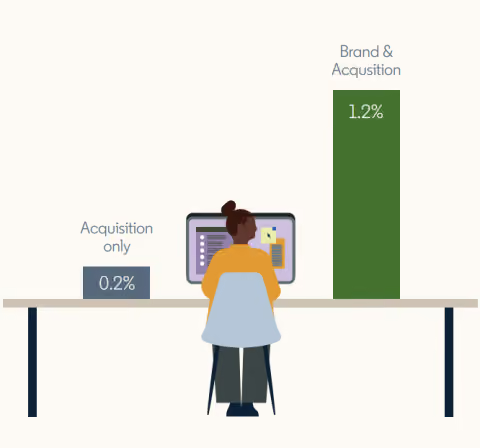
This effect is even more noticeable when the audience is familiar with the brand. Users who have previously interacted with the company typically convert significantly better than cold traffic. This is why Matched Audiences often work as a bridge between brand building and acquisition.
Company lists are particularly important for ABM. When domains are uploaded correctly and subsidiaries are considered, the match rate can be as high as 92–98%. This makes LinkedIn one of the most effective channels for targeting specific accounts rather than similar ones.
In one of our case studies, we worked with a SaaS client who had a monthly budget of $21,000. The CPL was $778, the conversion rate was 1.1%, and the internal lead quality score was 3/10. After adding filters for company size and industry, excluding irrelevant job titles, and narrowing the audience, the CPL dropped to $412. Meanwhile, the CPC increased from $8.50 to $12, but the traffic became significantly closer to the actual buying process.
This illustrates a basic principle: a more expensive click can be more valuable than a cheap one if it comes from someone with the right account and role in the decision-making process. The best LinkedIn ads agencies usually evaluate this at the SQL and opportunity level, not only through CPC or CPL.
Below are a few practical guidelines for setting up audiences:
- For prospecting campaigns, it’s best to keep the minimum audience size at around 50,000 members. Below this threshold, frequency, CPM, and CPL tend to increase.
- For retargeting campaigns, 10,000 members may be sufficient.
- It’s best to set up exclusion lists before launching a campaign. Current customers, competitors, students, and irrelevant geographic locations should be excluded from acquisition campaigns.
In February 2024, LinkedIn replaced Lookalike Audiences with Predictive Audiences. This tool expands reach based on the attributes of your seed audience and requires a minimum of 300 members in the source segment. For SaaS companies, Predictive Audiences can help scale beyond Matched Audiences without manually expanding demographic filters.
Beyond CPL: Measuring What Actually Matters for SaaS
LinkedIn Lead Gen Forms optimization should not stop at CPL. CPL reflects the cost of a form fill, but it does not reflect the cost of a qualified call. It is not the cost of a demo, and it is not the cost of a closed deal. For SaaS, where the average customer journey takes 272 days, optimizing for CPL means optimizing the first two seconds of a nine-month process.
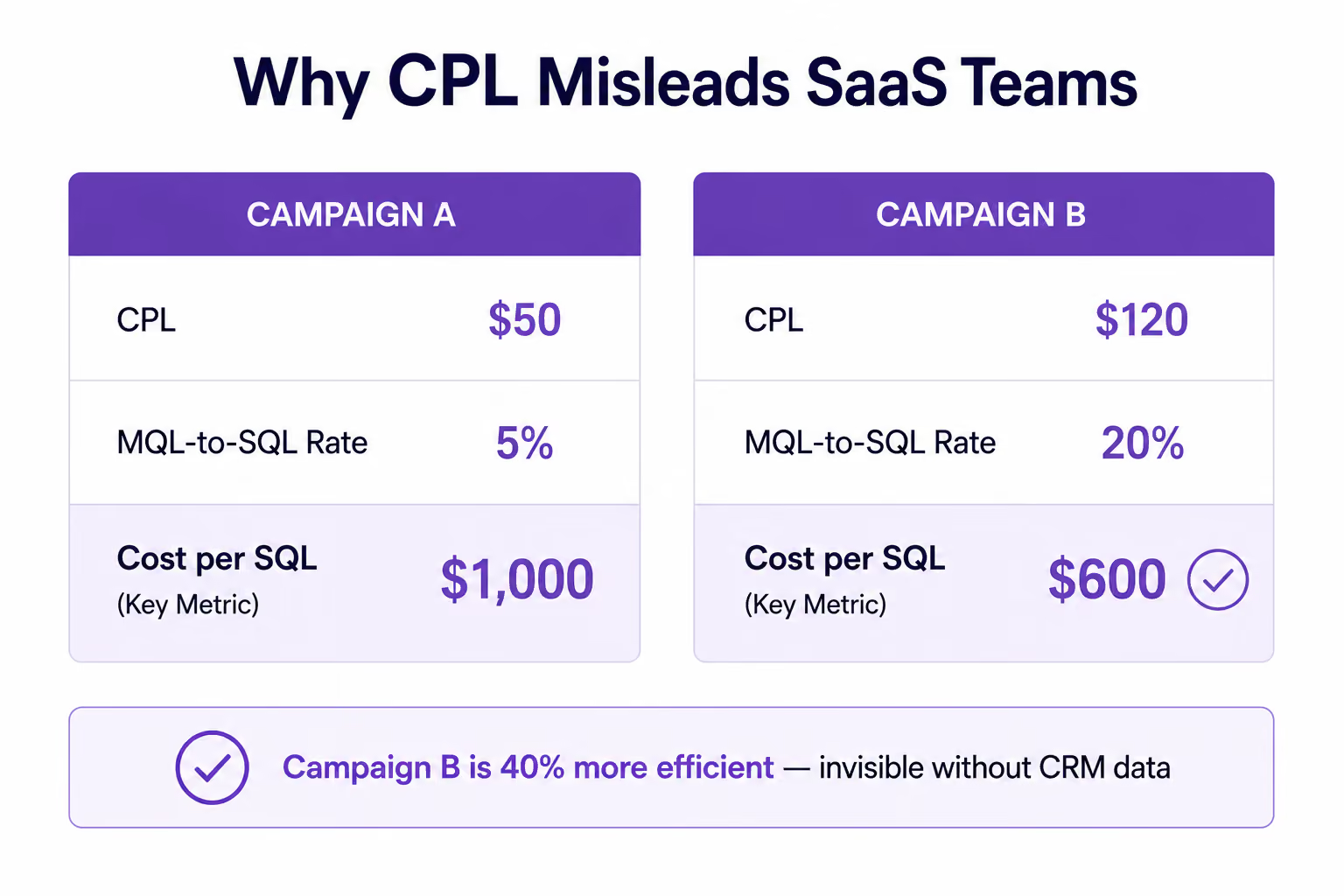
The difference becomes clear when you look beyond the initial stage. For SaaS teams using conversion rate optimization services, this is where form CVR needs to be connected to SQL rate and pipeline quality. Consider two campaigns. The first generates leads at a CPL of $50, but only 5% of those leads convert to SQLs. The second has a CPL of $120 and converts 20% of its leads into SQLs. In the first case, the cost per SQL is $1,000, while in the second case, it’s $600. Despite the higher CPL, the second campaign is 40% more efficient at generating SQLs.
The problem with LinkedIn ads Lead Gen Forms is that Campaign Manager does not show this difference. The platform recognizes form submissions, but it doesn't know which leads became MQLs, SQLs, or opportunities. This data is stored in the CRM, so without full-funnel tracking, it’s impossible to accurately evaluate the campaign's effectiveness.
LinkedIn Conversions API (CAPI) helps close this gap. It allows you to send CRM data, such as MQLs, SQLs, pipeline, and revenue, directly to the platform. This helps the algorithm optimize toward real business events rather than just web conversions.
According to data from Dreamdata, the use of offline conversion data is associated with a 20% reduction in CPA and a 31% increase in attributed conversions.
This trend is also visible at the market level. According to LinkedIn, five months after the launch of the Dreamdata integration, over 85% of Dreamdata’s paid-plan customers were already using LinkedIn CAPI to send offline and online conversions back to LinkedIn.
This shows that the market is gradually moving away from optimization based on form fills and shifting toward signals that are closer to the pipeline: SQLs, opportunities, and revenue. When LinkedIn receives CRM signals, the algorithm begins to see not only leads but also their quality. In the MarketerHire case study, connecting LinkedIn CAPI via Zapier reduced the cost per qualified lead by 30% and increased the conversion rate from appointment to qualified buyer by 35%.
Technically, implementation does not usually require complex infrastructure. LinkedIn supports native integrations with HubSpot, Salesforce, and Marketo, and for other CRMs, you can use Zapier or Make. The minimum useful event set to send back to LinkedIn includes:
- Lead (form submit)
- SQL (sales qualification)
- Opportunity
- Pipeline Created
- Closed Won
Another parameter most teams overlook is the attribution window. By default, LinkedIn offers a 30–90-day window. With an average customer journey of 272 days, a significant portion of LinkedIn’s impact on the pipeline may simply not be captured in reports. That’s why Dreamdata recommends using an attribution window of at least 12 months.
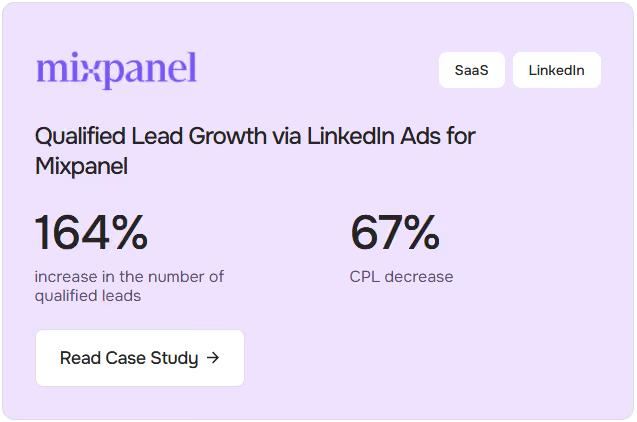
In our Mixpanel project, where we worked on optimizing paid acquisition on LinkedIn, one of the first tasks was to set up proper conversion tracking. There were over 60 campaigns running in the account, but the account did not have a unified UTM tagging system, so it was impossible to link leads from Salesforce to specific campaigns. After setting up the tracking structure, standardizing UTM parameters, and integrating over 30 Lead Gen Forms with Salesforce, the team was able to analyze performance at the qualified lead level, rather than just form fills. The result was a 164% increase in qualified leads, accompanied by a 67% decrease in CPL.
For SaaS teams, Lead Gen Form reporting should go far beyond CPL. The key metrics to track are:
- Form CVR
- MQL-to-SQL rate
- Cost per SQL
- Cost per Opportunity
- LGF-attributed pipeline value
- Attribution window. For B2B SaaS, 90 days is considered the minimum, although sales cycles that are longer often require 12 months or more
A Practical Framework for Higher-Quality LinkedIn Leads
If we were to boil this entire article down to one principle, it would be that lead quality is developed sequentially across three levels. Each subsequent level builds on the previous one but cannot compensate for its mistakes. Even the most well-designed form cannot fix incorrect targeting. A strong offer won’t save a campaign if the audience doesn't match the ICP. Additional fields won’t help if the user isn’t initially interested in the offer.
Therefore, it is better to view LinkedIn Lead Gen Forms as a sequential filtering system, not only as a lead generation tool.
The Three Layers of Lead Quality
Targeting determines who will see the ad and form.
This is the foundation of the entire campaign. If the audience is chosen incorrectly, further optimization is pointless.
The offer determines who will click on the ad.
This is where the first intent signal is formed. Even a high-quality audience won’t deliver the desired results if the offer doesn't match the stage of the funnel.
Form fields and custom questions determine who will complete the form.
At this stage, additional filtering and context emerge to help the sales team quickly assess lead quality.
A LinkedIn ads agency should adjust the configuration by campaign goal, not apply the same form setup to every audience. The simplified framework below shows how that logic changes.
When to Use Lead Gen Forms vs. Landing Pages
Lead Gen Forms generally perform better with warm audiences and with retargeting campaigns, particularly those promoting low- to mid-funnel offers. In these scenarios, forms require fewer user actions, yield a lower CPL, and convert mobile traffic well.
Landing pages tend to perform better in BOFU scenarios, especially for demo requests, consultations, and pricing-related offers targeting cold traffic. They allow full control over messaging, make it possible to add qualification questions, and collect behavioral signals, such as time on page and views of specific sections. According to Apexure, such scenarios can deliver SQL rates 20–40% higher than Lead Gen Forms.
Red Flags That Signal a Quality Problem
Several signs indicate that a campaign is optimized for volume rather than lead quality.
- There are no custom questions on the form
- A warm audience receives a generic gated content offer
- There is no CRM integration, and leads are uploaded manually
- The attribution window is limited to 30 days or less
- The only KPIs are CPL and form CVR
- Demo offers are launched to a cold audience
- There are no exclusion lists
Follow the Right Optimization Order
One common mistake is starting optimization with the form, creative, or individual questions. In practice, however, the order should be reversed.
Strong LinkedIn Lead Gen Form best practices follow the same order: first, ensure the campaign is showing ads to the right audience. Then, check that the offer aligns with the stage of the funnel and the user’s intent level. Only after that should you configure the form fields and custom questions.
Each step depends on the one before it. Trying to optimize the form with incorrect targeting is like trying to improve conversion at a stage that wasn’t intended to receive that traffic.
Need a Second Opinion on Your Lead Quality?
Many LinkedIn Lead Gen campaigns do not have a lead generation problem. They have a qualification problem.
If your forms generate leads but SQL rates remain low, the issue is rarely limited to a single field or question. More often, it comes from the interaction between targeting, offer strategy, form design, CRM tracking, and attribution.
As a SaaS digital marketing agency, Aimers helps B2B SaaS companies build LinkedIn acquisition systems that optimize for pipeline, not just form submissions. From audience strategy and Lead Gen Form design to CRM integration and conversion tracking, our focus is on improving the metrics that matter after the form is submitted.
If you want an outside perspective on your current LinkedIn setup, we can review your funnel, identify quality bottlenecks, and recommend the highest-impact opportunities for improvement.
FAQs
What Are LinkedIn Lead Gen Forms?

Are LinkedIn Lead Gen Forms Effective for SaaS?
What Are LinkedIn Lead Gen Form Best Practices for Higher-Quality Leads?
Should LinkedIn Lead Gen Forms Use Custom Questions?
Should SaaS Teams Use LinkedIn Lead Gen Forms or Landing Pages?