
LinkedIn Ads Targeting Options: The Complete Guide

LinkedIn is the only advertising platform that uses verified professional data for targeting. Users update their job titles, companies, and skills because this information directly impacts their career opportunities. This fundamentally distinguishes LinkedIn from Meta and Google, where professional context is weak or absent.
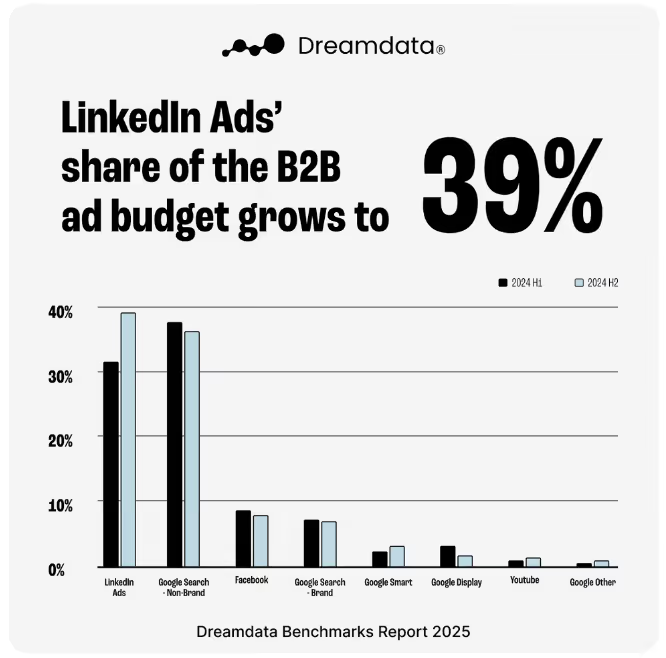
For B2B SaaS companies, this means direct access to the ideal customer profile (ICP): 65 million decision-makers, four out of five of whom are involved in business decisions within their organizations. By the end of 2025, LinkedIn accounted for 39% of all B2B paid media budgets.
However, having a professional audience does not guarantee results. That is exactly why a strong digital marketing service for SaaS has to go beyond access to the platform and focus on targeting quality. Targeting on LinkedIn involves more than 20 categories, each with different mechanics, restrictions, and applicability depending on the GTM model. In this guide, we've broken down each category and provided specific recommendations for setting up B2B SaaS targeting. Taken together, these LinkedIn Ads targeting options define how much control you actually have over reach, lead quality, and pipeline fit.
Why LinkedIn Targeting Works Differently for B2B SaaS

Before delving into specific options, it’s important to understand the two fundamental mechanisms that underpin all targeting on LinkedIn. Most targeting options on LinkedIn ultimately build on one of these two logics:
- Attribute-based targeting: You define audience parameters using LinkedIn filters (e.g., job title, industry, and company size), and the platform finds users who match those criteria
- List-based targeting (Matched Audiences): You upload your own data (e.g., a list of companies, contacts, or website visitors), and LinkedIn matches it with its database to create an audience of specific people or accounts
For B2B SaaS, these mechanisms serve different purposes and are not interchangeable. Attribute-based targeting is used for profile-based prospecting. With this method, you describe who you want to find. List-based targeting is used for known accounts or contacts; you know who you want to reach. Using attribute-based targeting as the sole ABM tool is one of the most common mistakes in SaaS campaigns.

It’s also important to note that a narrow ICP leads to small audiences and expensive inventory. The median CPC for SaaS is $8.04, compared to $2.59 for finance and under $3 for education. This is an industry characteristic, not a platform issue.
Locations Targeting

"Locations" is the only required field for every LinkedIn campaign. Among all LinkedIn ad targeting options, this is the only one you cannot skip. Without it, the campaign cannot be launched.
You can target by country, region/state, city, or metro area. Targeting is determined by either the user’s profile data or their IP address.
For B2B SaaS with an international ICP, it is critical to segment regions at the campaign level from day one. Otherwise, LinkedIn advertising costs become harder to interpret because regional price levels get blended together. For example, with similar targeting, the CPC for SaaS Sponsored Content is $8–12 in North America and €4–5 in Europe, the Middle East, and Africa (EMEA). Mixing regions in a single campaign without separating budgets results in aggregated metrics that cannot be correctly interpreted.
Demographic Targeting

Demographic targeting includes two attributes: age and gender.
For B2B SaaS demand generation, however, it has minimal practical value. This is also a useful reminder that not all LinkedIn targeting options deserve equal weight in campaign planning. Age is a less reliable proxy for career stage than the seniority filter, which directly indicates job level. Gender targeting is rarely used in SaaS demand generation.
Skip this section unless you have a specific, data-driven hypothesis about your audience.
Company Targeting

Company Targeting is a core layer of ICP definition in B2B SaaS. In practice, these are some of the most commercially meaningful LinkedIn targeting parameters because they map directly to company fit. It includes:
- Company Industry
- Company Size
- Company Name
- Company Followers
- Company Connections
- Company Growth Rate
- Company Revenue
Company Size is one of the most reliable filters for SaaS because it effectively predicts deal size, sales model, and budget. For instance, the 50–200 employee segment usually represents the mid-market, which has its own purchasing logic. The 1,000+ employee segment is enterprise-level, where the deal cycle can last six to twelve months and decisions are made by a buying committee of six to ten stakeholders, not by a single person.
The "Company Industry" field on LinkedIn often yields overlapping audiences. For instance, "Computer Software," "Internet," and "Information Technology and Services" may describe the same pool of companies. Because of this, combined targeting dilutes the signal. We recommend creating separate campaigns for such industries and evaluating them by SQL rate, not just CPL.
Company Growth Rate is useful for SaaS products sold to growing teams. If a company is actively expanding, there is usually a higher likelihood of having an open budget for new tools.
Company Revenue is particularly important if the product's ACV is one of the key ICP criteria. For example, if the product’s annual value is $100K, companies with revenue of $1M are unlikely to be a realistic target audience.
Company Followers and Company Connections are niche filters with limited scope. They are part of the broader LinkedIn audience targeting options set, but rarely strong enough to anchor a SaaS campaign on their own. Followers allow you to target people who follow a competitor’s page. Company Connections allows you to target the first-degree connections of employees at a specific company but is only available to companies with at least 500 employees. In most cases, these are supplementary tools rather than primary targeting options.
Job Experience Targeting (Jobs Targeting)

Job experience is a key category for B2B SaaS. For most campaigns, LinkedIn ads audience targeting becomes materially more useful once job-based filters are configured correctly. It includes job title, job function, job seniority, member skills, and years of experience.
Job Title vs. Job Function + Seniority
Job Title appears to be the most precise targeting option, but in practice, it behaves differently. LinkedIn interprets job titles quite broadly. For example, targeting "VP of Marketing" may include "VP of Product Marketing," "VP of Brand Marketing," and other similar roles. This isn't apparent in Campaign Manager; the audience size appears correct, but it ends up being broader than anticipated.
Therefore, job title works best for narrow, technical roles with established titles. Such roles include “DevOps Engineer,” “Site Reliability Engineer,” and “Data Scientist.” Here, the risk of a broad audience is lower because job titles are more standardized.
For leadership and purchasing roles, it is more reliable to use the combination of job function and seniority. For many SaaS teams, this is one of the best LinkedIn targeting options for B2B when the goal is to reach real buying roles rather than title variants. This approach targets the department and level of responsibility, not a specific title. For instance, the combination "Engineering" + "Director" encompasses not just one role but rather the entire group of individuals who influence technical and budgetary decisions within the engineering team. This includes engineering managers, directors of software development, and VPs of Engineering.
Our experience shows that, for B2B SaaS, this approach usually yields more consistent results. After all, buying roles are not always named the same across different companies. Focusing on function and seniority rather than the exact wording of a job title makes the audience less noisy and better reflects the actual decision-making structure.
Member Skills can indirectly indicate a company’s technology stack. For instance, the "Salesforce" skill may suggest a more advanced CRM strategy. While it is an unreliable primary filter, it is useful as an additional layer of targeting. This is particularly true if you need to narrow the audience down to users working in the relevant technology environment.
Years of Experience are useful when seniority filters do not capture experienced individual contributors. A developer with 10+ years of experience can influence the choice of DevTools, even without a management title. However, in this case, they will not be included in the “Director+” audience, even though they are still involved in the selection process.
LinkedIn recommends having an audience of at least 50,000 for Sponsored Content and at least 15,000 for Message Ads. Delivery typically becomes less consistent and effective below these thresholds.
Education Targeting

Targeting education includes: Degrees, fields of study, and member schools.
For B2B SaaS demand generation, however, this setting has little practical value. Among all LinkedIn ads audience types, education-based segments are usually some of the weakest for demand gen. In a professional context, educational background is less important than experience: a VP of Engineering with or without an MBA has the same influence on the decision to purchase SaaS.
However, there are niche use cases. For instance, a field of study such as "Computer Science" or "Software Engineering" can sometimes serve as an indirect indicator of a technical audience in DevTools campaigns. However, specifying "Engineering" in "Job Function" usually works more reliably. "Member Schools" is better suited for recruiting, alumni campaigns, and community outreach than for demand generation.
Use this setting only as a refinement layer when you have a validated hypothesis. It generally doesn't work well as the basis for an audience.
Interests and Traits Targeting
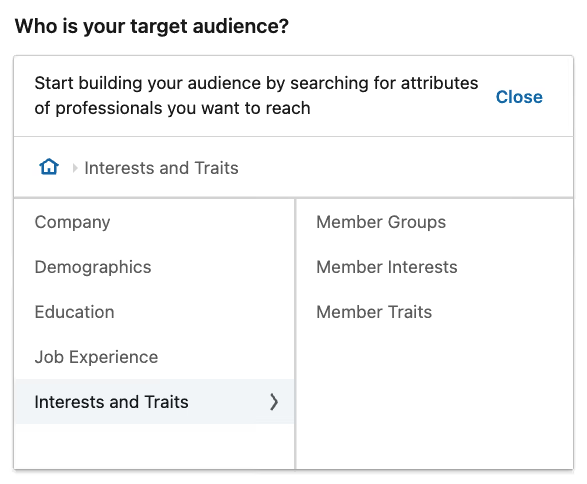
The “Interests and Traits” category includes “Member Interests,” “Member Traits,” and “LinkedIn Groups.” In most SaaS accounts, LinkedIn ads filters targeting this layer should be treated as refinement, not foundation. For B2B SaaS, this category is generally less effective than firmographic and job-based targeting because it provides less reliable information.
"Member Interests" are based on inferred data, i.e., user activity and engagement with content, rather than self-declared professional attributes. Therefore, they can be used as a guide but not as a reliable basis for defining an audience. For example, an interest like "Cloud Computing" may appear for a user after minimal interaction with the topic, but this does not equate to actual relevance for a purchase.
LinkedIn groups can be useful in niche scenarios, especially if the audience is highly specialized. For example, DevOps groups can be helpful. Keep in mind that group membership does not always reflect current interest or professional activity, so such signals are often outdated.
Member traits typically provide the least value for B2B SaaS demand generation. Signals such as "frequent traveler" or "job seeker" may be relevant in consumer or recruiting campaigns but rarely improve audience quality in SaaS sales.
We recommend using interests and groups as a refinement layer, not as the basis for targeting. They work best on top of firmographic and job-based filters. In many cases, it’s more useful to apply them as an exclusion layer to remove segments with a low probability of conversion.
Buyer Group Targeting

Buyer Group Targeting is a new tool that was launched in February 2026. It matters because LinkedIn targeted advertising is moving beyond role-by-role setup toward template-based committee coverage. Instead of using manual Boolean combinations of roles to target buying committees, LinkedIn AI identifies key stakeholders for a specific product category.
There are three pre-built templates:
- Technical Committee. This template includes CTOs, VPs of Engineering, IT Directors, and architects. This is the primary option for software as a service (SaaS) and infrastructure solutions
- Financial Committee. It covers CFOs, finance directors, and procurement, which is relevant for products that directly impact the budget
- User Committee. Focuses on the product’s end users rather than decision-makers
In B2B, purchases are rarely made by a single person. A deal typically involves multiple roles from different functions and levels. The Buyer Group simplifies the process of covering this entire structure and reduces the risk of overlooking important roles when setting up targeting.
For enterprise SaaS campaigns, the Technical Committee template can often be used directly. It aligns well with how technical solutions are organized within companies and covers key roles.
However, the templates are designed for typical scenarios. If the buying committee differs depending on the segment, manual configuration via Job Function and Seniority provides more control and accuracy.
Matched Audience Targeting

Matched Audiences is a first-party data-based targeting system. For SaaS teams running named-account programs, this is where LinkedIn ads targeting for B2B becomes meaningfully more precise. It includes Company List, Contact List, Website Retargeting, and Predictive Audiences. It forms the basis for account-based marketing (ABM) on LinkedIn and is the most powerful tool for SaaS teams with a defined account strategy.
Company List Targeting
With Company List, you can upload a CSV file containing a list of target companies. LinkedIn then matches these companies against its database of over 13 million company pages and creates an audience consisting of their employees.
The quality of the match depends heavily on the data used in the list.
- The most reliable option is the LinkedIn Company Page URL, with a match rate above 90%
- Domain names usually work well, too, but yield less consistent results (60–90%)
- Company name alone is the weakest option, as it often leads to duplicates, errors, and inconsistencies. If your CRM or database already contains Company Page URLs, it’s best to use those
After uploading the list, Company List almost always requires an additional targeting layer. Without that step, targeted LinkedIn ads quickly turn into broad company-wide reach with limited buying relevance. Therefore, the next step is to add job function and seniority to narrow the audience down to those involved in the decision-making process.
Exclusion lists are just as important as targeting. By excluding current customers, employees, and competitors, you can reduce unnecessary spending by 10–20% and preserve your budget for actual target accounts. Since CRM data quickly becomes outdated, these lists must be updated regularly.
In our experience, the Company List feature works particularly well within an ABM framework when you need to cover multiple roles within a single account. For instance, rather than targeting "everyone from target companies," you can sequentially reach legal, finance, and IT decision-makers within a single account list. This provides much more precise control over who sees the ads and better aligns with the buying committee's logic. In one of our case studies, LinkedIn accounted for 40% of the entire pipeline in the first year, with an ROI of 4:1 versus Google's 1.8:1.
Contact List Targeting
With the Contact List feature, you can upload CRM data, such as email addresses, names, and company names. LinkedIn then attempts to match these contacts with its profiles. In B2B, this format is usually used to engage with an existing audience rather than for cold outreach. The average match rate for B2B contact lists is 60–75%. Using high-quality data with the correct fields increases the rate to 65–85%.
Match quality depends directly on the quality of the source data. The more complete and accurate the list, the greater the likelihood that LinkedIn will find the right people. In practice, lists that include the following fields perform best:
- First name
- Last name
- Company name
- Job title
This combination yields more reliable results because a work email address does not always match the address a person uses on LinkedIn.
The Contact List is particularly useful in the later stages of the funnel when the goal is to precisely target known stakeholders rather than find a new audience. This makes it a good tool for BOFU campaigns with a conversion-focused message.
The same lists can also be used in reverse as a suppression layer in prospecting campaigns. By excluding current customers, active deals, and contacts that have already been processed, you can reduce unnecessary spending and avoid duplicating communication with an audience that is already being targeted.
Website Retargeting and Insight Tag
The LinkedIn Insight Tag is a JavaScript code installed on a website that unlocks several features. It enables you to run retargeting campaigns for website visitors, track conversions, and access Website Demographics. This feature allows you to see which companies, job titles, and industries are visiting the site, even if the user didn’t click on an ad.
A common mistake is grouping all website visitors into a single audience. For teams asking how to target audience on LinkedIn ads more accurately, page-level intent is one of the clearest places to start. For example, a user who reads the blog and a user who visits the pricing page are at different stages of intent. They have different levels of purchase readiness, so they need different messages, offers, and CTAs. At Aimers, we recommend segmenting by page type and level for this reason.
For SaaS, audiences with high intent–primarily visitors to the pricing and demo pages–typically deliver the greatest value. In many cases, this is also where conversion rate optimization services have the clearest downstream impact. These segments are closer to making a purchase decision and usually yield a lower CPL than cold TOFU traffic.
One of the most accurate BOFU scenarios is built on the intersection of the Insight Tag and the Company List. In this case, ads are shown only to website visitors who work at the target accounts you've specified. This setup combines behavioral signals with ABM precision, allowing you to narrow your reach to truly high-priority accounts.
Website demographics are useful not only for marketing, but also for the sales team. If employees from target companies regularly visit the site, it's a sign of interest. The SDR team can use this data for outreach before anyone fills out a form.
Predictive Audiences

Predictive Audiences is a new LinkedIn tool that uses machine learning to identify users similar to those who have already converted. Unlike traditional Lookalike Audiences, Predictive Audiences considers not only profile matches, but also behavioral signals.
For this tool to work reliably, a high-quality seed is needed. Conversion events transmitted via CAPI are better suited for this purpose than simply uploaded contact lists. In this case, the algorithm learns from real user actions rather than a set of static attributes.
For SaaS with a narrow ICP, Predictive Audiences almost always require additional constraints. Otherwise, the wrong LinkedIn ads targeting settings can widen reach faster than they improve quality. Without firmographic guardrails (such as Company Size and Industry) the audience will gradually shift beyond the ICP. While this results in a lower CPL, it simultaneously reduces the SQL rate because the algorithm optimizes for volume rather than quality of demand.
We recommend using Predictive Audiences primarily as a scaling tool. This is ideal when your named account list has been exhausted but the total addressable market (TAM) allows for further expansion. In this case, Predictive Audiences can help broaden TOFU reach without completely abandoning ICP logic.
Audience Network and Audience Expansion
Both tools are enabled by default in the LinkedIn Campaign Manager. For B2B SaaS, however, it’s important to configure them separately because they often blur the audience and degrade lead quality.
The Audience Network extends ad impressions beyond LinkedIn by placing ads on partner websites. For teams wondering what is LinkedIn audience network, the short answer is broader delivery with weaker professional context. This can lower CPM and increase reach. However, outside of LinkedIn, the professional context–the very reason the platform is used in B2B SaaS–disappears.
Consequently, while CPL at the report level may appear to improve, this is often due to less relevant traffic rather than actual performance growth.

Audience Expansion works differently. This tool automatically expands your reach to include users that LinkedIn considers similar to your initial audience. The algorithm itself determines who is considered "similar enough." Advertisers have no control over this expansion and no transparency regarding the underlying criteria.

For B2B SaaS campaigns, where targeting accuracy is crucial, it's usually best to disable both tools during the launch phase. The exception is pure TOFU brand awareness campaigns, where scale is the priority rather than precisely hitting the ICP. Even in this case, however, disabling the tools should be a conscious decision, not the default setting.
Decision Framework: Targeting Stack by GTM Motion
When choosing a targeting stack, you should start by considering the GTM model and ACV. Any experienced LinkedIn ads management agency should be making that decision before campaign buildout begins. The same approach will not work equally well for a PLG product with a low average order value as it will for enterprise ABM with a long sales cycle. First, determine how you plan to sell the product. Then, build an audience structure tailored to that model.
For PLG and self-serve SaaS with an ACV below $5k, basic attribute-based targeting is usually sufficient. In this model, scale takes priority over named accounts, so job function, seniority, company size, and industry form the foundation. In this model, Matched Audiences act as a retargeting layer rather than a source of new reach. Once conversion signals have been accumulated, it makes sense to enable Predictive Audiences later to expand the TOFU without compromising ICP logic.
For sales-led, mid-market SaaS with an ACV ranging from $5k to $50k, targeting should be based on a company list combined with job function and seniority. Here, the focus shifts from reaching the relevant market to focusing on specific accounts and the roles within them. Retargeting based on pricing and demo pages strengthens the MOFU, while contact lists help target the later stages of the pipeline precisely. In this model, it's best to segment campaigns by region from the beginning to avoid mixing different CPC and CPL levels within a single structure.
For enterprise ABM with an ACV above $50K, targeting should be as segmented as possible. The foundation here is tiered company lists, where accounts are categorized by strategic value. Additionally, separate campaigns should be launched for each role within the buying committee because the economic buyer, technical champion, and end user respond to different content and evaluate the product based on different criteria. Sequential retargeting allows you to tailor your message based on engagement level, and Buyer Group templates help speed up setup when the buying committee fits a standard scenario. Contact Lists work best within Tier A accounts in this model because specific stakeholders are already known.
The table below provides a simplified diagram that correlates GTM motion with the basic targeting stack, an additional layer, target audience size, and expected campaign ROI.
Our case studies also support this logic. For instance, RecMan (a recruitment SaaS platform) achieved a CPL on LinkedIn that was half that of Google, with a 93% conversion rate to MQL, by combining Company List and Job Function. This exceeded the cost-per-MQL KPI by 40%. Clearly demonstrating how list-based targeting works within a sales-led model.
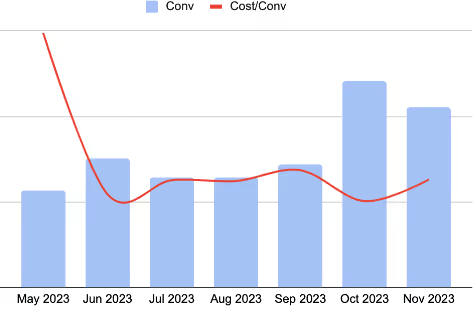
In this example, shifting from broad targeting to reaching specific decision-makers by job title and role increased the conversion rate by 210%. This illustrates how precision in targeting is more important than breadth of reach for the mid-market and enterprise segments.
Another case study confirms this logic from a different angle. In a SaaS account with a monthly budget of $21,000, excluding irrelevant job titles and adding company size and industry filters caused the cost per lead (CPL) to drop from $778 to $412. Meanwhile, CPC rose from $8.50 to $12; however, every click came from someone actually involved in the purchase. In this case, more expensive traffic was of higher quality and ultimately more effective.
LinkedIn Ads Targeting Best Practices for B2B SaaS
Targeting options don’t work in isolation. They are part of the overall campaign structure. In practice, it’s not only important to choose specific filters, but also to organize them into a functional system. We’ve outlined key principles to help you transform targeting options into a clear, manageable B2B SaaS campaign structure. In other words, these are LinkedIn ads targeting best practices grounded in how SaaS campaigns actually scale.
Build your targeting on a list-based foundation.
For account-based marketing (ABM) and sales-led models, the company list should serve as the foundation, with attribute-based filters acting as a refining layer on top. This approach gives you control over which accounts are included in the reach. However, if you use only attribute-based targeting, the campaign operates based on the logic of a similar audience rather than named accounts.
Keep audiences within a working range.
For most SaaS campaigns, the optimal audience size is between 30,000 and 100,000. Narrower audiences lead to inventory shortages, higher cost per click (CPC), and unstable delivery. Conversely, audiences that are too broad begin to blur the ideal customer profile (ICP) and reduce targeting accuracy.
Disable Audience Expansion and the LinkedIn Audience Network.
These tools are enabled by default, but they typically work against quality for precision campaigns. They both expand reach beyond the initial audience, which can improve top-level metrics while reducing traffic relevance and lead quality.
Update creatives every 14 days.
Niche SaaS audiences burn out quickly, which causes CTR to drop and CPC to rise. Rotating creatives is an effective way to control campaign costs and maintain stability in this context. This applies whether the campaign uses static formats or draws from LinkedIn video ads examples as part of the creative mix.
Use exclusion lists as part of your mandatory setup.
Before launching a campaign, exclude your employees, current customers, and competitors. This reduces wasted spending by 10–20% without compromising reach to the target audience.
Segment campaigns by funnel stage.
TOFU and BOFU campaigns should be separate because they involve different objectives, signals, and expected outcomes. Mixing them in a single structure causes the algorithm to receive conflicting input data, rendering the average CPL useless for analysis.
Segment the buying committee into separate campaigns based on roles.
Economic buyers, technical champions, and end users perceive the product differently, so they need different messages and types of content. A single campaign targeting the entire buying committee will likely result in a compromised message that fails to resonate with any of the roles.
Campaign Setup Checklist
If you want to understand which targeting stack fits your product and GTM model, we can look at your setup in context. At Aimers, we work with B2B SaaS companies on LinkedIn and help align targeting with pipeline goals, buying roles, and campaign structure. Reach out to us or book a free campaign audit.
FAQs
What are the best LinkedIn Ads targeting options for B2B SaaS?

Should I use Job Title or Job Function + Seniority on LinkedIn?
What audience size is best for LinkedIn Ads?
How should I structure LinkedIn targeting for ABM campaigns?
Why is my LinkedIn CPL high even when CTR looks good?