

Google Display Ads Targeting Options for B2B SaaS Teams

March 30, 2026
The Google Display Network is one of the largest marketing channels. It covers over 35 million websites and apps viewed by 90% of internet users worldwide. However, if it is not set up correctly, it may not produce any results except for a wasted budget.
Based on our experience, the average CTR for Display campaigns in B2B SaaS is 0.35%. In remarketing campaigns, cost per lead is typically 1.5–2 times lower than in cold campaigns, while CTR can reach 1.2%. These results are achieved by precisely configuring the campaign for each stage of the funnel. The channel continues to evolve and change.
Today, we will discuss which Google Display targeting options will be relevant in 2026 and how to apply them at different stages of the funnel to achieve optimal results.
How Google Display Targeting Changed in 2025 – and Why It Matters for B2B SaaS
Until 2025, Display campaigns in Google Ads existed in two separate formats. Standard Display gave advertisers manual control over targeting, bids, and placements. Smart Display handed control over to an algorithm (automatic targeting, automatic bids, automatic ad generation). Google has combined them into a single format: new Display campaigns include the capabilities of both types, and the degree of automation can be configured within a single campaign. Along with the merger of formats, Optimized Targeting has become the default setting for all Display campaigns. This changed how Google Display network targeting works in practice for B2B SaaS advertisers.
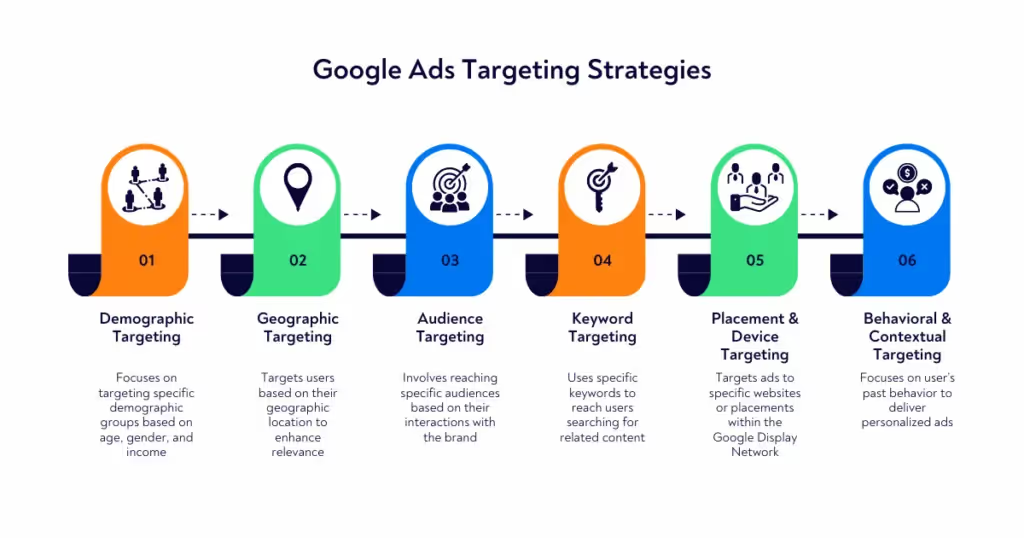
This key change directly affects targeting. Previously, audience settings were strict restrictions. For example, if you added the "Business Software" in-market segment, the ad would only be shown to that segment and no one else. With Optimized Targeting, however, these settings have become signals. The algorithm uses them as a starting point, analyzes the behavior of users who have already converted, and expands impressions to those who demonstrate similar patterns, even if they are not included in the original segment.
For B2B SaaS, this creates a specific problem. The algorithm optimizes for conversions recorded in the account without taking ICP into account. If there is insufficient conversion data from the target audience, or if the account tracks micro-conversions such as page views, Optimized Targeting will start expanding to where conversions are easier to generate, but not to where they turn into paying customers.
Therefore, understanding each targeting option and how it interacts with the algorithm determines whether the advertiser is managing the campaign or just watching it. The same logic applies when comparing Google Ads campaign types more broadly: automation changes control, but it doesn't remove the need for strategy.
TOFU – Targeting Options for Awareness Campaigns
The goal of Display at the top of the funnel is to reach the audience before they actively start looking for a solution like yours. This is where the channel works most organically. The user is not yet in vendor comparison mode but is in a context that is relevant to the product. There are three options that cover this task, each with a different degree of accuracy. There are three options that cover this task, each with a different degree of accuracy. Together, they form the core Display Ad targeting options used at the awareness stage.
Affinity Audiences
Affinity Audiences are predefined Google segments based on users' long-term interests:
- Websites they regularly visit
- Apps they use
- Search queries over the past weeks and months
This is not a signal of active intent, but rather a behavioral portrait of the user.
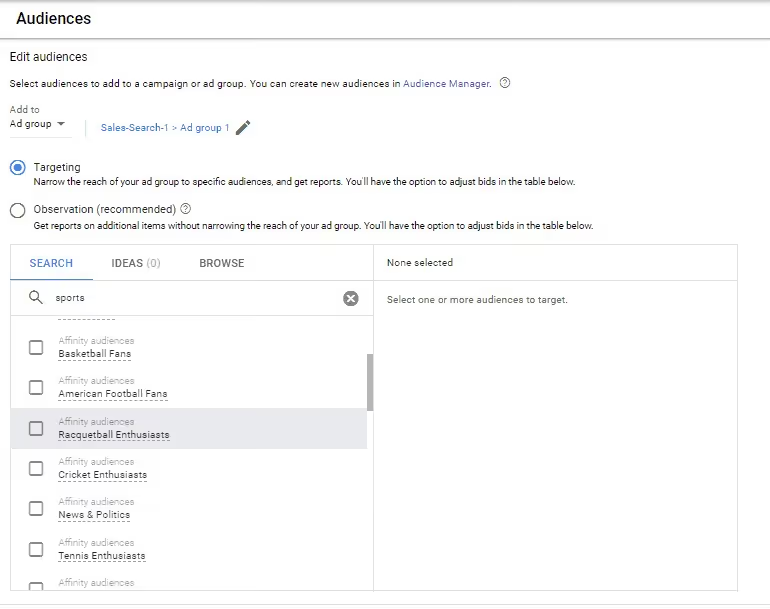
For B2B SaaS, the most relevant predefined categories are “Business Professionals,” “Technology Enthusiasts,” and “Business & Finance.” The problem is that these categories are broad: “Technology Enthusiasts” includes consumers, developers, students, and anyone who regularly reads tech publications, regardless of their job title or industry. Using Affinity Audiences on their own for B2B SaaS is not advisable. In practice, this part of interest targeting AdWords is too broad to work as a standalone prospecting layer. They work as an additional layer on top of content targeting or placement targeting, but not as the sole basis for a campaign.
Custom Segments
With Custom Segments, you can create your own audience segment instead of relying on Google's preset categories. This is one of the most flexible forms of Google Display audience targeting available in Display. Advertisers specify keywords, competitor URLs, and relevant apps, and Google finds users whose behavior matches these signals.
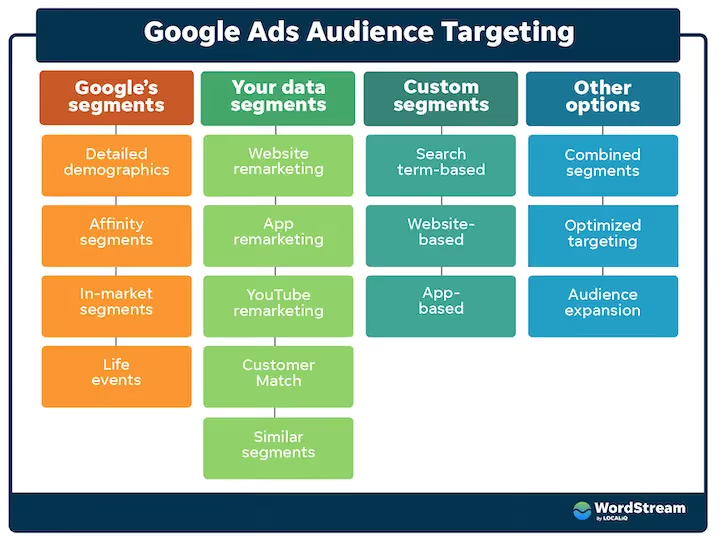
In December 2025, Google expanded the availability of Custom Segments for Display campaigns, establishing them as a comprehensive audience-targeting tool on this platform. For many teams, this made GDN targeting options more usable than they had been before.
For B2B SaaS, Custom Segments work through two approaches. The first approach is competitive: add competitors' URLs and keywords from their category. In many cases, this overlaps with how custom intent audiences Display ads are used to reach category-aware buyers. Google will show ads to users who have visited these sites or searched for related queries. The second approach is categorical. Add keywords that describe the problem that the product solves, such as "CRM for SaaS," or "churn reduction software." This allows you to reach an audience researching the category who has not yet formed a shortlist of vendors.
An important limitation: Custom Segments determine who sees ads, but not where they appear. Control over placements is a separate setting.
Topic and Keyword Contextual Targeting
Unlike audience targeting, content targeting does not show ads to specific individuals based on their history. Rather, ads are shown on pages with relevant content. Who reads it doesn't matter. This makes content targeting the only option that does not depend on cookies or user behavior data.
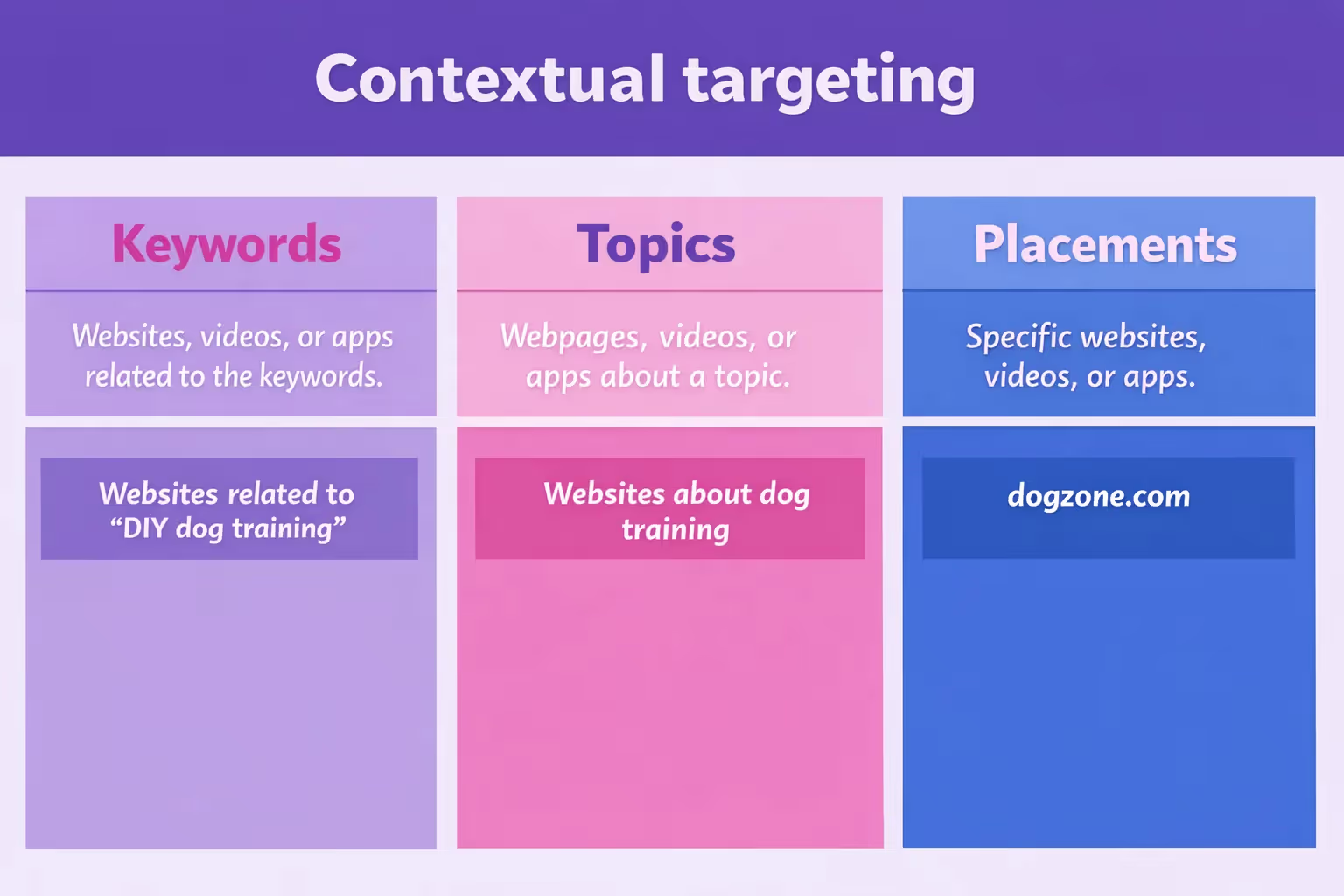
With Topic Targeting, you can select thematic categories of pages: "Technology," "Business & Industrial," or "Software." Keyword contextual targeting works more accurately. In practical terms, contextual targeting Google Display ads is often the cleaner option when cookie-based audience signals are weak. Google analyzes the content of the page and displays the ad where the text matches the specified keywords.
For B2B SaaS, content targeting is effective on professional platforms, such as industry media, tech review sites, and documentation of related tools. At Aimers, we often combine Keyword Contextual Targeting with Placement Targeting on specific sites, which gives us control over both the page content and the ad's placement. For teams trying to improve Google Ads performance without broadening audience signals too early, this is often the cleaner path.
When Optimized Targeting Makes Sense at the TOFU Stage
At the awareness stage, Optimized Targeting can be left enabled, but with some caveats. The goal of a TOFU campaign is not conversions, but reaching a relevant audience. If your account has accumulated enough data about who converts into qualified leads, the algorithm can effectively expand your reach beyond the initial segments. This is one of the few cases where broader Google Display network audience targeting can still work at TOFU. If such data is not available or is based on micro-conversions such as page views, Optimized Targeting on TOFU will optimize for the wrong signal.
MOFU – Targeting Options for Consideration Campaigns
At the MOFU stage, the audience is already showing signs of active research: looking for solutions, comparing vendors, reading reviews. Here, Display helps capture demand. At this stage, the right Display advertising targeting setup has a direct impact on traffic quality. Three targeting options help with this, each with its own degree of accuracy and control.
In-Market Audiences
In-Market Audiences are groups of users that Google has identified as currently researching a specific category. Google analyzes search queries, visited websites, and viewed content. Based on this behavior, Google assigns users to categories indicating an active intent to buy.
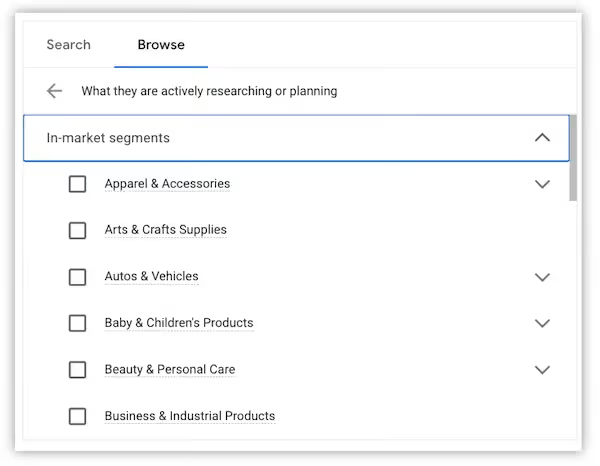
For B2B SaaS, the most relevant categories are "Business & Productivity Software," "Enterprise Technology," and "CRM & Marketing Software." However, these categories are broad. For example, the "Business & Productivity Software" segment includes a small business owner looking for a task manager and an enterprise director evaluating ERP systems. Using In-Market Audiences in Targeting mode without additional filters means paying for impressions from audiences with the right intent but the wrong profile.
We usually recommend starting with Observation mode for the first two to four weeks. During this time, they should collect data on how this segment converts relative to the rest of the audience. Only then should they switch to Targeting mode or exclude the audience. That evaluation step belongs in any serious Google Ads checklist, especially on MOFU.
Similar Segments
Similar Segments is an audience that Google automatically creates based on a seed list: the algorithm analyzes the behavior of users from the original list and finds those who demonstrate similar patterns but have not yet interacted with the product.
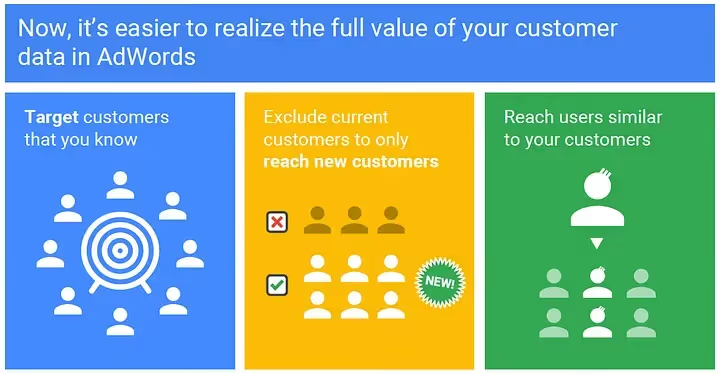
The quality of Similar Segments directly depends on the quality of the seed list. If the initial audience consists of converted users with a clear ICP profile, Similar Segments works as a scaling tool on MOFU. If not, this is exactly the kind of issue PPC audit services should catch before more budget is pushed into expansion. If the seed list consists of all website visitors without segmentation, the algorithm will expand towards a broad audience without signs of intent.
The minimum seed list size for forming Similar Segments is 1,000 users. For most B2B SaaS companies with a narrow market, this means that the segment is either not formed or is formed based on insufficient data.
Placement Targeting on MOFU
During the consideration stage, users actively read reviews, comparisons, and industry content. Placement Targeting allows you to show ads on specific websites where this audience is at the moment of research: G2, Capterra, TechCrunch, industry media, documentation of related tools. In other words, placement targeting Google Display network gives you direct control over research-stage context.

Unlike audience targeting, placement targeting gives you control over the context: ads appear not just to “similar users,” but to a specific audience at the moment when they are clearly in decision-making mode. For B2B SaaS, this is one of the few display tools where you can reasonably assume a professional viewing context.
Observation Mode vs. Targeting Mode
There are two modes for adding each audience option in Google Ads: Targeting or Observation. This distinction matters across most Google Display Ads targeting options, especially on MOFU.
Targeting mode narrows the reach; ads are only shown to users who meet the selected criteria. In Observation mode, ads are shown to the entire campaign audience, and Google tracks and reports on the behavior of users from the selected segment separately. Based on this data, advertisers can apply bid adjustments, increasing bids for high-conversion segments and decreasing or excluding weak ones.
For MOFU campaigns, the process is as follows:
- First, add new audience segments, such as In-Market Audiences, Similar Segments, or Custom Segments, in Observation mode for two to four weeks
- Then, once each segment has enough data, ideally at least 30 conversions, move the strongest ones into Targeting mode or separate ad groups with tailored messaging
BOFU – Targeting Options for Conversion Campaigns
At the BOFU stage, the audience is already familiar with the product: they have visited the website, interacted with the content, possibly started a trial or filled out a form, but have not completed the conversion. Here, Display should bring the user back with a specific message that corresponds to where they left off. This is also the stage where a conversion rate optimization agency can help make sure the landing experience matches the intent behind the ad. Three options work specifically with this audience.
Remarketing by Site Pages
Standard remarketing shows ads to users who have visited a website based on URL rules. The minimum audience size for display advertising is 100 active users in the last 30 days. Building and structuring Google remarketing audiences around these intent levels, rather than treating 'remarketing' as one undifferentiated list, is usually what separates a BOFU campaign that recovers cost from one that just repeats the same banner.
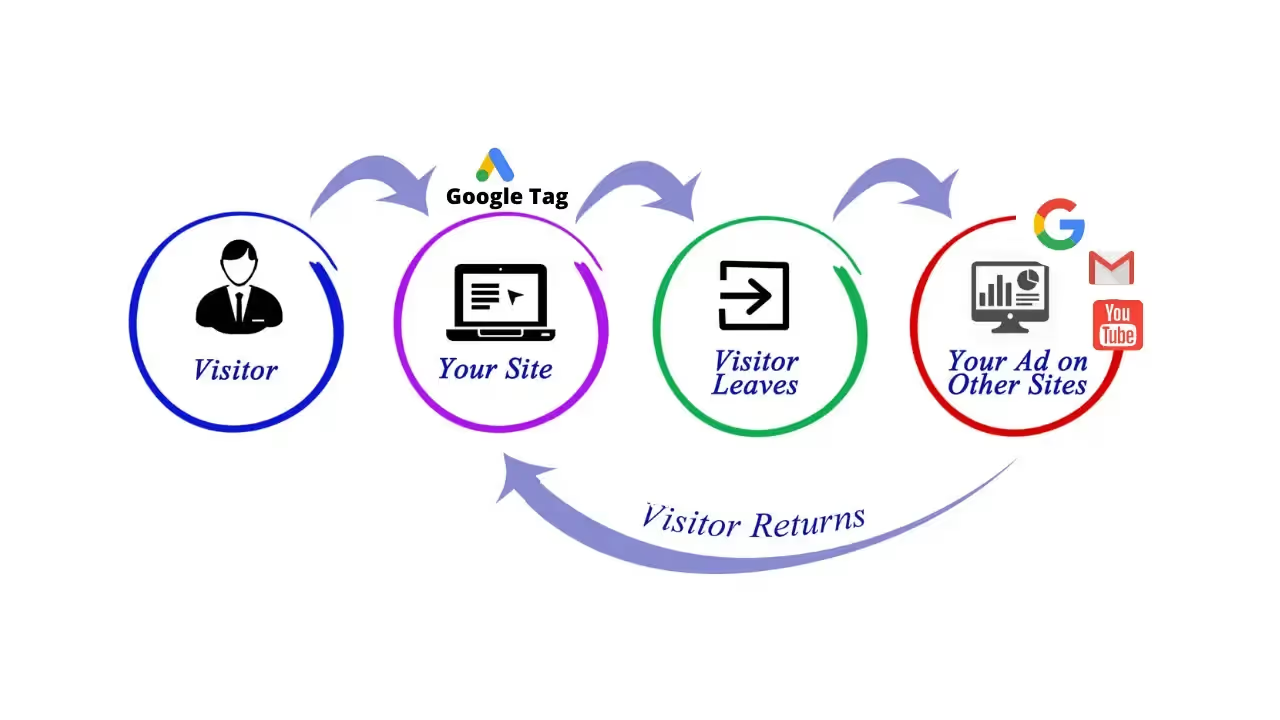
For B2B SaaS, page-based segmentation is essential. A user who opens a pricing page is at a different stage in the decision-making process than someone who reads a blog article. Showing them the same ad ignores the existing signal.
Basic B2B SaaS segmentation looks like this:
- Visitors to the pricing page: These visitors have high intent and a direct conversion CTA (“Book a Demo,” “Start Free Trial”)
- Visitors to feature or use case pages: Medium intent; message focuses on a specific problem that the product solves
- Blog visitors: Low intent; nurture message without pressure to convert.
- Converted users – exclude
At Aimers, we have noticed that Display remarketing campaigns yield a CTR of up to 1.2%, compared to 0.35% for cold campaigns. Additionally, the cost per lead in remarketing is 1.5–2 times lower.
Customer Match
Customer Match allows you to upload CRM data to Google Ads and show ads to specific people from that list if they are logged into their Google account. This is one of the most precise forms of Google demographic targeting only in the sense that the audience is defined first and filtered later by account data.
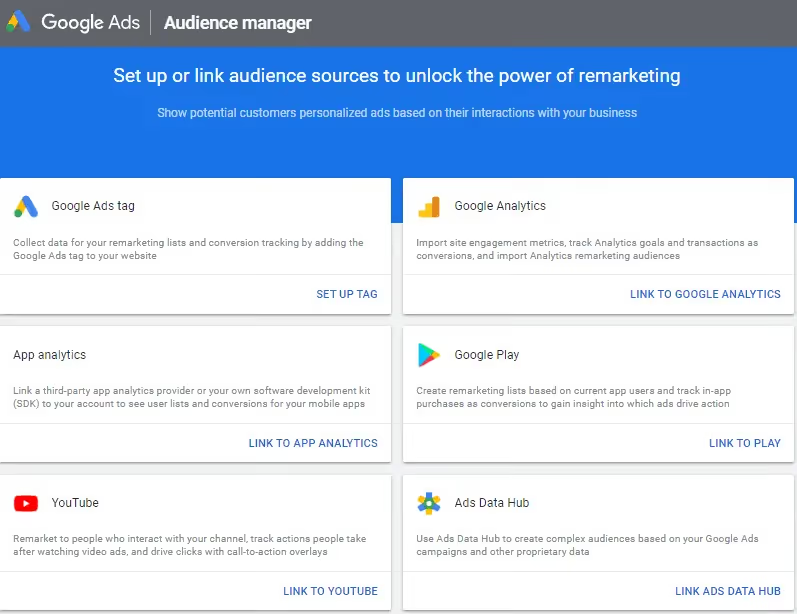
For B2B SaaS, this is the warmest audience segment on Display: leads that did not convert after a demo, users on an active trial, webinar participants, contacts from the pipeline. This is an audience that does not need to be told what the product is – they need a specific reason to take the next step.
Two technical limitations:
- The minimum size of the uploaded list is 1,000 contacts
- The feature is not available to all accounts; Google has requirements for spending history and policy compliance
For B2B SaaS companies with a small CRM base, this means that the segment may not be large enough for full display.
Dynamic Remarketing
Dynamic Remarketing automatically generates ads based on a user's viewing history on a website. It requires a configured business feed, which is a list of pages, products, or services with attributes, as well as a dynamic tag that transmits viewing parameters.

The use of Dynamic Remarketing is limited for B2B SaaS. Typically, a company only has one product, so there is no feed in the traditional sense. However, the format works for SaaS companies with multiple pricing plans or separate product modules. In this case, a user who has viewed a page for a specific plan will see an ad for that plan. A simple Display advertisement example here would be a plan-specific message shown after a pricing-page visit without a trial signup.
Remarketing for Trial Users
This is a separate segment specific to SaaS: users who signed up for a trial but did not upgrade to a paid subscription. The average trial-to-paid conversion rate in B2B SaaS is 10–25%. This means that 75–90% of users who start a trial do not become customers.
Remarketing to trial users differs from remarketing to website visitors in that the message should be tied to the trial stage rather than the funnel stage. For example, impressions should begin on the second or third day of the trial with an onboarding-oriented message, such as "Stuck on setup? Watch this two-minute tutorial." In the last week, send a reminder about the end of the trial, such as "Your trial ends in three days." According to our data, this approach improves trial-to-paid conversion by 15–30%.
Optimized Targeting – How It Works and When to Turn It Off
Optimized Targeting is an ad group-level setting that is enabled by default in all Display campaigns. Its mechanics are fundamentally different from standard targeting: the audience segments that the advertiser adds to the campaign become a starting point for the algorithm, rather than a directive. Google analyzes the behavior of users who have already converted and expands impressions to those who show similar patterns, regardless of whether they are included in the original segments. If the algorithm finds more conversion-friendly traffic outside the specified signals, it may completely stop showing ads to the original audience.
An important technical limitation: Optimized Targeting only works with conversion bidding strategies:
- Maximize Conversions
- Maximize Conversion Value
- Target CPA
- Target ROAS
When using engagement- or reach-oriented strategies, Audience Expansion is activated instead – a similar mechanism, but optimized for reach and engagement rather than conversions. Any experienced Google Display Ads management agency should evaluate this setting together with bidding strategy, not in isolation.
When Optimized Targeting Still Works
In TOFU campaigns aimed at reach and with sufficient high-quality conversion data in the account (at least 50 conversions before the start of evaluation, as recommended by Google), the algorithm has the potential to expand reach to relevant audiences outside the specified segments. This makes sense if the conversions in the account reflect real business results: purchases, demo requests, trial registrations.
When to Disable Optimized Targeting
In BOFU campaigns with remarketing, Optimized Targeting undermines the very logic of the tool. Remarketing is based on showing ads to specific people who are already familiar with the product. With Optimized Targeting enabled, Google starts showing remarketing ads to an audience that is similar to the remarketing list but not included in it. As a result, part of the remarketing campaign budget is spent on a cold audience that sees a message that does not correspond to their stage in the funnel.

For example, Cypress North's remarketing display campaign with Optimized Targeting enabled spent $5,500, of which about 70% went to expansion and optimized targeting. In one month, zero conversions were received from the expanded audience. The CPL from optimized targeting was three times higher than from the original audience segments.
Just Global launched Display campaigns with Optimized Targeting enabled for a B2B client. The invalid click rate was 66% compared to 26% for campaigns without this setting. After disabling it, the number of invalid clicks decreased by 84% – from 31,400 to 5,200, with a stable number of impressions.
It is also worth disabling Optimized Targeting on campaigns with Customer Match. An uploaded CRM list is an accurate segment with a specific communication task. Expanding beyond its limits means showing a conversion message to an audience that has not gone through the corresponding stage of the funnel.
How to Check Whether Optimized Targeting Is Working
To check whether Optimized Targeting is actually helping, look at three things:
- In Google Ads, go to Audiences > Keywords and Content > Audiences
- In the table, find the row labeled "Total: Expansion and Optimized Targeting." This row displays separate statistics on traffic attracted by the algorithm outside the original segments
- Compare the CPL, CR, and lead quality between the original segments and the expanded audience
- If the expanded audience shows significantly higher CPL or zero conversions, disable the setting
This is a basic part of ongoing Display advertising optimization, not a one-time cleanup task.
How to Combine Targeting Options by Funnel Stage
Targeting options rarely work on their own. The strongest Google Display audience targeting setups usually combine audience, content, and placement layers: audience signals determine who to show ads to, content signals determine where, and modifiers refine the profile. Combining audience and content targeting within a single campaign can increase conversion rates by 40% or more compared to using only one type.
The layering principle works in two modes. In AND mode, Google shows ads only to those who meet all the specified criteria at the same time. For example, a user enters the In-Market segment and visits sites from the Placement Targeting list. This also shows how AdWords demographic targeting becomes more useful only when paired with stronger intent or context signals. The reach narrows, and relevance increases. In OR mode, Google shows ads to those who meet any of the specified criteria. The reach is wider, but control is lower. For B2B SaaS with a narrow ICP, AND mode on MOFU and BOFU usually provides higher quality traffic at a higher CPM.
Best Targeting Options for B2B SaaS: What Works and What Doesn't
As you can see, Google Display offers quite a few targeting options, most of which are technically applicable to B2B SaaS. However, not all of them are effective for the specifics of the B2B SaaS sector. At Aimers, targeting setup is a standard part of how we build B2B SaaS media strategy. That is one reason many companies choose a SaaS digital marketing agency instead of treating Display as a separate tactical channel. Therefore, we will focus on which types of Google Display ads and targeting options actually affect results in B2B SaaS without requiring additional conditions.
Targeting Options That Deliver Results in B2B SaaS
Display advertising in B2B SaaS is most effective as a remarketing channel rather than a prospecting channel. This is a fundamental position: display advertising is rarely shown to decision-makers in a work context, and without this condition, prospecting campaigns targeting a cold audience result in low-quality traffic with high CPM.
Remarketing on website pages with segmentation by intent is a basic tool. Visitors to the pricing, demo request, and documentation pages receive different messages with different CTAs. At Aimers, we used Display Remarketing to bring back users who visited the site but did not convert: banners and videos conveyed the value proposition and addressed the objections of the warm audience. The result of a full-funnel strategy with Display as a BOFU channel: +110% customers, -24% CPA.
Custom Segments with competitor URLs and category keywords is the only prospecting option we use at TOFU for B2B SaaS clients. It allows us to reach an audience that is actively researching the category without the broad, irrelevant reach of Affinity Audiences. In the campaign for Knack, we launched Display campaigns with remarketing and custom intent simultaneously with account restructuring. As a result, trial-to-subscription CR increased by 240%, and subscription CPA decreased by 34%.
Placement Targeting on professional platforms (G2, Capterra, industry media) works on MOFU as a tool for contextual presence at the moment of active research. This is also why it shows up in many best Google Ads examples for B2B: the context is easier to justify and the audience is easier to qualify.
Targeting Options That Require Additional Conditions to Work
Affinity Audiences in its pure form is too broad a signal for B2B SaaS with a narrow ICP. It can only work as an additional filter on top of content targeting.
Similar Segments are of limited use for most B2B SaaS companies with a small base. A minimum seed list of 1,000 users and a narrow market mean that the segment either does not form or is formed based on insufficient data.
Optimized Targeting on BOFU – always disable. In remarketing campaigns, it expands impressions beyond the warm audience and dilutes the signal. The Just Global case study confirms that after disabling Optimized Targeting, the number of invalid clicks decreased by 84%.
Non-Negotiable Account-Level Settings
Three settings apply to all campaigns, regardless of funnel stage. Any real discussion of Google Ads cost has to start with these controls, because they directly affect waste, relevance, and conversion efficiency.
Placement Exclusions: By default, Google displays display ads in mobile games, entertainment apps, and sites created solely for advertising. In other words, on resources created solely to generate advertising traffic. For B2B SaaS, this environment is irrelevant: there are clicks, but no conversions. We recommend adding these categories to placement exclusions at the account level when launching your first campaign.
Device Targeting: Demo requests, trial registrations, and contact requests in B2B SaaS overwhelmingly occur on desktops. Users make decisions at work, not at home on their smartphones. For BOFU campaigns, reduce mobile bids by 30%-50% by adjusting bids at the device level. This is less critical for TOFU.
Frequency capping: For TOFU, one to three impressions per week per user are sufficient to build awareness. This prevents overheating an audience that is not yet ready to interact. For BOFU, up to seven to ten impressions per week are sufficient, but creative rotation is mandatory every two to four weeks. A warm audience tires of the same ad faster than a cold audience.
What Actually Works
Display can be a high-performing channel for B2B SaaS, but only when targeting is aligned with funnel stage. Lean on remarketing and Custom Segments where they belong, use Placement Targeting to show up during active research, and keep Optimized Targeting off on BOFU. These aren't glamorous changes, but they're the ones that move CPL and improve lead quality in practice. If you want to go deeper on what this looks like for your specific campaigns, talk to our team . We work with SaaS companies on this every day.
FAQs
For B2B SaaS, it should usually be turned off in BOFU and remarketing campaigns. This setting expands ad delivery beyond the original audience segments and starts showing ads to users who are not on the remarketing list. As a result, part of the budget goes to cold traffic even though the message is designed for a warm audience. In many cases, turning it off improves traffic quality and lowers CPL.

In our experience, three of the most effective options for B2B SaaS are page-based remarketing, custom segments built around category keywords and competitor URLs, and placement targeting on professional platforms or industry media. These setups give you more control over user intent and context, which matters a lot for a narrow ICP.
The most common reason is overly broad targeting. For example, Affinity Audiences without additional filters often generate impressions from users with general interest but no real buying intent. In B2B SaaS, display advertising usually works better as a remarketing channel than as a primary source of cold lead generation.
The strongest approach is typically page-based segmentation. Users who have visited the pricing page are usually further along in the decision-making process than users who have only read the blog, so they should see different messages. In our experience, remarketing CTR can reach around 1.2%, while cost per lead is often 1.5–2 times lower than in cold campaigns.
At the TOFU stage, custom segments and contextual targeting work best for reaching users who are exploring the category. At the MOFU stage, In-Market Audiences and Placement Targeting help capture demand on review and comparison pages. At the BOFU stage, the core tools are page-based remarketing and Customer Match, which help re-engage users who already know the brand and move them toward conversion.



.png)