What We Cut Before Increasing a SaaS Google Ads Budget

November 2, 2026

When a B2B SaaS company aims to scale growth, the natural instinct is to raise the Google Ads budget immediately. However, scaling an unoptimized account inflates customer acquisition costs rather than revenue.
The short answer: Cut seven specific types of waste from your account before increasing spend, then confirm with three core metrics: Sales Qualified Leads, pipeline value and Lead Quality Score that qualified demand did not drop. Once inefficiency is removed, you can reallocate capital into high-performing channels.
This article covers:
- Why cutting must precede scaling
- The 7 primary cuts we make in SaaS accounts (and typical spend share)
- A 6-step framework for reading the search terms report
- How to reallocate saved capital to expand real pipeline
- How to prove that demand remained intact using CRM data
Why Do We Cut Before We Scale?
A larger budget does not automatically create more qualified SaaS demand. If an account already wastes spend on any of the following, more budget just gives those inefficiencies room to grow:
- Irrelevant searches
- Low-value locations
- Existing customers
- Duplicate keywords
- Traffic that rarely reaches the sales pipeline
That is why PPC budget optimization starts with the existing account, not the next campaign. The goal is not to reduce Google Ads spend for the sake of a smaller number. It is to find spending that is unlikely to deliver the outcome the campaign is meant to produce.
This matters for SaaS because the first conversion is rarely the final one. A signup, free trial, or demo request can look great in Google Ads and still bring little revenue. A Google Ads management agency can help you trace spend beyond the first conversion to the pipeline.
For example, RecMan's first optimization round cut CPA by 68% in one month. Only after confirming the waste was gone did the team move to a longer-term strategy.
So before adding budget, we ask three questions:
- What traffic can we remove?
- What budget can we reallocate?
- Does the remaining traffic still generate qualified leads and sales opportunities?
What Are the 7 Cuts We Make First?
Before increasing a SaaS Google Ads budget, we look for spend that can be removed or reallocated without reducing qualified demand. Here are the seven areas we check first.
1. Irrelevant Search Terms
How to find it:
Start with the Google Ads search terms report and sort queries by spend. Look for searches outside your target ICP:
- Consumer intent
- Free or open-source alternatives
- Jobs
- Tutorials and definitions
- Features your product does not offer
Then compare them with conversion and CRM data where available.
Typical share of spend to investigate:
5-30% of Search spend.
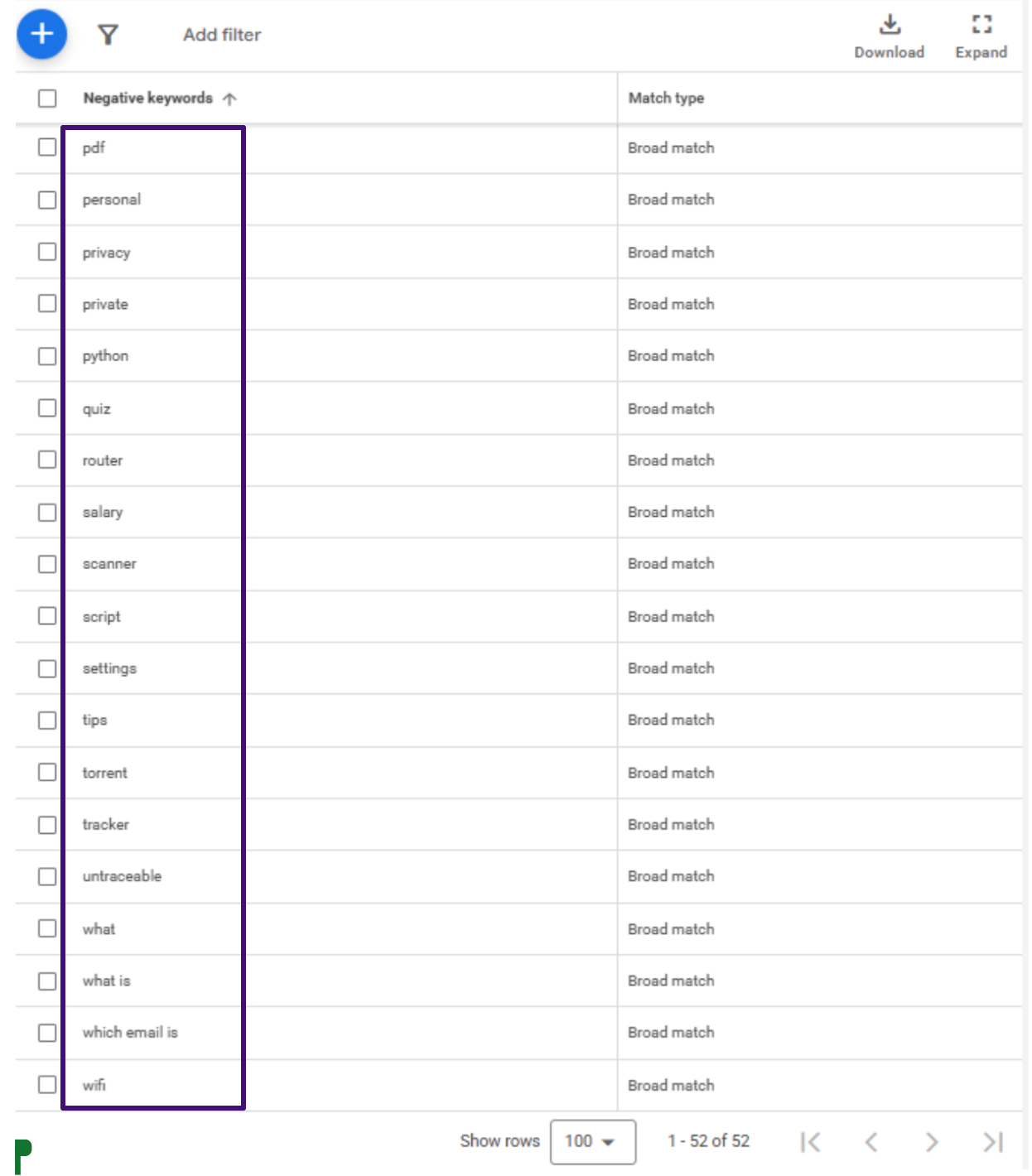
This is one of the clearest sources of Google Ads wasted spend, because the report shows what people actually searched for. Repeated irrelevant patterns are a stronger signal than single queries. They can justify adding Google Ads negative keywords, changing match types, or restructuring campaigns.
Example:
- TuxCare's Search optimization included adding irrelevant search queries to the negative keyword list. Search conversions increased 4x while CPA decreased by 61%.
Building account-level negative lists is essential to filter out non-commercial intent systematically:
2. Brand Terms Cannibalizing Growth
How to find it:
- Separate branded and non-branded campaigns
- Compare spend, conversions, new customer contribution, and downstream funnel performance
- Check whether branded conversions are incremental or just capture existing demand
Typical share of spend to investigate:
10-30% of Search spend.
Brand campaigns can protect SERP visibility and capture high-intent users. They can also absorb a budget that could generate new demand, and a high branded conversion rate does not mean the spend is incremental.
The key question:
Is branded spend creating new demand, or capturing demand that already exists?
3. Search Partners And Display Expansion
How to find it:
Segment performance by network and, for Display, review placements, audiences, devices, and locations. Compare the quality of conversions, not just their volume or CPA.
Typical share of spend to investigate:
5–20% of total spend when these expansion options are enabled.
Additional reach does not automatically mean additional value. A SaaS campaign can generate inexpensive signups through Search Partners or Display while producing very few MQLs, SQLs, or customers.
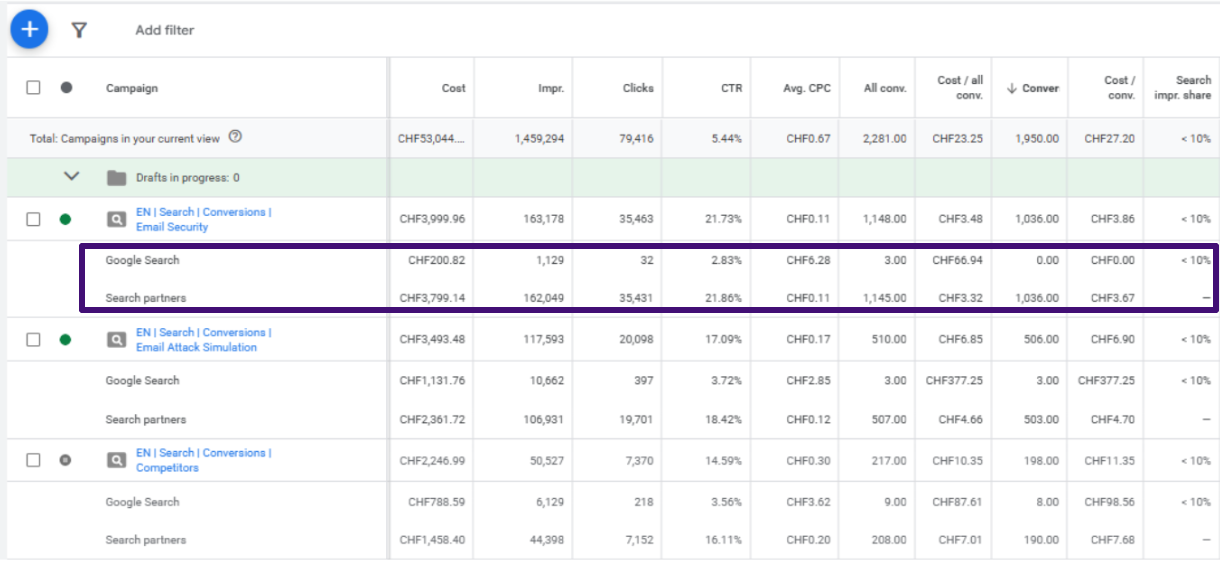
The cut does not necessarily mean switching the network off. It can mean removing specific placements, audiences, locations, or expansion settings that consistently produce low-value traffic.
4. Wrong Geographies, Devices And Hours
How to find it:
- Break performance down by country or region, device, day of week, and hour
- Compare spend and conversions with MQL, SQL, opportunity, or revenue data
- Look for segments that consume meaningful budget but deliver weaker downstream results
Typical share of spend to investigate:
10-30% across these targeting dimensions in a globally targeted SaaS account.
A country can generate plenty of clicks and leads while producing poor lead quality or few sales opportunities.
Examples:
- ZappySys: Removed low-performing countries, then refined targeting using CRM data. Lead Score rose from 12 to 19, while total CPA fell by 10%.
- ScraperAPI : Reduced less profitable geographies and excluded regions that generated signups but no requests. After the budget was reallocated, requests grew by 404.62% and MRR by 175%.
The same logic applies to devices
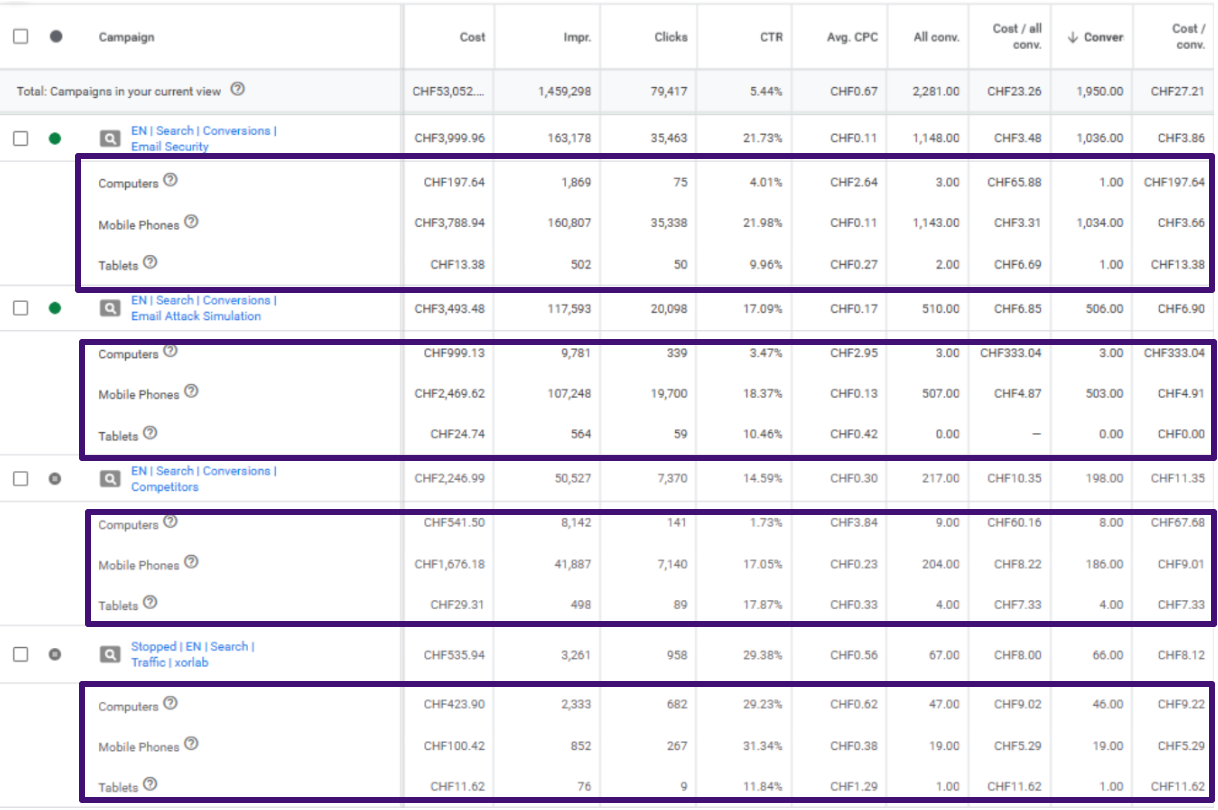
Device breakdown showing Mobile Phones consuming over 90% of campaign expenditure with low CPCs (CHF 0.11-0.13), while Desktop (Computers) produced higher-intent traffic with realistic B2B engagement.
A mobile segment with a lower CPL is not necessarily better if desktop produces more SQLs. That is why we judge these segments by downstream performance, not CPC or CPL alone.
5. Duplicate Keywords And Overlapping Campaigns
How to find it
- Review campaign and ad group structures for repeated keyword themes, overlapping match types, and identical locations
- Look for campaigns targeting the same search intent
- Use the search terms report to spot multiple campaigns attracting similar queries
Typical share of spend to investigate:
5-10% of spend.
The issue is not necessarily paying twice for the same click. It is inefficient budget allocation and a fragmented account structure.
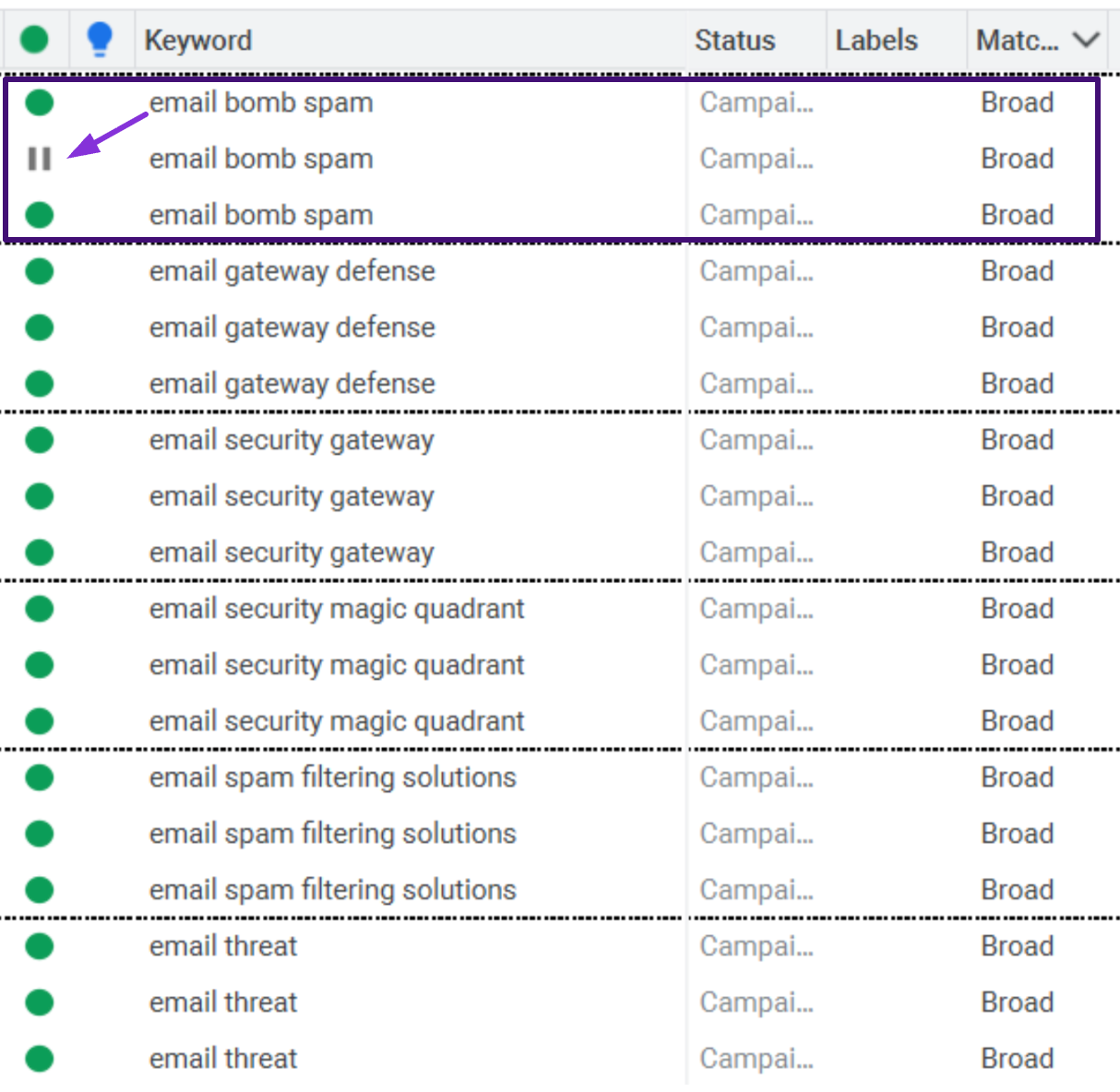
Example:
B2B SaaS account showing keyword duplication. Identical Broad Match terms (such as “email security gateway” and “email gateway defense”) are repeated across different campaigns, driving internal auction competition and cannibalizing performance data.
What we look for:
- Duplicate keyword themes
- Unnecessary match-type duplication
- Overlapping locations
- Low-volume campaigns with separate budgets
- Keywords that would perform better elsewhere
Depending on the account, the fix may be to pause, consolidate, or restructure campaigns rather than add more budget.
6. Existing Customers And Job Seekers
How to find it
- Use the search terms report to find queries about login, support, documentation, careers, jobs, salaries, and internships
- If customer lists are available, check whether existing customers are included in acquisition campaigns
Typical share of spend to investigate:
1-5% of Search spend.
This is usually a smaller source of waste, but it is easy to identify and exclude. Someone searching for a login page or “Company X careers” is unlikely to be a new customer.
These searches can also inflate campaign performance, because branded queries often convert at high rates. The goal is not to exclude every existing-user query, but to separate acquisition spend from traffic that serves a different purpose.
7. Low-Intent Traffic From Automated Campaign Types
How to find it
- Break down automated campaigns by audience, placement, location, asset group, search category, and conversion action
- Connect conversions with CRM data to see whether they become MQLs, SQLs, opportunities, or customers
Typical share of spend to investigate:
10-25% of automated campaign spend when conversion quality is materially weaker than Search.
A campaign can report hundreds of conversions while generating very little qualified pipeline if it optimizes toward a low-value conversion event.
Automated campaigns are not inherently low quality. They work well when conversion signals are strong and the account has enough data. The problem is scaling them before confirming that their conversions represent real business value.
The Final Check
Across all seven areas, the question is the same: if we remove this traffic, do SQLs, pipeline, or lead quality actually decline?
If they do not, the spend is a strong candidate for reallocation.
How Do You Read the Search Terms Report for Waste?
A practical 6-step review process follows these actions:
- Set a statistically meaningful timeframe: Select a 30 to 90-day window (or 14–30 days for high-spend accounts). This ensures you analyze real search trends rather than isolated statistical noise.
- Sort by spend: Sort queries strictly by Cost. The top 20% of expensive queries typically account for 80% of total expenditure. This catches major leaks immediately.
- Check commercial intent: Evaluate whether the searcher could realistically become an ICP buyer. Filter out B2C intent, free or open-source requests, tutorials, and terms containing "free", "cheap", "crack", "course", "jobs", "salary", "login", "portal" .
- Identify repeatable patterns: One irrelevant query may be an anomaly; twenty variations around the same concept indicate a targeting flaw. Group these queries into semantic themes.
- Compare downstream conversion quality: Do not stop at surface-level conversions. Cross-reference search terms with CRM data to verify whether queries produce MQLs, SQLs, and pipeline or just low-value trial signups.
- Apply negative keywords selectively and recheck: Add account-level google ads negative keywords for terms completely foreign to your business, and campaign-level negatives for product-specific overlaps. Be cautious with automated google ads recommendations that urge switching to Broad Match.
For a deeper look at budget allocation errors, see our guide on 7 mistakes wasting your PPC budget.
Where Does the Money Go Next?
Cutting waste only creates value if the freed budget has somewhere better to go.
The next step is usually reallocation rather than simply lowering total spend.
That can mean moving budget toward:
- high-performing non-brand Search;
- markets with stronger SQL rates;
- keywords with proven commercial intent;
- campaigns with a stronger MQL-to-SQL rate;
- new high-intent keyword groups;
- remarketing audiences with meaningful engagement;
- experiments that have a clear hypothesis and measurement plan.
For example, in ScraperAPI, the budget was shifted toward non-branded campaigns while weaker geographic traffic was reduced. The account was ultimately able to support a 3x budget increase while requests and MRR grew substantially.
This is the difference between reducing Google Ads spend and optimising Google Ads spend.
The first is a cost-cutting exercise. The second is capital allocation.
If you want a broader framework, see our guides on 5 Ways to Do PPC Budget Optimization and The Cost of Google Ad.
How Do We Check the Effect on Qualified Demand?
A successful cleanup should not be judged by the Google Ads interface alone. We compare performance before and after the changes, then connect ad data with CRM stages wherever possible.
Spends and clicks are supposed to fall, so they are not the verdict. MQLs, SQLs, and CPA per SQL are:
- Spend down 20%, clicks down 25%: this alone does not show whether the optimization worked.
- Spend down 20%, MQLs stable, SQLs up, CPA per SQL down: the cuts likely removed low-value traffic, not qualified demand.
SaaS adds one complication: conversion lag. A lead generated today may not become an SQL for weeks, so we compare equal time windows and recheck SQLs after the sales cycle plays out. TuxCare, for example, had a 60 to 90 day sales cycle. After the account was reworked, total Search and Display conversions increased 6x and CPA fell 61%.
For complex accounts, CRM data becomes part of the optimization loop. Our Google Ads management and free PPC audit processes use this analysis to connect campaign performance with business outcomes.
When Is Cutting the Wrong Move?
Cutting is not always the answer. Some campaigns look expensive or weak for good reasons, and cutting them too early can hurt growth. Hold off in these cases:
- The campaign is new. It needs time to learn and stabilize.
- Your sales cycle is long. Leads take weeks or months to turn into pipeline, so early numbers look worse than the real results.
- The market is strategically important. Volume is low for now, but the market matters for future growth.
- There is too little data. With a small sample, you cannot tell a real pattern from normal variance.
- The campaign brings quality. A high CPL can still produce strong SQLs and pipeline. Cutting it only because another campaign has a lower CPA can hurt growth.
The rule is simple: cut proven waste, not anything that looks expensive.
Key Takeaways
Before increasing your SaaS Google Ads budget, find the money that is already being spent without creating qualified demand. Check these areas in order:
- Search terms report
- Brand traffic
- Search Partners, Display, and placements
- Geographies, devices, and schedules
- Duplicate keywords and campaign overlap
- Existing customers and job seekers
- Automated campaign traffic
Use negative keywords to block recurring irrelevant intent, and judge big decisions by MQLs, SQLs, pipeline, and revenue, not clicks alone.
The best optimization is not the one that brings more conversions inside Google Ads. It is the one that removes low-value traffic while keeping or improving the flow of qualified opportunities. Once that is proven, raising the budget becomes a much safer move.
Not sure where your budget leaks? Talk to our team and we will help you find it.
FAQs
There is no universal percentage. It depends on the account, industry, campaign type, match types, geographic targeting, and how mature the account is. Instead of using a benchmark as a target, identify where spend is going to traffic that has little chance of becoming qualified demand. A Google Ads wasted spend review should focus on the source and quality of the traffic rather than a fixed acceptable percentage.

It can. That is not necessarily a problem. If the leads being removed are low quality, total lead volume may decrease while MQLs, SQLs, or pipeline remain stable or increase. Knack provides a good example: after low-quality trial sources were removed, the account generated fewer trials, but the trial-to-subscription conversion rate increased by 317%. The important outcome was better customer quality, not maximum trial volume.
For active Search campaigns, we recommend reviewing search terms regularly rather than waiting for a quarterly audit. The frequency depends on traffic volume. High-spend accounts may need weekly reviews, while smaller accounts can use a less frequent schedule. The important part is consistency. New search terms continue to appear as campaigns generate traffic, so a one-time cleanup will not prevent future waste.
Usually, before. First identify and remove obvious waste. Then check whether qualified demand remains stable. Once you know the account is spending efficiently, increase budget on campaigns and segments with evidence of strong business value. That does not mean you should never scale and optimize at the same time. It means you should avoid using additional budget to compensate for problems that already exist in the account.
After reducing wasted Google Ads spend, monitor total spend, clicks, MQLs, SQLs, cost per SQL, opportunity volume, and pipeline contribution. Spend and clicks may decrease as irrelevant traffic is removed, while MQLs and SQLs should remain stable or improve. Compare equivalent reporting periods and account for sales-cycle delays before deciding whether the optimization worked.
October 7, 2026

October 6, 2026