

Facebook Ads Targeting Options for B2B SaaS: Full Guide

May 13, 2026
Facebook still offers the largest social reach inside the Meta ecosystem. According to Statista, as of the first quarter of 2025, it had 3.07 billion monthly active users. Within the Meta ecosystem, the total daily audience reached 3.43 billion users in March 2025, marking a 6% year-over-year increase.
For B2B SaaS, Facebook ads targeting options are not valuable because of reach alone. Unlike LinkedIn, Facebook lacks direct access to professional context. The platform operates based on behavioral and interest signals, not firmographics. B2B SaaS teams need to build audiences from indirect signals: behavior, interests, engagement, and first-party data.
The same targeting options on Facebook can produce either relevant traffic or low-intent reach. The outcome depends on how you combine them and at which stage of the funnel you use them. Without a clear targeting structure, Facebook can turn into a source of cheap leads that never move into pipeline.
Why Facebook Targeting Requires a Different Mental Model for B2B SaaS
Facebook Ads performance for B2B SaaS depends heavily on data quality. The more you rely on Meta signals, the broader and less predictable your reach becomes. The more you use your own data, the greater your control and precision. Structurally, Facebook Audience targeting falls into two layers.
Core audiences are based on Meta data, such as geography, demographics, interests, and behavior. These are used for cold prospecting when you don’t yet have an established database.
Matched Audiences are based on your own data: These include Custom Audiences (Pixel, CRM, and engagement) and Lookalike Audiences, which are built from these segments. They require data collection first, but they usually deliver more stable and controllable results.
These levels are not interchangeable. Core audiences are necessary for achieving a large reach and testing hypotheses at the top of the funnel. Matched Audiences are used for retargeting and scaling based on performing segments. In B2B SaaS, consistent results usually appear when both layers work together.
One practical limitation should be planned for before launch. The match rate for B2B email lists on Facebook is typically 20–40%, whereas in B2C, it can be 60–80%. This is because work email addresses rarely match personal accounts. Therefore, CRM data should be supplemented with other identifiers. Otherwise, part of the audience simply won’t be matched.
Location Targeting
Location is a required setting in Facebook Ads. Without it, you cannot launch a campaign. Its role goes beyond launch setup. Geography directly affects the cost of traffic and how you interpret results.
Facebook allows you to target by country, region, city, ZIP code, or a radius ranging from 1 to 50 miles. There are four targeting modes available for each location:
- Everyone in location
- Recently in location
- Traveling in location
- Living in location
For B2B SaaS, it usually makes the most sense to use "Living in location" to exclude tourists and temporary visitors who are not part of the target audience.
CPM can vary sharply by region:
- North America: $15–$25
- EMEA: $5–$15
- APAC: $2–$8
These are general figures that aren't specific to SaaS. However, they can serve as a starting point for evaluating Facebook ads cost before segmenting campaigns by region. When launching a single campaign across multiple regions, audiences with different costs are mixed within it. As a result, North America can consume a budget faster, while cheaper regions may create the illusion of stronger performance.
For global B2B SaaS with one ICP, campaigns should usually be segmented by region from the start. This is where paid social advertising services often add value: not by increasing reach, but by keeping budget allocation, regional CPMs, and performance comparisons clean.
Demographic Targeting
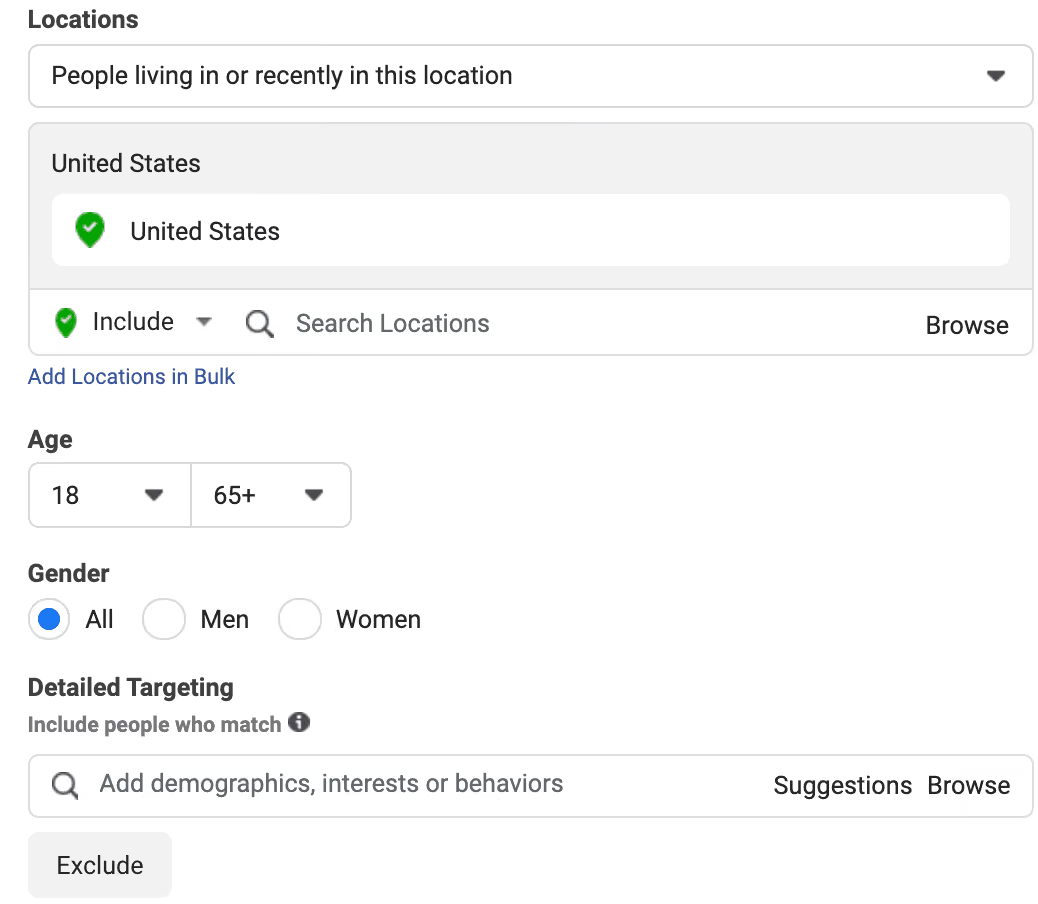
Facebook demographic targeting includes age, gender, language, education, marital status, life events, and professional attributes.
However, for B2B SaaS, this targeting option has a significant limitation: the platform does not verify users’ professional information. In other words, Facebook does not guarantee that a user actually holds a particular job title. The platform makes inferences based on profile information and behavior. Additionally, users update their Facebook profiles much less frequently than their LinkedIn profiles, so this data quickly becomes outdated. While demographics are not useless, they cannot be used as the sole method for defining an ICP.
Therefore, for B2B SaaS, demographic parameters serve as an additional layer of targeting rather than the primary basis. A few configuration rules are more useful than the full demographic set:
- Age. It usually makes sense to set this parameter fairly broadly. The 25–45 age range typically encompasses most decision-makers and senior specialists without significantly limiting reach. A too-narrow range reduces scale without guaranteeing a better ICP match.
- Language. This is one of the few truly precise filters. It determines the user interface language, not just the user's geographic location. For global SaaS, this is important because you can show localized ads only to people who use the relevant language, even within a single country.
- Life events. This is a niche but useful signal. Categories such as "new job" or "recently promoted" allow you to reach users when they change roles. During this period, they are more likely to reevaluate tools and processes, so the likelihood of a response is higher. This targeting can work for products where a new role or company change creates purchase intent.
The Facebook targeting options list below shows which demographic filters can support SaaS targeting and which ones should stay secondary.
Detailed Targeting: Interests
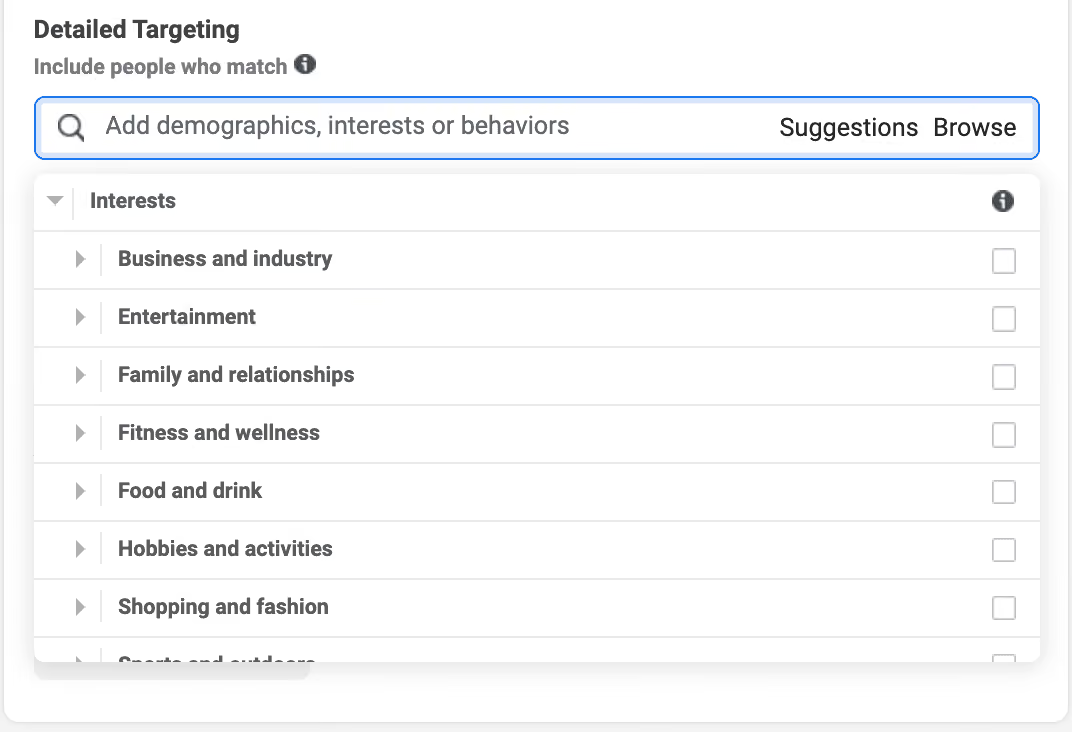
In Meta Ads Manager, Facebook detailed targeting often starts with interests. Interest targeting helps reach cold audiences that have not interacted with your product yet. However, interests should not be viewed as an exact description of your audience. Without understanding how Meta builds these segments, targeting can become inaccurate quickly.
Interest segments are generated by Meta’s algorithm. The platform analyzes user behavior, such as which pages a person likes, what content they view, and what they click on. Therefore, a suggested interest like "Enterprise Software" may not reflect reality. A user could have interacted with CRM content just once and be placed in this segment, even if they have no connection to purchasing B2B solutions.
For this reason, interest targeting provides broad but imprecise reach by default. It can still work for B2B SaaS when used for TOFU testing.
In practice, categories that are closely related to the business context work best:
- Business and industry, including SaaS, cloud computing, and enterprise software
- Technology, especially if linked to specific tools or platforms
- Small business, as an indirect signal for the SMB audience
To improve accuracy, narrow down the audience using AND logic. In Ads Manager, the "Narrow Audience" feature accomplishes this by requiring the user to match multiple interests simultaneously. For example, "Enterprise Software" and "Project Management" for a product in the work management category. This allows you to reduce the audience size while making it significantly more relevant. Otherwise, you’ll reach everyone to whom the algorithm has assigned any of these interests, which dilutes the audience pool.
Interest targeting can be combined with basic filters, such as age and language, or as a way to gather initial traffic and data for building Lookalike Audiences.
Detailed Targeting: Behaviors
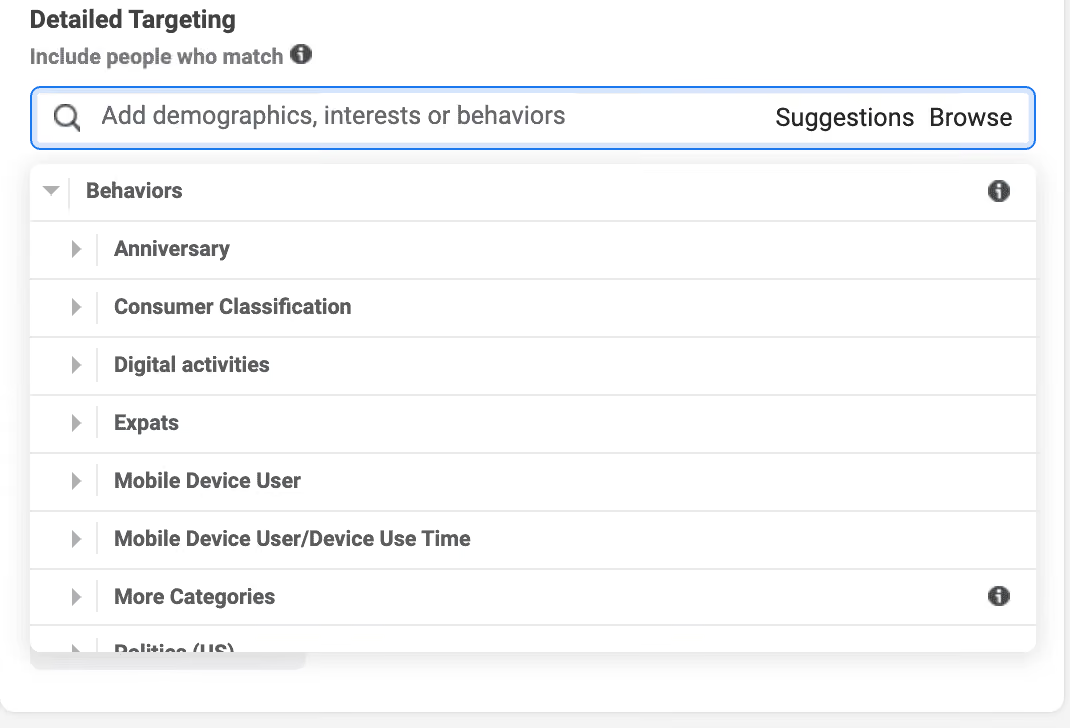
Behavior targeting is based on user actions rather than stated or inferred interests. Facebook tracks what people actually do, such as managing pages, interacting with platform features, and engaging in purchasing activity. As a result, behaviors are generally more accurate than interests, but they still require filtering.
The practical Facebook behavioral targeting list for B2B SaaS is shorter than it looks in Ads Manager. There are several useful segments, but most need additional filters to become reliable.
Facebook Page Admins / Business Page Admins
This segment includes users who manage Facebook Pages. Because it is based on actual behavior, it can indicate business involvement or decision-making authority. However, the segment itself is noisy: it includes fan page administrators as well as random users. To improve accuracy, it needs to be narrowed down. For example, specify the age range 28–55 and business interests.
Technology Early Adopters
A segment of users who adopt new technologies and products before others. This can work for SaaS products that need an audience open to new tools. Works best when combined with interests in specific technology categories.
Engaged Shoppers
Users who actively engage with shopping within Facebook. This signals a readiness to take action, but it’s better suited for simple and quick transactions. For complex B2B SaaS with a long sales cycle, its value is limited, but it can work for SMB products with quick onboarding.
Like interests, behaviors do not provide precise targeting on their own. They only work in combination. For example, "Page Admin + age + business interests" yields a much more relevant audience than any of these filters used separately.
Custom Audiences – Targeting Your Own Data
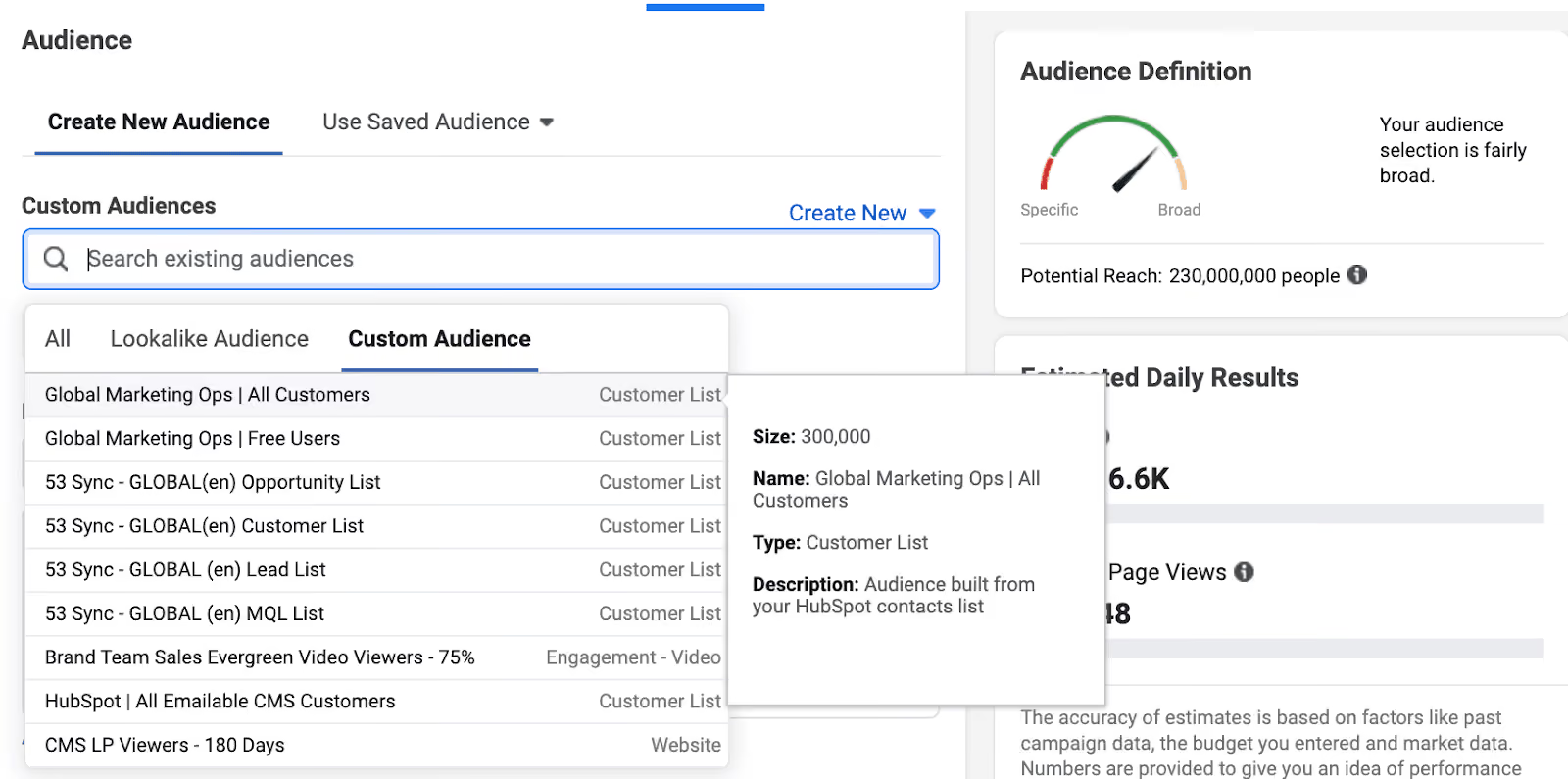
A full list of Facebook targeting options should not stop at Meta-inferred signals. Custom Audiences let you target users based on first-party data. These users may have visited your website, submitted a lead form, entered your CRM, watched your videos, or engaged with Meta assets. Unlike interest and behavior targeting, Meta does not build the audience from inferred signals alone; it uses your actual data to find a relevant audience. For B2B SaaS, this is the most accurate method of targeting because it reflects genuine interest rather than indirect signals.
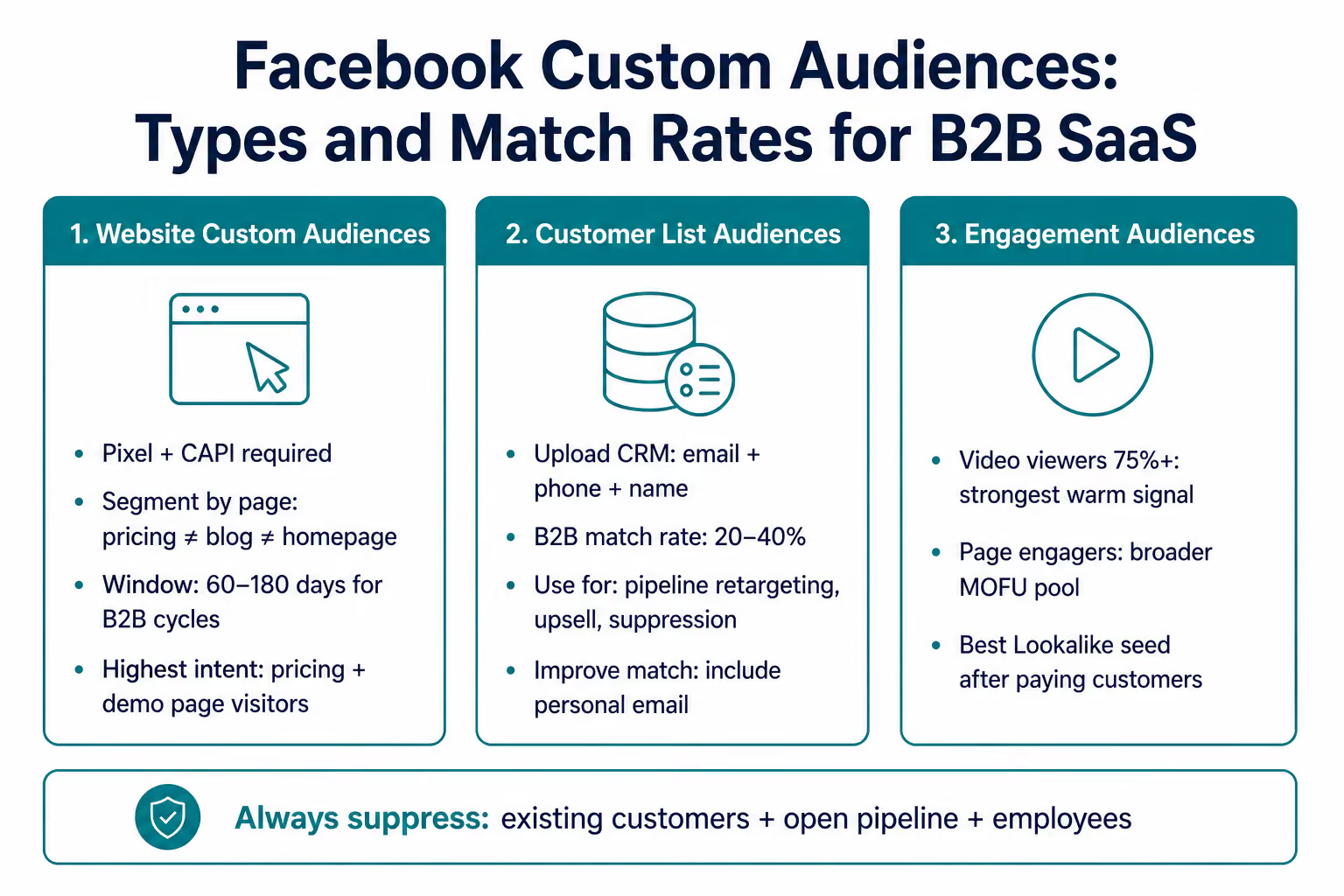
Website Custom Audiences: Pixel + CAPI
Website Custom Audiences are built from user behavior on your website. This feature is powered by the Meta Pixel, which is a JavaScript code that tracks visitor actions and links them to Facebook profiles. Without the Pixel, it’s impossible to properly set up Facebook retargeting ads or train the algorithm on conversions.
Due to the iOS 14 changes and tracking restrictions, the Pixel no longer covers all events. Some event data is lost. The Conversions API helps close this gap by transmitting conversion data directly from the server, bypassing the browser. Together, the Pixel and the API provide a more complete picture and a stable signal for optimization. For B2B SaaS, this is critical because the sales cycle is long, and losing even a few events can degrade the algorithm’s training.
A common mistake is grouping all visitors into one audience, such as "All Website Visitors." This segment does not account for user intent. A stronger setup segments users by funnel stage and intent.
Practical segments for SaaS include:
- Engaged pricing page visitors (e.g., those who spend 3+ minutes on the page)
- Demo page visitors
- Users who started registration but did not complete it
For a long B2B cycle, it makes sense to use a 60–180-day window to capture the entire decision-making period.
Customer List Custom Audiences
With Customer List Custom Audiences, you can upload CRM data, including email addresses, phone numbers, and names. Meta then matches this data with user accounts and creates an audience.
The main limitation is the low match rate in B2B. It's usually 20–40%, compared to 60–80% in B2C. This is because work email addresses rarely match personal Facebook accounts.
To improve accuracy, include multiple identifiers for each contact in the list, such as email address, phone number, first name, and last name. Personal email addresses usually produce higher match rates than corporate emails.
Practical use cases for SaaS include:
- Retargeting pipeline contacts with conversion-focused content
- Upselling existing customers on products or pricing plans
- Excluding current customers from acquisition campaigns
Custom Audiences for Engagement
Engagement Custom Audiences include users who have already interacted with your content on Facebook or Instagram. These interactions can include video views, page visits, or form submissions.
The strongest signal for this option is video watch time. A user who watches at least 75% of a video has demonstrated genuine interest. These segments work well as:
- An audience for retargeting
- A source for lookalike audiences
Compared to clicks or likes, video engagement provides a more reliable signal of intent and is better suited for further campaign optimization.
Lookalike Audiences: Scaling Beyond Known Contacts
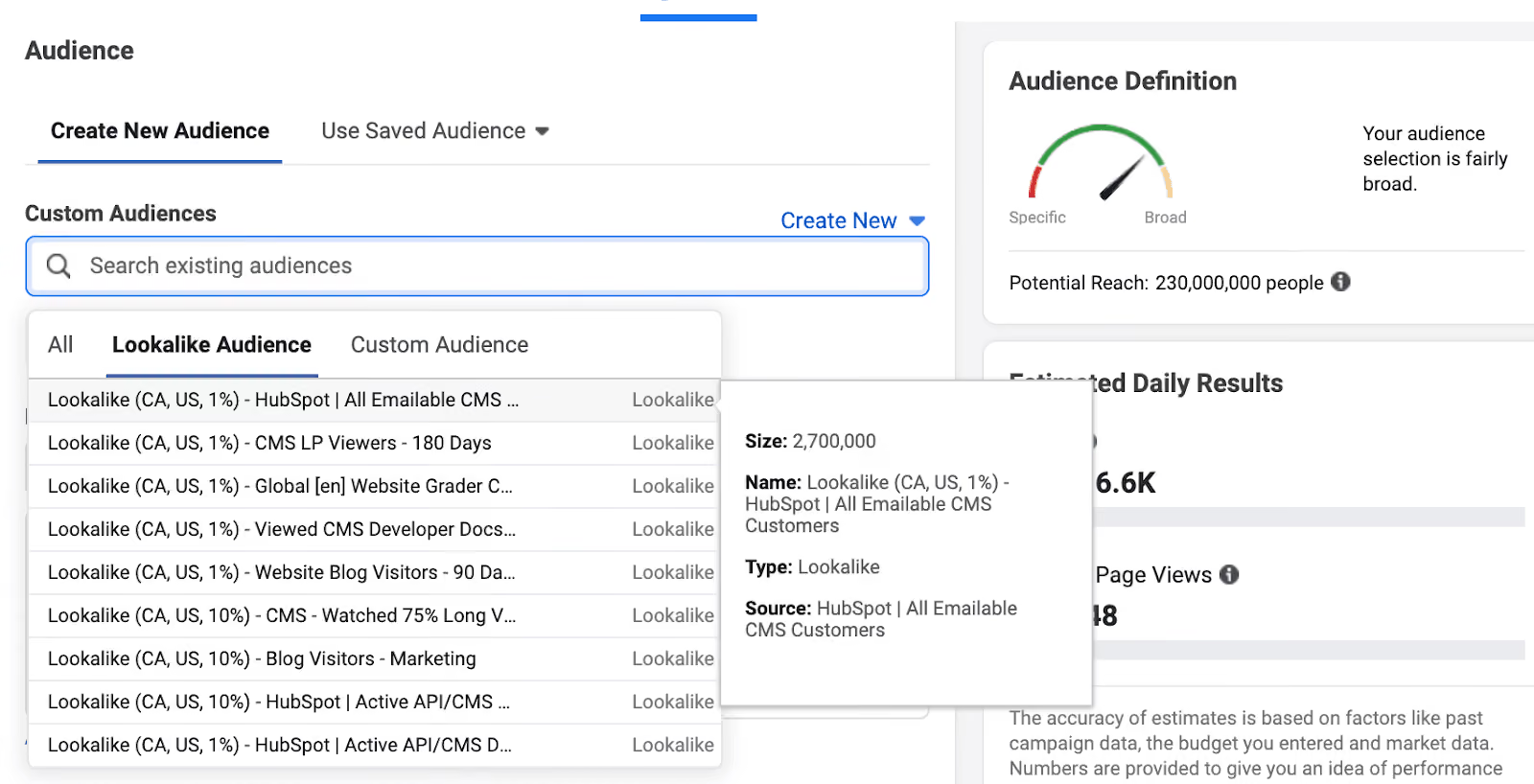
Among Facebook targeting options, Lookalike Audiences are the scaling layer, not the starting point. Meta identifies users with similar characteristics and behaviors based on the source audience you’ve uploaded or collected.
The quality of the source audience determines the outcome. If the source audience contains weak signals, the algorithm will amplify them. However, if you provide a precise signal, it will find similar users with a higher likelihood of conversion.
In practice, source quality usually ranks like this (in descending order of quality):
- Paying customers
- Trial users
- Demo sign-ups
- All website visitors
A customer-based lookalike audience almost always performs better than a lookalike audience built from a broad website audience. The reason is simple: You are feeding the algorithm buyers, not users who only showed interest. HubSpot also points to customer-based look-alikes as a stronger source audience.
In terms of configuration, audience size affects the balance between precision and reach. Setting it to 1% yields the most relevant audience in the country with the lowest reach. This will be the most precise segment. For B2B SaaS, we usually recommend starting with 1–2% and gradually expanding to 3–5%, provided that performance remains stable.
The size of the source audience is also important. Ideally, you should start with at least 100 contacts, but that is the bare minimum. More consistent results are achieved with 1,000–10,000 users. With a smaller sample size, the algorithm lacks the data necessary to build an accurate model.
Lookalike audiences can extend beyond the ICP by design. The algorithm is optimized for similarity, not business context. Therefore, for B2B SaaS, it’s best to further filter these audiences, for example, by age, language, or core interests. This helps maintain relevance and reduce wasted reach.
Advantage+ Audiences – When to Use Meta’s Automated Targeting
Among Facebook advertising targeting options, Advantage+ Audience gives Meta the most control. Advertisers set the objective and budget, and the platform automatically expands and refines the audience to find users most likely to convert. This mode gives advertisers limited control over audience composition.
This approach works when the algorithm has sufficient data. For SaaS, this is typically a PLG or self-serve model with frequent conversions, such as trial sign-ups or registrations. The more events that occur, the faster the system understands who converts, and the more accurately it finds similar users.
In enterprise B2B SaaS, however, the situation is different. If there are few conversions, the algorithm lacks sufficient data. In this case, Advantage+ expands the audience beyond the ICP because it tries to compensate for the lack of signals with volume. As a result, ICP relevance drops.
For products with a narrow ICP and a long sales cycle, manual targeting provides more control and generally yields more consistent lead quality. A Facebook advertising agency should pressure-test that trade-off before moving budget into automated targeting. At Aimers, we have repeatedly seen that automated targeting works better for simple, high-volume conversions than for complex, rare ones.
We recommend not switching the entire campaign to Advantage+ right away. For teams deciding how to optimize Facebook ads, it makes sense to test Advantage+ separately against manual targeting in A/B campaigns and then decide whether to scale up based on the results.
Targeting Best Practices for B2B SaaS
The most useful best practices in Facebook ads are not about choosing one perfect filter. After reviewing all targeting categories, a set of practical guidelines remains that directly impact results. They are about building a targeting system that works.
Set Up Pixel + CAPI Before Launch
If only part of conversion events is reported, the algorithm trains on incomplete data. For B2B SaaS with a few conversions, this is particularly critical because losing even a fraction of signals weakens optimization.
Build Lookalikes from Customers, Not All Visitors
The "All Visitors" segment mixes high-intent users with low-intent traffic. Building a lookalike audience from paying customers or high-LTV accounts allows the algorithm to focus on actual buyers, not just interested individuals.
Segment Retargeting by Behavior, Not Visits
The “All Visitors” audience mixes users with different levels of intent. A blog reader and a user who viewed pricing require different approaches. Segmentation by actions provides more precise control and better conversion quality. In our Propello case study, this combination of retargeting and segmented prospecting resulted in a 235% increase in sign-ups while reducing CPA by 33%.
Keep Audience Size in a Working Range
For conversion campaigns, the workable range is approximately 500,000–2,000,000. If the audience is too small, the algorithm lacks data. CPM rises, and delivery quality declines. In this case, it’s better to broaden the targeting and use creative as a filter rather than trying to narrow the audience down to perfection.
Set Up Exclusions Before Launch
Prospecting campaigns should exclude employees, current customers, and active pipeline leads. This simple adjustment immediately reduces unnecessary spending without compromising traffic quality.
Adjust Frequency by Funnel Stage
For a cold audience, a frequency higher than two impressions quickly leads to burnout. In the middle of the funnel, 3–4 impressions are acceptable. At the bottom of the funnel, you can increase the frequency, but it’s important to monitor user response. A rise in ad hides usually signals a problem before CTR drops.
Avoid Early Decisions in Cold Campaigns
The Meta algorithm needs time to exit the learning phase and accumulate data. For cold audiences, reliable insights often need 60–90 days of data. Decisions made in the first few weeks often lead to premature changes that worsen performance.
What to Check Before Launching Facebook Targeting
Facebook Targeting Decision Framework for B2B SaaS
As with other PPC platforms, Facebook targeting should not be chosen by option alone, but on the GTM model and ACV. These factors determine where scale is more important, where precision is more important, and what role the platform can play in customer acquisition.
Use Facebook as a Primary Channel for PLG SaaS
In this model, Facebook can serve as the primary acquisition channel. The goal is not just to generate leads on Facebook, but to create enough conversion volume for the algorithm to learn from real buyer behavior.
The initial setup typically includes either Advantage+ or Detailed Targeting with tech-related behaviors. For PLG SaaS, Facebook ads targeting interests can help test broad category relevance before stronger first-party data is available.
Next, lookalike targeting based on paying customers is enabled for scaling, along with Pixel-based retargeting to bring back users who did not complete the trial or registration.
For the initial test, a budget of at least $1,500/month is required; otherwise, the algorithm will not receive a sufficient signal.
Use Facebook as a Supporting Channel for Mid-Market SaaS
In this context, Facebook usually functions as an additional channel alongside LinkedIn or Google rather than as the primary source of leads. The logic of Google Ads vs. Facebook Ads is different here: Google captures existing demand, while Facebook helps nurture and re-engage audiences that are not ready to convert yet.
The foundation consists of customer list custom audiences for engaging with known contacts and website custom audiences for users with high intent (pricing and demo pages).
Lookalike audiences based on customers are used for cold outreach with additional filter controls.
The campaign sequence is structured in stages: cold prospecting, nurturing, and conversion.
A budget of at least $3,000 per month is usually needed for consistent performance.
Use Facebook for Retargeting in Enterprise SaaS
Due to the lack of precise firmographic targeting, Facebook’s applicability is limited. The platform is not ideal for directly reaching the buying committee.
The primary use case is retargeting. You can create Website Custom Audiences for website visitors and Customer Lists for pipeline contacts. You can also exclude existing customers.
Retargeting should not be measured by last-click CPA alone, but by its impact on the funnel. Assisted conversions and view-through attribution provide a more accurate picture.
Start Broad, Then Refine with Data
Initially, it’s best not to narrow your audience too much. Narrow targeting limits the algorithm and slows down the learning process. In practice, a broader start followed by creative-based filtering and accumulated data usually produces more consistent results. Once you start receiving conversions, you can create more precise retargeting segments and lookalike audiences based on real signals.
Ready to Build a Targeting Stack That Actually Fits Your SaaS?
Facebook targeting works when the mechanics match the GTM motion. Using the wrong audience type at the wrong funnel stage is one of the most common reasons B2B SaaS teams write off the channel too early.
At Aimers, we run paid campaigns for B2B SaaS companies across Meta, LinkedIn, and other platforms. If you need a SaaS marketing services provider to audit your current targeting setup or build one from scratch, we’re open to a conversation.
FAQs
What are the main Facebook Ads targeting options?

How does Facebook Ads targeting work for B2B SaaS?
Is Facebook Ads good for B2B SaaS?
What is the difference between Custom Audiences and Lookalike Audiences?
How can I optimize Facebook Ads targeting?

.png)
