
LinkedIn Message Ads for B2B SaaS: What Works in 2026

May 18, 2026
LinkedIn Ads provide access to a professional audience that is difficult to reach effectively on other platforms. However, most ad formats appear in the feed, where users’ attention is split across posts, updates, and other ads.
Message and Conversation Ads allow you to send a message directly to the inbox when the recipient is active in a professional context. Open rates are typically higher for these formats than for feed-based ads. However, these formats do not scale with cold audiences as well as Sponsored Content. For LinkedIn message ads SaaS campaigns, audience warmth and funnel fit matter more than reach alone.
This guide explains how LinkedIn Sponsored Messaging formats work, how Message Ads differ from Conversation Ads, how to launch a campaign in Campaign Manager, and which use cases make sense for B2B SaaS in 2026.
LinkedIn Sponsored Messaging: Format Overview and Funnel Positioning
First, let’s break down how each format works and where it fits in the funnel.
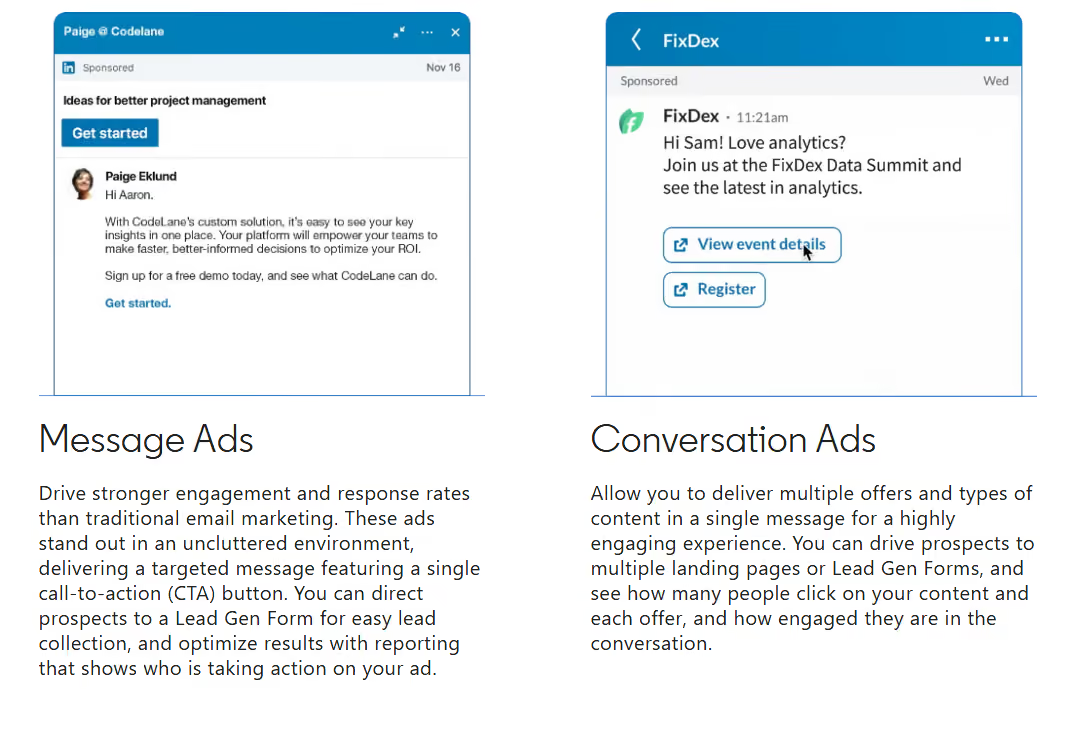
Message Ads consist of a single message with a single CTA in the LinkedIn Inbox. This format includes the sender, subject line, message text, button, and optional banner. It is a direct, offer-driven interaction with the user. Message Ads work best in scenarios involving a clear, single action, such as webinar registration, downloading gated content, requesting a demo, or following up with a warm audience.
Conversation Ads work differently. Rather than showing one CTA, Conversation Ads present several interaction options within the message. Each button can lead to a separate landing page, a Lead Gen Form, or the next step in the conversation. This makes the format stronger for nurturing and qualification scenarios where users can choose different paths based on intent.
Conversation Ads offer another key advantage for B2B SaaS: LinkedIn shows which options users select. The format essentially provides an additional intent signal within the ad itself. For instance, it reveals which use case, offer, or content generates the most interest among the audience.
Both formats use a CPS model, meaning advertisers pay for delivered messages rather than opens or clicks. At the same time, LinkedIn limits frequency; a single user cannot receive a sponsored message from a single advertiser more than once every 30–45 days.
This directly impacts the format’s role in the funnel. A strong LinkedIn message ads strategy starts with accepting that Sponsored Messaging is not well-suited for mass reach or low-cost TOFU traffic. The scale is limited here, and each contact is expensive. The format works best when the audience already knows the brand and has a clear reason to engage.
Quick Reference: Message Ads vs Conversation Ads for B2B SaaS
Use Case 1. Demo Requests: The Most Direct BOFU Application
Demo requests are one of the clearest BOFU use cases for LinkedIn Sponsored Messaging in B2B SaaS. This format is effective when the audience is familiar with the product, ready to take the next step, and needs a low-friction path to convert.
For LinkedIn message ads for lead generation, Message Ads combined with a Lead Gen Form are most commonly used. Rather than being redirected to an external landing page, users open the form directly within LinkedIn. Fields are automatically populated with information from the user’s profile, such as name, company, job title, and email address. This reduces form friction. According to LinkedIn, Message Ads with Lead Gen Forms have a conversion rate that is approximately three times higher than redirecting users to an external website.
Demo campaigns work best with a warm audience. This primarily involves retargeting users who have visited pricing or demo pages via the LinkedIn Insight Tag. You can also use Matched Audiences based on CRM data, such as contacts in the sales pipeline who have interacted with the company but haven't requested a demo yet.
Message structure matters more here than creative complexity. Among practical LinkedIn Message Ads examples, a typical high-performing flow looks like this:
LinkedIn specifically notes that messages shorter than 500 characters have a 46% higher CTR than longer versions. Therefore, the format calls for concise and straightforward text.
Sender credibility is equally important. Even before opening the message, the user sees the sender’s name, photo, and job title. For B2B SaaS, this significantly impacts the open rate. Messages from VPs of Sales or director-level professionals typically perform better than messages from generic or irrelevant sender profiles.
Use Case 2. ABM: Reaching Every Stakeholder in the Buying Committee
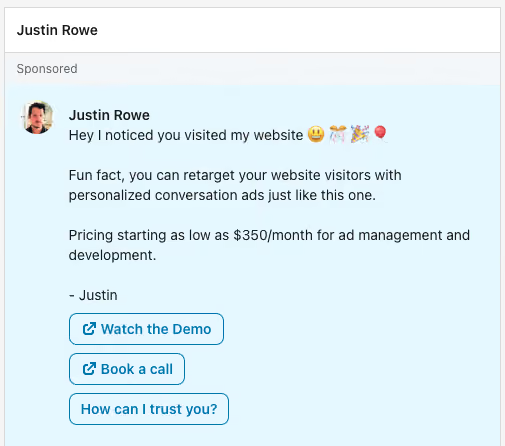
LinkedIn Conversation Ads SaaS are particularly useful for enterprise B2B SaaS in ABM scenarios, where multiple stakeholders evaluate the product through different criteria.
According to Gartner, the average B2B deal involves six to ten stakeholders. Each stakeholder views the product differently. For example, CFOs and VPs of Finance evaluate ROI and budget impact. Product and engineering leaders look at workflow fit, implementation effort, and team adoption. DevOps and IT teams focus on integrations, security, and infrastructure constraints.
Conversation Ads offer an advantage over standard Message Ads in this regard. Rather than a single CTA, you can create multiple scenarios within a single message and allow users to select the option that interests them.
For example:
- "Show me the ROI case" – a financial case study or ROI calculator
- "How does it integrate with our stack?" – technical documentation or a demo with an engineer; or
- "Request a demo" – Lead Gen Form
For B2B SaaS, this creates a more practical form of personalization. LinkedIn shows which button the user clicked, meaning Conversation Ads provide an additional intent signal within the campaign. This data can be used as a qualification signal for SDRs and sales outreach going forward.
For ABM campaigns, the basic targeting structure typically looks like this: Company List + Job Function + Seniority. This is where top LinkedIn ads agencies usually focus less on reach and more on account coverage, role mapping, and message paths. First, a list of target accounts is uploaded via Matched Audiences; then, roles and job levels are added. Consequently, different stakeholders within the same company receive messages with different engagement scenarios. At Aimers, deep CRM analysis for a Healthcare AI SaaS client revealed that roles like 'Billing Manager' outperformed higher-seniority titles like 'CEO' and 'Owner' in lead conversion, insights that helped the campaign surpass its quarterly lead generation target by 119%.
However, we should note an important limitation. LinkedIn limits the frequency of Sponsored Messaging. Typically, a single user cannot receive Sponsored Messaging from the same advertiser more than once every 30–45 days. For ABM, the account-level messaging sequence needs to be planned before launch. Typically, you work with the champion within the team first and then bring in the economic buyer when the deal reaches the budget discussion stage.
Use Case 3. Event and Webinar Invitations
LinkedIn highlights event invitations as a primary use case for Sponsored Messaging. Inbox messages feel closer to professional invitations than standard feed ads. This is particularly important for B2B because webinars, roundtables, and product events are usually promoted through direct outreach rather than mass reach.
B2B SaaS teams typically use Sponsored Messaging to promote:
- Technical webinars that address a specific ICP challenge
- Product launch events
- Customer advisory boards
- Demo days for a specific segment or account list
For these campaigns, a combination of Message Ads and Lead Gen Forms is also commonly used. Users receive an invitation in their inbox and can register directly on LinkedIn without being redirected to an external landing page. As a result, registration rates are typically higher than for feed-based event ads.
Event campaigns work best with a warm audience:
- CRM contacts
- Website visitors via Insight Tag
- Participants in past webinars and events
Timing matters. Sponsored Messaging is delivered only when the user is active on LinkedIn. Therefore, a single message sent several days before the event rarely yields maximum results. You also need to keep the frequency cap in mind.
Event campaigns usually perform better when Sponsored Messaging is paired with other LinkedIn placements. LinkedIn video ads examples can also inform reminder creatives for more complex events. In our experience, the most common approach is to use: Sponsored Messaging is used as the primary invitation touchpoint and Sponsored Content is used for reminder communications to the same audience
According to LinkedIn, running Sponsored Messaging and Sponsored Content simultaneously increases the open rate by 19% and the click-through rate (CTR) by 72% for Sponsored Messaging campaigns.
How to Set Up Message Ads in Campaign Manager
Launching Message Ads in Campaign Manager has two stages: Campaign Setup and Ad Setup. Here’s how it works, step by step.
Step 1: Select a Campaign Objective
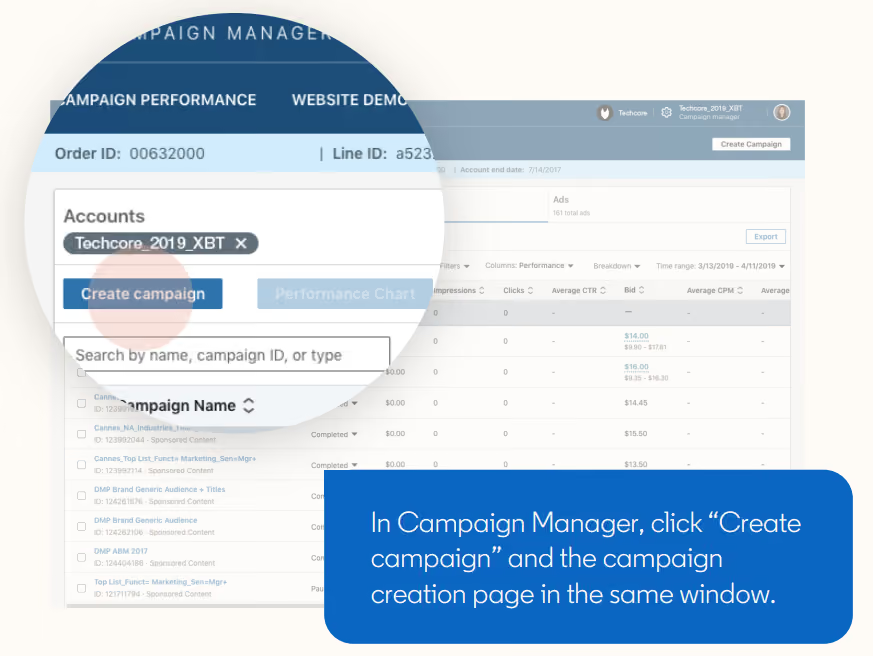
In Campaign Manager, click "Create campaign" and select an objective.
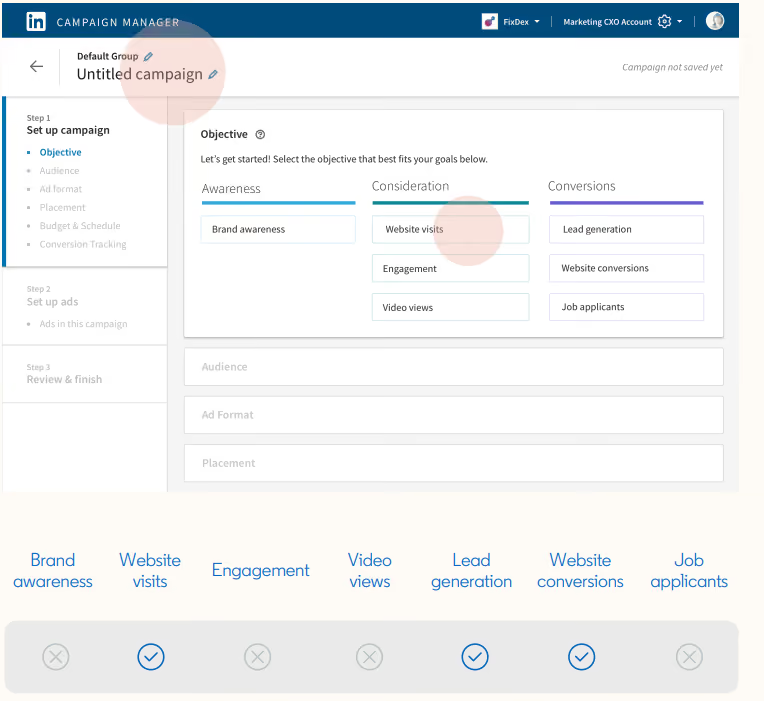
Campaign Manager
The following options are available for Message Ads:
- Website Visits
- Lead Generation
- Website Conversions
If your campaign collects demo requests via the LinkedIn Lead Gen Form, select Lead Generation. Only this objective allows you to embed the form directly into the message. According to LinkedIn, this approach can generate up to four times more leads than sending traffic to an external landing page.
Step 2: Set Up Your Audience
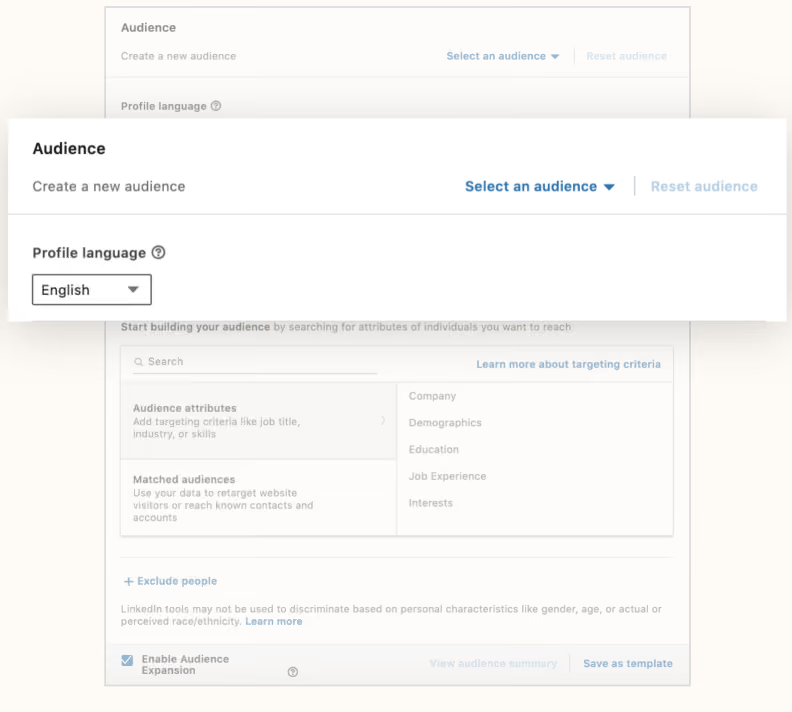
First, specify the profile language and location. Once the campaign is saved, the language cannot be changed, so this setting should be checked before launch.
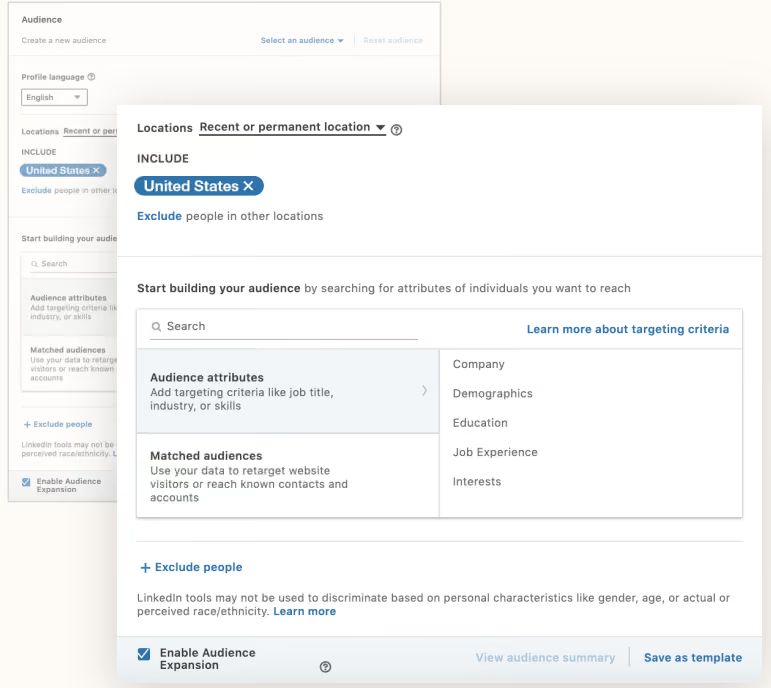
Next, add audience attributes:
- Job function
- Seniority
- Company size
- Skills
Matched audiences:
- Website retargeting
- CRM lists
- Company lists
Keep in mind that Message Ads operate with a frequency cap, meaning a single user cannot be sent Sponsored Messages from the same advertiser on a regular basis. Official LinkedIn materials for Message Ads specify a limit of approximately 45 days. Because of this, audiences that are too small quickly reach their delivery limit, so a stable campaign usually requires an audience size of at least 15,000–25,000.
Step 3: Select the Ad Format
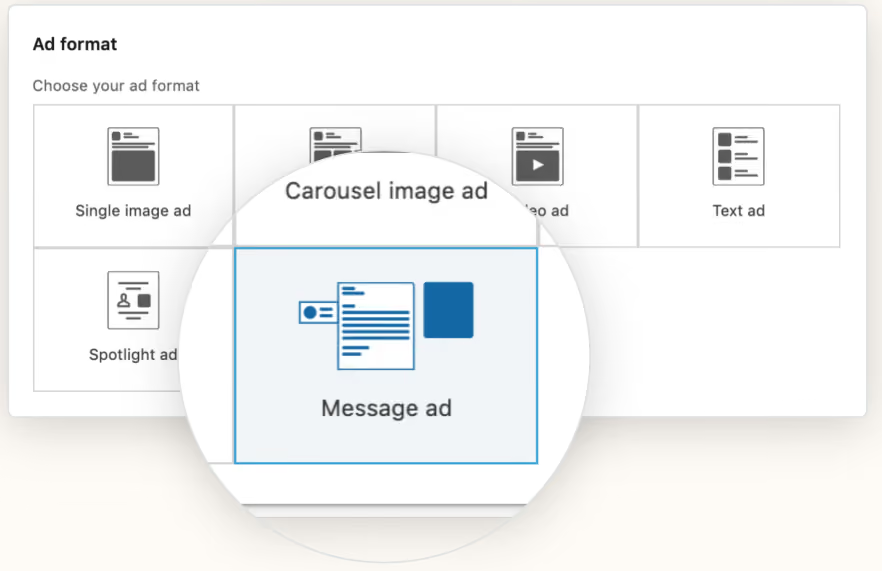
In the format selection step, choose “Message Ad.”
There is an important limitation here: Message Ads only appear within the LinkedIn Inbox and are not supported on the LinkedIn Audience Network. You can only use one Sponsored Messaging format per campaign. If the team still needs to clarify what is LinkedIn audience network, it should treat it as a separate placement environment rather than part of Sponsored Messaging.
Step 4: Set Your Budget and Schedule
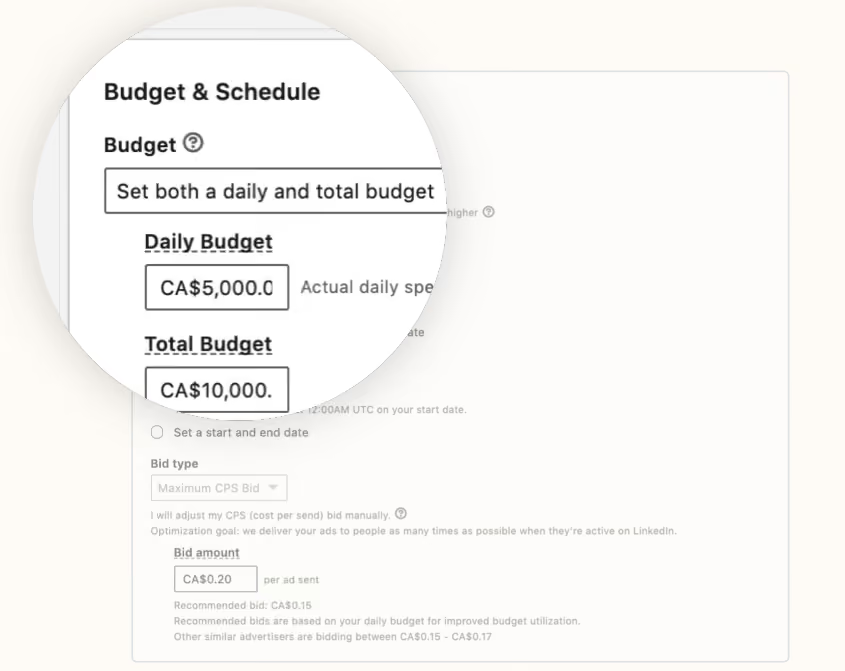
LinkedIn recommends using a total budget instead of a daily budget for Message Ads.
Messages are sent only when the user is active on LinkedIn, and the frequency cap further limits reach. As a result, the daily budget may be spent unevenly.
The bid model for Message Ads is fixed: cost per send (CPS). A campaign can end when the total budget is reached or on the specified end date.
Step 5: Set Up Conversion Tracking
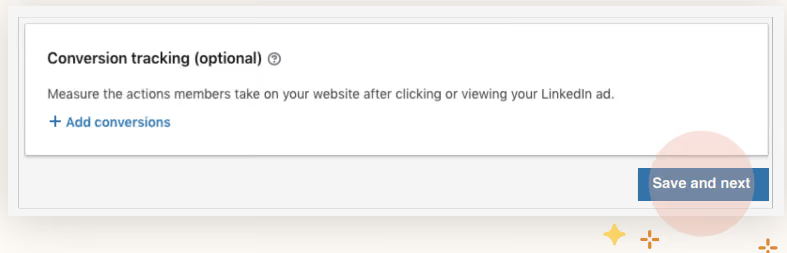
Before launching your campaign, set up conversion tracking via the Insight Tag. This allows you to see what actions users take after interacting with the message, such as demo requests, sign-ups, downloads, and other conversions.
After configuring Campaign Setup, click "Save and Next."
Step 6: Select a Sender Profile
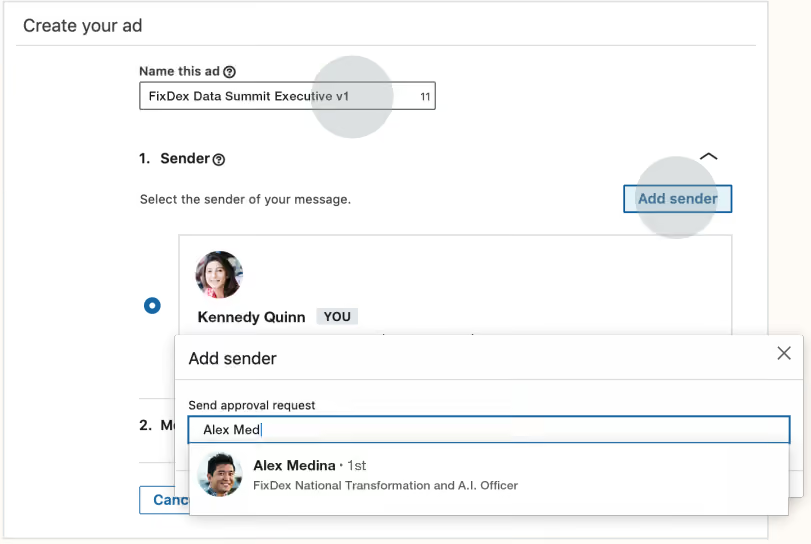
Sender Profile
During Ad Setup, select the sender, meaning the LinkedIn profile the message will come from.
To use a colleague’s profile as the sender, they must:
- Be your first-degree connection
- Approve the sender request within LinkedIn
Without these steps, the profile cannot be used in the campaign.
The sender significantly influences the open rate because users see the name, job title, and photo before opening the message. A LinkedIn ads management agency will usually test sender fit against the offer, funnel stage, and audience seniority rather than choose the most senior profile by default. For B2B SaaS, senders at the director level or higher with a relevant role or industry typically perform better.
Step 7: Create the Message
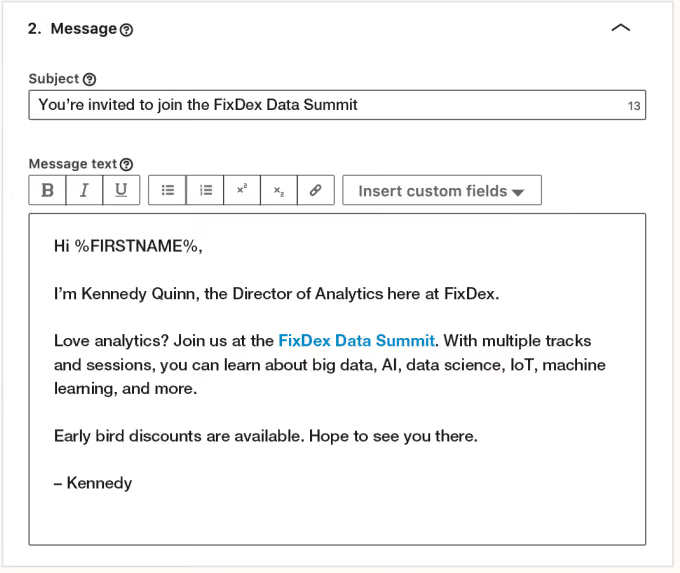
The following are available for Message Ads:
Subject line
- Message body
- Personalization fields
- Hyperlinks
- CTA button
Subject lines are limited to 60 characters. Technically, the main text supports up to 1,500 characters, but LinkedIn recommends keeping the message within 500 characters or less (shorter messages typically show a higher CTR). A strong LinkedIn message sample should usually stay closer to the lower end of that range and focus on one offer.
For personalization, you can use dynamic fields such as %FIRSTNAME% and %COMPANYNAME%. Links within the text are clickable, so part of the CTA can be embedded directly into the message body.
Step 8: Set Up the CTA and Banner
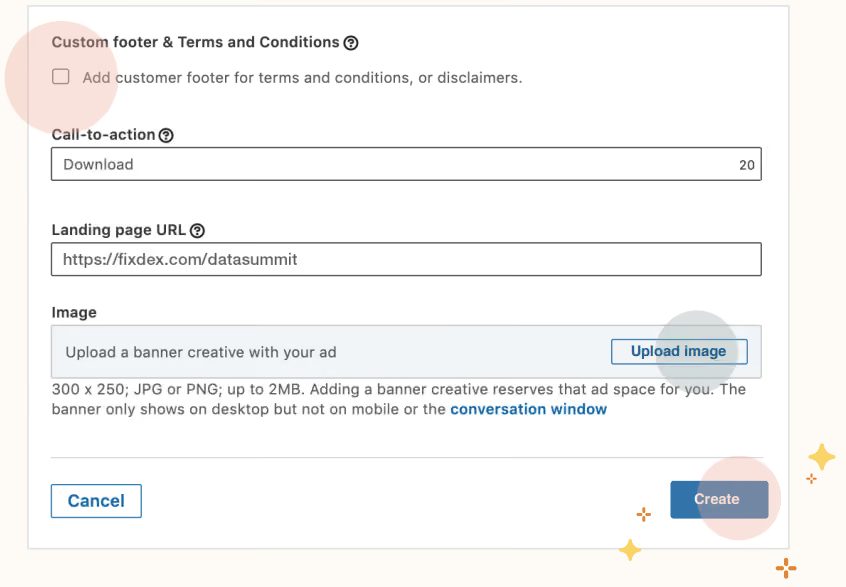
The CTA button is required. The limit is 20 characters.
Although a banner image is optional, it must meet the following requirements:
- Size: 300 x 250 pixels
- File type: JPG or PNG
- File size: Up to 2 MB
LinkedIn recommends adding a banner because, without one, third-party visual content may appear next to the message. Note that the banner is only displayed on desktop. It does not appear in the mobile inbox or conversation view.
Before Launching: Send a Test Message
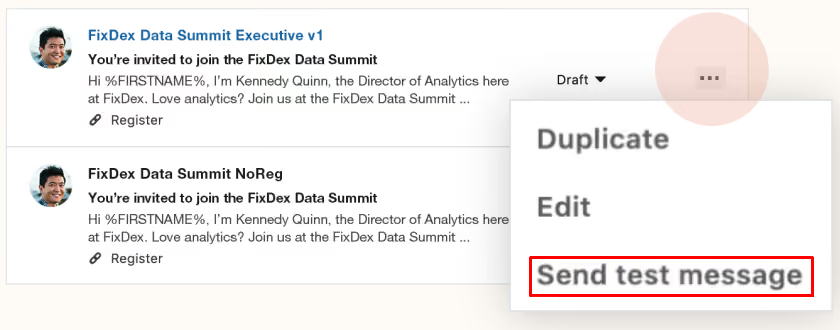
Before publishing, select "Send test message" from the "..." menu in the ad preview. This allows you to check the following:
- The display of personalization fields
- Whether links work
- Banner image rendering
- The overall appearance of the message in the inbox
After launch, Message Ads cannot be fully edited. To make changes, you usually have to duplicate the ad and launch a new version.
Message Ads vs. Conversation Ads: When to Use Which
Both Message Ads and Conversation Ads enable direct communication through the LinkedIn Inbox. However, they operate on different principles. The choice depends on offer structure, audience composition, and the number of campaign paths.
LinkedIn Message Ads work best in straightforward scenarios with one audience segment, one offer, and one expected action. Examples include a demo request, webinar registration, or retargeting follow-up. This format is easier to produce, launches faster, and requires less campaign logic.
Conversation Ads work better when the audience includes different roles, interests, or levels of intent. Rather than a single CTA, users are presented with several interaction paths, and LinkedIn tracks which option they choose. This provides additional engagement and intent data directly within the campaign.
Best Practices That Move the Metrics
A few LinkedIn Message Ads best practices have a direct impact on open rates, CTR, and engagement quality.
Keep Messages Short
LinkedIn notes that Message Ads with up to 500 characters achieve a 46% higher average CTR than longer messages. The inbox is not built for long copy; users quickly scan messages and decide whether to open links or close them. Short messages that focus on a single problem, offer, and CTA work best.
Include Links Directly in the Message Text
According to LinkedIn, hyperlinks within the message body increase CTR by approximately 21%. If you mention a case study, webinar, or resource, make it clickable right away rather than relying solely on the CTA button.
Use Personalization Fields
LinkedIn allows you to automatically populate fields such as name, company, job title, and other details from the user’s profile. The Sponsored Messaging format resembles a real message more than a traditional ad. However, personalization alone does not make a message relevant; generic outreach without context is usually perceived as a mass mailing, even before it's opened.
Run Sponsored Messaging Alongside Sponsored Content
According to LinkedIn, combining Sponsored Messaging and Sponsored Content for the same audience increases open rates by 19% and CTR by 72% for messaging campaigns.
The reason is simple. Feed ads build brand familiarity before the user receives the message in their inbox. The Sponsored Message is then perceived as a continuation of a familiar interaction rather than a cold touchpoint.
Don’t Add a “Not Interested” CTA to Conversation Ads
LinkedIn specifically recommends against using a separate opt-out button within branching paths. Users who aren’t interested in the message will simply close it. An additional negative-response CTA usually only worsens engagement metrics without providing any practical benefit to the campaign.
Monitor Opt-Out Rate Before CPL
The opt-out rate is one of the earliest indicators of problems in Sponsored Messaging. If users start opting out at scale, the problem usually lies higher up in the funnel, such as an irrelevant audience, poor sender fit, or overly cold outreach.
In such cases, CPL often begins to deteriorate only after campaign quality has already declined. Opt-out rate should be treated as an early warning metric, not a secondary indicator.
When the Economics Work: Cost and ROI Framework
Sponsored Messaging operates on a CPS model. If the question is how do LinkedIn message ads work economically, the answer starts here: you pay for each message delivered, regardless of whether it is opened or clicked. This distinguishes Sponsored Messaging from feed ads, which use a CPC or CPM model. Sponsored Messaging is more sensitive to audience quality and offer fit.
LinkedIn does not publish a fixed CPS rate. When evaluating LinkedIn advertising costs, the cost is determined by an auction and depends on competition within the audience. According to Metadata.io, in most campaigns, Conversation Ads fall within a CPS range below $1.00. Other aggregated benchmarks show a range of approximately $0.26–$0.50, though this data is not SaaS-specific.
With an audience of 1,000 people and a CPS of $0.50–$1.00, the campaign budget would be $500–$1,000. Assuming a 40–60% open rate, 400–600 people would open the message. For B2B SaaS with an ACV of $10K+, even a few closed deals can make the campaign ROI-positive.
This model can be economically viable for B2B SaaS with an ACV of $10K+ even with a small number of conversions. For teams using conversion rate optimization services, the main question is whether the post-click path, Lead Gen Form, and sales follow-up can convert limited inbox demand into qualified pipeline. For example, Metadata.io attributes a $5.3M pipeline and $1.3M in revenue to LinkedIn Conversation Ads. According to their data, Conversation Ads have become one of the strongest-performing channels for converting leads into SQO.
Sponsored Messaging typically works best under the following conditions:
- ACV above $10K
- A warm audience (CRM lists, retargeting, matched contacts)
- A clear BOFU offer
In cold, low-ACV scenarios, the economics deteriorate quickly. For cold outreach targeting a broad audience, the CPS model is often too expensive. This is particularly evident in self-serve SaaS with low ACV, where a CPL in the $50–$100 range is no longer feasible.
Make LinkedIn Message Ads Work for Your SaaS Funnel
LinkedIn Sponsored Messaging can deliver strong results for B2B SaaS companies, but only when the audience, sender, offer, and funnel stage are aligned. Simply reaching the inbox does not guarantee an impact on your pipeline.
At Aimers, we use Sponsored Messaging for ABM, demo request campaigns, webinar funnels, and pipeline nurturing. If you need a digital marketing service for SaaS to evaluate the format, we can help assess where it fits into your funnel, which audiences are worth messaging, and where the format is likely to underperform.
FAQs
LinkedIn Message Ads are Sponsored Messaging ads delivered directly to a user’s LinkedIn Inbox. They include one message, one CTA, a sender profile, subject line, message body, CTA button, and optional banner. For B2B SaaS, they work best when the offer is specific and the audience already has some brand or product familiarity.

LinkedIn Message Ads use a cost-per-send model, so advertisers pay when the message is delivered, not when it is opened or clicked. Messages are delivered only when users are active on LinkedIn, and frequency is limited. This makes audience quality, sender credibility, and offer fit more important than raw reach.
Message Ads use one message and one CTA. Conversation Ads use multiple CTA buttons and branching paths, allowing users to choose the next step. Message Ads fit direct offers like demo requests or webinar registration, while Conversation Ads work better for ABM, buying committees, and multi-offer nurturing.
Yes, but mainly for BOFU and warm-audience campaigns. They work well for demo requests, ABM, webinar invitations, retargeting, and pipeline nurturing. They are usually weaker for cold prospecting because scale is limited and each delivered message has a direct cost.
LinkedIn does not publish a fixed cost-per-send rate. Cost depends on auction competition and audience demand. As a practical model, a campaign sent to 1,000 users at $0.50–$1.00 CPS would require about $500–$1,000 before opens, clicks, or conversions are counted.
October 7, 2026
October 6, 2026