

Google Display Ads Best Practices for SaaS in 2026

March 16, 2026

As a SaaS digital marketing agency, we constantly analyze PPC trends. Today, we want to discuss Google Display Ads best practices and how the Display channel fits into SaaS acquisition strategies. Every company knows the importance of working with demand and the Search channel. However, not every team understands the importance of the path that leads to this demand. Recent calculations show that the average B2B SaaS buyer interacts with 266 touchpoints before making a purchase decision. Along the way, potential customers learn about solutions, compare them, and read industry articles and news. The Display infrastructure covers all of this.Understanding Display advertising best practices is essential if a SaaS company wants this channel to influence demand before it appears in search.
It is in the display environment that the buyer develops a specific request, which then ends up in search. Additionally, display advertising is one of the most affordable channels in terms of cost per impression. The average cost per click (CPC) on the Google Display Network is less than $1, which is significantly cheaper than Search and LinkedIn and affects the overall Google advertising cost structure. For SaaS companies with long sales cycles, this means they can maintain a presence throughout the funnel without proportionally increasing their budget.
Google Display Ads in the SaaS Paid Mix: The Case for a Second Look
Let's briefly review the purpose of the channel. Display is one of several Google Ads campaign types used in SaaS acquisition strategies. The Google Display Network (GDN) is Google's advertising network and covers over 90% of internet users worldwide.Historically, the channel was known as Display Google AdWords, and today it remains one of the largest advertising ecosystems on the web. Ads are displayed on millions of websites and in Google applications and services, including YouTube, Gmail, and Google Maps.
Unlike Search, Display does not respond to search queries. Instead, the platform displays ads based on user behavior, interests, and the context of the pages they read. Therefore, the main role of Display is to introduce users to products and increase brand awareness.
What Ad Formats Are Available in Google Display Network
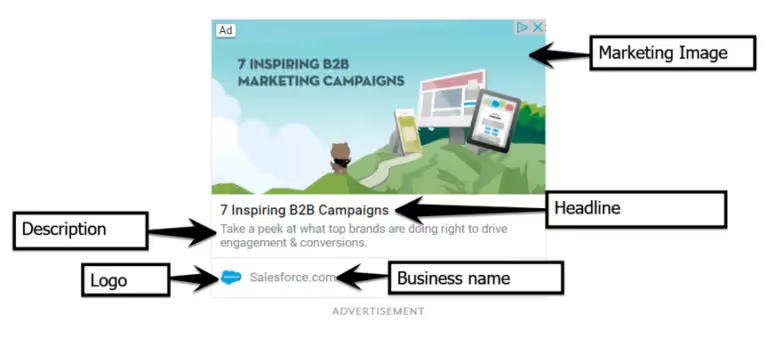
The main format today is Responsive Display Ads (RDAs). You upload a set of headlines, descriptions, images, and logos, and Google automatically combines and tests them on different platforms and sizes. In addition to RDAs, you can upload static banners (for teams that want complete control over the visuals) and Gmail ads, which appear in the "Promotions" tab.
The place of display advertising in the SaaS funnel:
- Awareness: First contact with the brand for a cold audience that has not yet searched for your product
- Nurturing: maintaining a presence throughout the long B2B cycle between points of contact
- Retargeting: Bringing back users who have already interacted with the product or website

Display rarely leads to the desired action (application, demo, trial), especially in B2B SaaS, where the median sales cycle is 90-180 days. Which is why many SaaS teams work with a Conversion Rate Optimization agency to improve landing page performance. Therefore, it would be incorrect to evaluate its effectiveness based on CPL. The indicator of effectiveness will be the impact on downstream conversion: how many closed deals included Display as one of the points of contact.

Targeting Best Practices for Google Display Ads in B2B SaaS
The effectiveness of a display campaign is first determined by targeting. Many GDN best practices focus on tightening audience signals rather than maximizing reach. The default GDN algorithm is optimized for reach rather than audience quality. Without specific restrictions, the platform shows ads to everyone, wasting your budget on irrelevant impressions. A solid remarketing strategy starts with this kind of targeting discipline rather than fighting the algorithm's default settings. Therefore, before launching, you need to set the correct targeting settings, which are typically included in a structured Google Ads checklist.
Custom Intent Audiences as an ICP Proxy
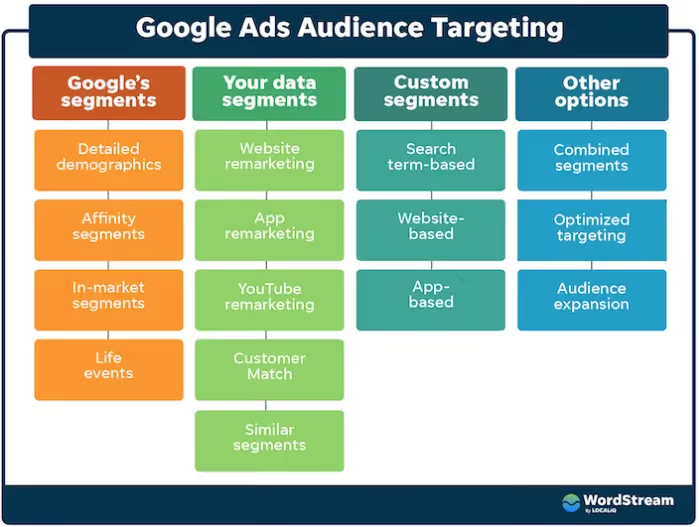
GDN does not provide direct targeting by job title or company size, unlike LinkedIn or Microsoft Ads with LinkedIn Profile Targeting. The closest targeting tool available on GDN to approximate ICP is Custom Intent Audiences. This tool allows you to customize targeting based on user search behavior.
The audience in GDN is formed from search queries that users have entered into Google. All you need to do is add competitors' queries, category keywords, and phrases related to specific business tasks to your custom intent. As a result, you will get an audience that is actively researching your category.
For B2B SaaS, it is effective to combine custom intent with in-market audience for the Software & SaaS category. Custom intent narrows the audience based on search behavior, while in-market adds a signal of active category exploration. Together, they provide a higher concentration of relevant audience than each layer separately.
Before narrowing your audience, it's worth running a campaign in Observation mode. In this mode, the platform shows ads widely but collects data on which segments convert. This allows you to make decisions about exclusions based on real campaign data rather than assumptions.
Placement and Audience Exclusions
After defining your audience, you need to set up exclusions. These Google Display Ads targeting tips help prevent irrelevant impressions and wasted budget in GDN campaigns. This is a mandatory step before launch, not optional.
First, you need to exclude mobile apps. Most GDN traffic comes from apps in the Games, Utilities, and Tools categories, where users accidentally tap on banners while using the app. For B2B SaaS, such clicks have no commercial value. No one makes a decision to purchase corporate software in a mobile game. Excluding this category of apps allows you to direct your budget to sites where your target audience actually makes business decisions.
In addition to apps, it is worth excluding parked domains and error pages, i.e., sites without a real audience, before launch. Also exclude irrelevant thematic categories (Entertainment, Sports, Games).
The placement report must be checked weekly for the first 30 days: GDN is constantly adding new sites, and without regular checks, irrelevant sites may return to rotation. After the first month, it is sufficient to check once every two weeks. Such a review will allow you to identify sites with high CTR but zero downstream conversion. They will need to be excluded separately.
Retargeting: The Highest-Intent Audience on GDN
After setting up cold targeting and exclusions, retargeting becomes a separate priority within the overall Google Display Ads strategy for SaaS. It is the only segment of the GDN where the audience is familiar with the product and has shown interest that can be measured. Display provides the most predictable results at the lowest cost per lead qualification here.

Retargeting works more effectively when the audience is segmented by specific actions rather than simply by the fact of visiting the website.These segmentation approaches are part of Display remarketing best practices in B2B SaaS. A user who opened the home page and a user who spent time on the pricing page are at different points in the decision-making cycle. Each segment requires a separate message:
- Visitors to the pricing page – messaging around ROI and payback periods
- Visitors to the demo page without conversion – lowering the barrier to entry, social proof
- Trial users who did not upgrade to a paid plan – product value, onboarding support
Retargeting time windows need to be adapted to the actual length of the sales cycle. For B2B SaaS with a cycle of 90+ days, the standard 30-day window cuts off a significant portion of the audience that is still in the evaluation process. Extending to 90 days keeps these users in active retargeting throughout the cycle.
Customer Match complements retargeting where pixel data is insufficient. Uploading CRM lists allows you to target existing contacts directly or build lookalike audiences based on them. For teams with a base of trial users or MQLs, this is one of the most accurate ways to work with a warm audience on GDN.
Creative Best Practices for Google Display Ads in B2B SaaS
Targeting determines the audience that will see the ad, while creativity determines how that audience will perceive it. Many Google Display ad best practices emphasize aligning creative messaging with funnel stage. Since display ads are not shown on demand, the user is not looking for a product and is therefore initially less interested in any offer. The creative's task is to capture attention and create a positive impression on someone who is not in the mood to learn or buy anything.
Responsive Display Ads: Setup and Asset Requirements
RDA is the primary format of the GDN. You upload a set of images, logos, headlines, and descriptions. Then, Google automatically tests different combinations and selects the best ones for each placement and audience.
In 2025, Google introduced asset-level reporting, which allows you to view impressions, clicks, cost, and conversions for each headline, description, and image individually, rather than just aggregated campaign data. This changed the optimization approach and created new ways to improve Google ads performance through asset-level testing. Rather than replacing the entire set of assets, you can now replace weak elements based on real data.

Technical Requirements for Assets:
- Landscape image: 1200 x 628 px — the main format for most placements
- Square image: 1200×1200 px — For mobile and small formats
- Logo in two formats: 1:1 and 4:1 without decorative elements or colored backgrounds
- Maximum file size: 5,120 KB
- File formats: JPG or PNG

RDA is inferior to static banners in the following ways:
- Retargeting with proven, high-conversion creatives
- Niche placements
- Campaigns with strict brand guidelines
In such scenarios, static banners yield a higher CTR when properly A/B tested. For prospecting and awareness campaigns, RDA is more effective due to automatic combination testing and fast learning cycles.
The Ad Strength column in the asset-level report is an indicator of the completeness of the asset set, not a direct predictor of conversion. According to Google, metrics at the individual asset level (CTR, CPC, CPA) are indicative and reflect not the isolated effectiveness of an element, but the result of the specific combination of assets in which it was displayed. Effectiveness should be evaluated at the asset group or campaign level.
Creative Messaging by Funnel Stage
A single creative for the entire funnel is one of the most common reasons for low Display effectiveness in B2B SaaS. Users who are just getting acquainted with the category and users who have already studied pricing require different messages.
Awareness. The audience is unfamiliar with the product and is not looking for a solution. Problem-led messaging works more effectively, focusing on the task that the product solves rather than its features or offer.

Consideration. The user studies the category and compares options. Measurable social proof works here: specific customer results in numbers, logos of recognizable companies from the portfolio, short stats from case studies. Abstract statements without numbers carry no weight at this stage.
Retargeting. Behavioral and dynamic retargeting show a 126% and 106% increase in CTR, respectively, compared to broad targeting. Different actions mean different levels of readiness to buy, and the message should reflect that.
Three segments that are worth highlighting first:
- Pricing page visitors. People who have reached the pricing page are already seriously considering the product. They don't need an explanation of what the product is. They need a reason why it will work. Messaging: ROI, payback period, comparison with alternatives
- Demo page visitors without conversion. People who wanted to watch the demo but did not sign up. Their barrier is not a lack of interest, but something else, such as timing, doubts, or the need to consult with their team. Messaging: customer reviews from similar situations, simplified first step (e.g., a call to “watch a 3-minute video” instead of “sign up for a demo”)
- Trial users who did not upgrade to a paid plan. People who tried the product but did not buy it. Messaging: what exactly they are missing, the specific value of upgrading to a paid plan.
Separately, you need to exclude users who have already performed the target action (submitted an application, made a purchase) from the display. For them, you need to create a separate category, which you then add to the campaign exclusions. This is necessary so that the budget is not spent on people who have already converted.
If you are interested in creatives, we have a separate article where we show and tell you in detail about the best Google Ads examples.
Display Ad Design: Core Requirements
With a CTR of 0.22%, B2B services have the lowest rate among all industries in Display. This is the reality of the channel. Understanding banner ads best practices becomes critical when working with such low engagement benchmarks. B2B audiences make purchasing decisions slowly and rarely click on a banner ad at first glance. The goal of display advertising in the B2B SaaS industry is to build brand awareness through consistent exposure. Therefore, the design approach should not be to encourage clicks, but rather to stick in the user's memory.
CTR is only a diagnostic metric and not an indicator of success in itself. A high CTR is not a reliable indicator of effectiveness unless it correlates with a low bounce rate, a high conversion rate, and a positive ROAS. In the context of B2B SaaS, an ad with a CTR of 0.15% that generates qualified leads is more valuable than an ad with a CTR of 0.5% that brings in irrelevant traffic.
We have identified several design principles that are effective in this context and reflect common best practices banner ads used in B2B SaaS campaigns.
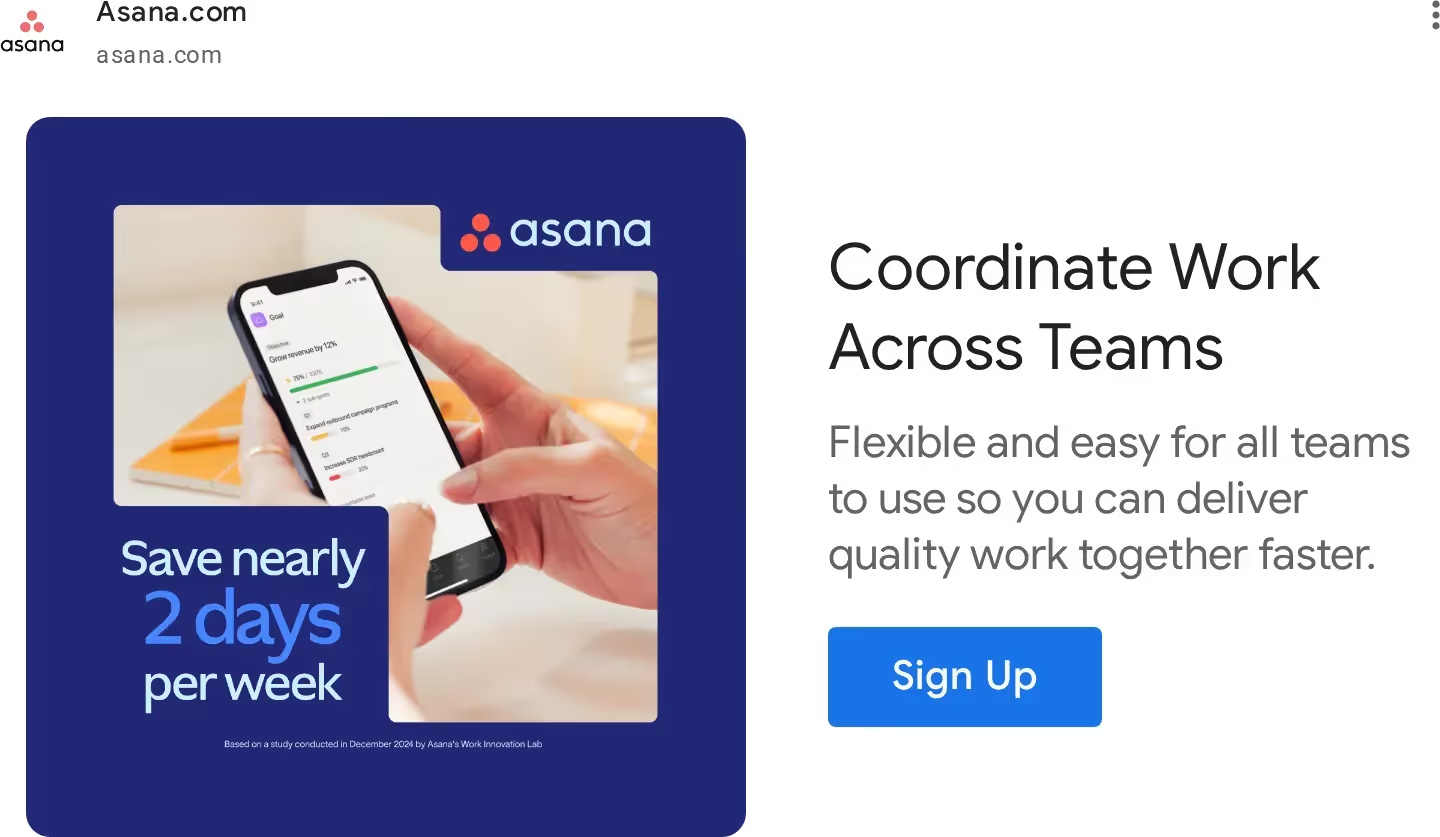
One visual focus. A complex banner with several competing elements is less effective than a simple one. For B2B SaaS, product screenshots and real interfaces work better because they convey specifics faster than stock photos or abstract graphics do.
Put your logo on every ad. In B2B with a long sales cycle, users see ads several times before clicking. Each ad without a logo is a missed opportunity for brand recognition. Someone may see a banner five to seven times without clicking but will remember the brand the next time they search on Google.
Use a CTA with an action verb. A CTA without a specific call to action does not work; the user does not understand what is expected of them. The wording depends on the stage of the funnel:
- Awareness: “See How It Works,” “Explore the Platform”
- Consideration: “Get the Report,” “Watch the Demo”
- Bottom-funnel / retargeting: “Start Free Trial,” “Book a Call,” “Get a Quote”
We discussed this in more detail in another article.
Creative refresh cycle. For high-frequency campaigns (1M+ impressions per month) – refresh every 4-6 weeks for static formats and every 8-10 weeks for video. For medium-volume campaigns (100K–1M impressions) – every 6-8 weeks for static formats. An indicator of the need for urgent updating is a drop in CTR of 25%+ from the initial level. In B2B SaaS with a narrow audience, retargeting campaigns burn out faster because the frequency of impressions per user is higher than in prospecting.
Bidding Strategy and Budget Allocation for SaaS Display Campaigns
Your bidding strategy affects how Google allocates your budget across auctions. Following Google Display Ads guidelines for bidding and conversion data is critical because Smart Bidding relies entirely on accurate signals. Choosing incorrectly early on reduces effectiveness and prevents the algorithm from learning, which leads to poor results.
Bidding Strategy by Conversion Volume
If you have fewer than 15 conversions per month, use Manual CPC. Smart Bidding is not effective at this stage because the algorithm lacks sufficient data to make informed decisions. Manual CPC gives you complete control over bids while the campaign accumulates conversion history. Note that Enhanced CPC (ECPC) has not been available for Search and Display campaigns since March 2025. Campaigns that were not transferred to a different strategy automatically switched to manual CPC. Campaigns with ECPC are actually running on Manual CPC without automation.
For 15–30 conversions per month, use the Maximize Conversions strategy without a target. The algorithm begins to learn, but there is not yet enough data for accurate CPA targeting. Setting a Target CPA for a new campaign without a conversion history is risky. A restrictive target will kill the campaign before it has a chance to learn. Maximize Conversions, on the other hand, gives the algorithm the freedom to collect data without strict cost restrictions.
30+ conversions per month: Target CPA. The standard threshold for switching to tCPA is a minimum of 30 conversions in 30 days. The initial target is set at the average CPA over the past 30 days, or slightly higher (but not lower). An underestimated target limits reach. Google does not find enough auctions where it can win at a given cost, and the campaign loses volume. After proper configuration, tCPA reduces CPA by an average of 10-30% after the learning period.
For awareness campaigns, use tCPM. It optimizes reach within the budget, not conversions. For B2B SaaS, this means creating separate campaigns with separate budgets — awareness and conversion campaigns should not compete for the same resources.
Learning Phase: What to Expect and What Not to Do
After switching to Smart Bidding, the campaign enters a learning phase. This period lasts about seven days. If the learning status has not disappeared after two weeks, it is time to check the conversion tracking settings.
During the learning phase, campaign performance is unstable. Many best practices Display Ads recommend avoiding major changes during this period so the algorithm can gather enough data. CPC may increase and conversions may decrease. The learning phase restarts with every significant change:
- Change in bidding strategy
- Significant change in target CPA
- Sudden change in budget
- Change in conversion goals or significant changes in targeting
In B2B SaaS, which has a low conversion volume, each restart of the learning phase results in a loss of data and time.
There are two rules for working with bidding during and after the learning period:
- Change the target CPA by no more than 20% at a time, and wait one week between changes. A sharp decrease in the target CPA limits reach, and the algorithm cannot find enough auctions at the specified price
- The daily budget should be at least three to five times the target CPA. For example, if the target CPA is $50, the daily budget should be at least $150–$250. With a smaller budget, the algorithm does not have enough volume to learn
Conversion Window and Budget Split
Conversion window. The default conversion window in Google Ads is 30 days. However, best practices for Google Display Ads recommend adjusting this window to match the real sales cycle, especially in B2B SaaS. For B2B SaaS with a sales cycle of 90-180 days, a significant portion of conversions influenced by Display campaigns are not attributed to them correctly. Check the conversion lag data in your account and set a conversion window that corresponds to the actual cycle. Extending it to 90 days gives the algorithm a more accurate picture of the impact of Display on downstream conversions.
Frequency cap. Without limiting the frequency of impressions on a narrow B2B audience, the budget is concentrated on the same users. Recommended parameters by stage:
- Awareness: 3-5 impressions per user per week
- Consideration: 5-7 impressions per week
- Retargeting: up to 10-12 impressions per week
Prospecting vs retargeting split. These two types of campaigns solve different problems and require separate budgets and separate bidding strategies. Prospecting works to expand the audience – the cycle to results is longer. Retargeting works on a warm audience – the result is faster and more predictable. For most B2B SaaS teams at the start, the optimal split is 30% prospecting, 70% retargeting. As the retargeting audience base grows, the ratio can be shifted towards prospecting.
Conclusion
Display isn't a vanity channel, and it isn't a shortcut to leads either. For B2B SaaS, it does something more specific: it builds the memory that makes your brand the obvious choice when the buyer finally searches. Get the targeting tight, match the creative to the funnel stage, and give the algorithm enough data before touching the settings. When Display is configured well, it quietly does its job across every touchpoint, long before your Search campaigns ever see the click.
FAQs
Yes, but their role differs from search advertising. In B2B SaaS, display advertising rarely leads to quick leads, partly due to the long sales cycle typical for the industry (90-180 days on average). The main value of the channel lies in its impact on subsequent conversions: brand awareness, repeat exposure, and retargeting of users who later return via search or other channels.

The average cost per click on Google Display Network is usually less than $1. This is significantly cheaper than search advertising or LinkedIn. Due to its low cost per click, Display is often used for the top of the funnel, where it is important to maintain a constant brand presence without significantly increasing the budget.
Google Display Network offers several types of targeting, including interest-based audiences, in-market audiences, Custom Intent, and retargeting. In B2B SaaS, the combination of Custom Intent and in-market audiences is considered the most effective, as it allows you to get closer to your target customer profile through search behavior and category interest signals.
Retargeting is considered the most effective segment of GDN because it works with users who have already interacted with the site or product (studied pricing, watched a demo, or tested the product). This makes Display an important tool for moving users further down the sales funnel.
The choice of strategy depends on the volume of conversions. With a low number of conversions, Manual CPC is usually used to control bids and collect data. When campaigns start to receive a sufficient volume of conversions, you can switch to automatic strategies, such as Maximize Conversions or Target CPA.



.avif)

.png)