
Best Microsoft Ads Campaign Types for B2B SaaS


Microsoft Ads (or Bing Ads) is often mistakenly considered a less effective alternative to Google Ads. However, the platform offers unique advantages, such as direct collaboration with a Business Development Manager (BDM) and deep integration with LinkedIn.
Our experience suggests that Microsoft Ads for B2B SaaS lead generation remain effective at comparatively lower costs. For example, in our case study for Cogan, a B2B company, adding Microsoft Ads to the media mix increased the number of leads by 26% while reducing CPA.
However, not all Microsoft Ads campaign types are equally effective in the B2B SaaS segment. In this article, we discuss the most effective and applicable ones.
Why Microsoft Ads Makes Sense for B2B SaaS
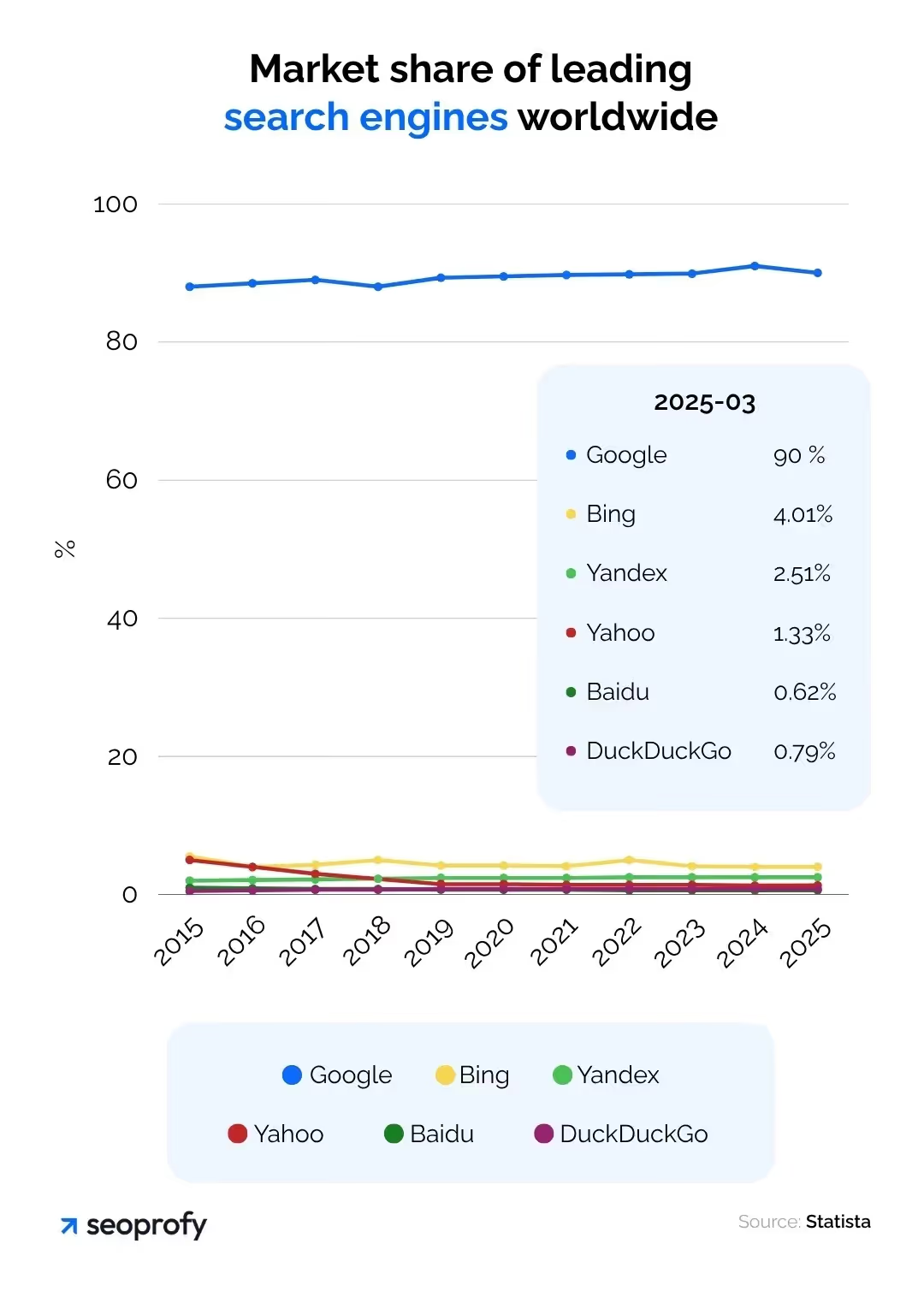
Although Microsoft Ads is not usually considered for B2B SaaS marketing, it actually reaches your target group extensively. Bing powers Microsoft's advertising platform, reaching more than 12% of desktop search queries globally. In fact, it reached as much as 36% of desktop search queries in the US alone. Note that many users perform specific actions like demos, applications, or filling out forms on office computers. In fact, an average of 1.8 billion users search using Bing monthly, producing an average of 900 million searches daily.
Additionally, different types of Microsoft campaign Ads uses LinkedIn data, enabling you to target users by job title, experience, and industry. LinkedIn Profile Targeting is exclusive to Microsoft Ads. This feature is unavailable on Google or LinkedIn Ads.
Which Microsoft Ads Campaign Types Actually Work for B2B SaaS?
Microsoft offers different campaign types that target specific goals and audience touchpoints.
Each of these types is useful in a specific context. However, within Microsoft Ads strategies for SaaS companies, the primary focus for B2B marketing is on search and audience campaigns. Other formats are typically used for broader objectives or different business models.
Search Campaigns for B2B SaaS
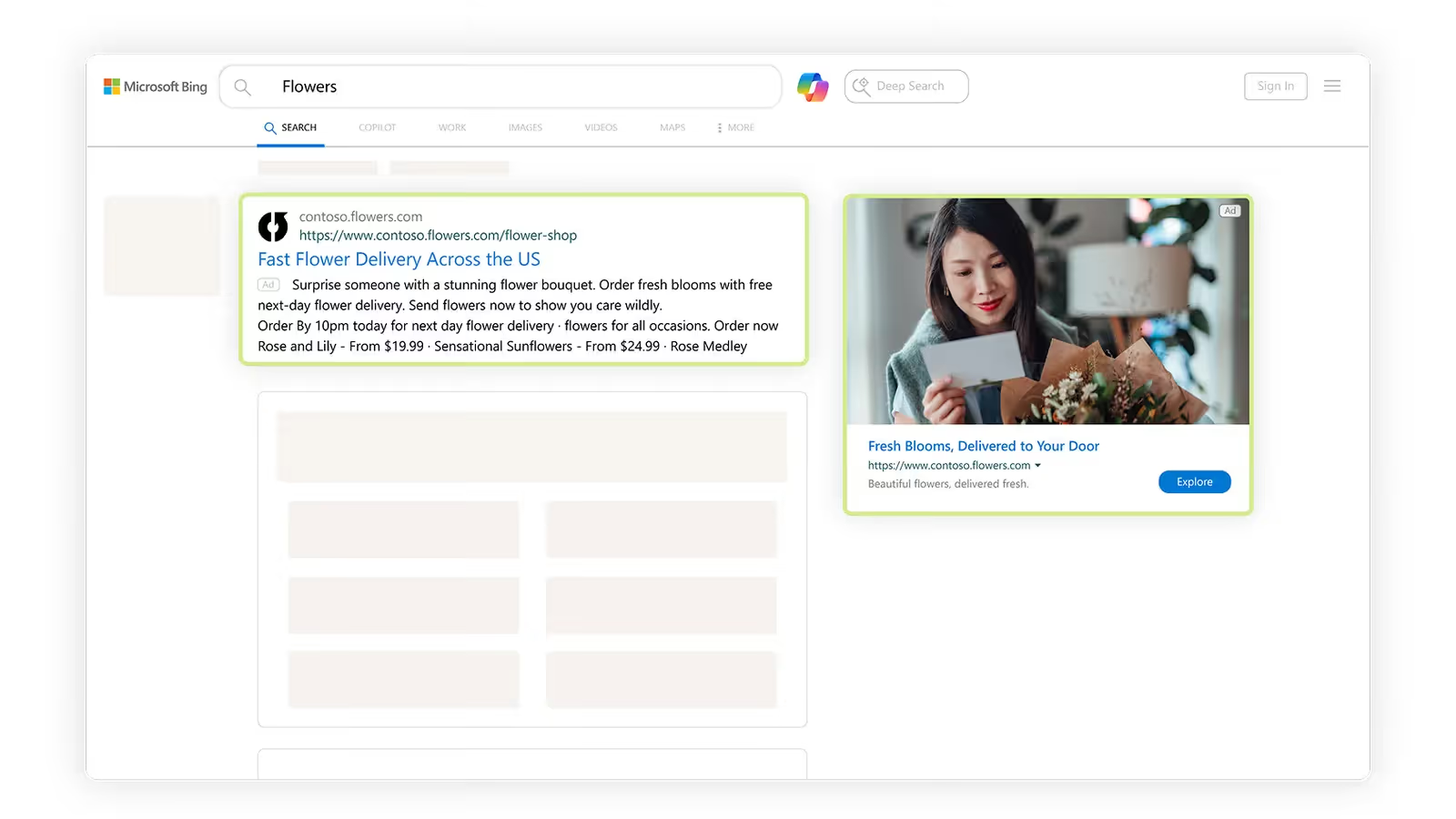
Search advertising is still the main driver of engagement in the B2B SaaS industry. It capitalizes on existing demand. Users looking for a solution to a specific task are ready for a demo, trial, or purchase.
Microsoft Ads provides an additional source of this type of traffic thanks to its audience. Bing has a 12% share of the desktop search market. This makes the platform particularly relevant for corporate audiences using office devices.
Another advantage of Bing advertising campaign is LinkedIn Profile Targeting. Microsoft Ads is the only platform where you can use professional attributes, such as job title, industry, and company, in a search campaign. This allows you to more accurately target your ideal customer profile (ICP) and filter out irrelevant traffic at the ad display level.
Due to less competition and a lower CPC (30-50% lower than Google Ads in many B2B niches), Microsoft Search is becoming a strategically important channel, especially for building a diversified funnel in a mature market. We will discuss the Search Campaign formats and settings that help with this below.
Brand Search Campaigns
A company's ranking in organic search results is not enough. In Microsoft Ads, as in Google, competitors can purchase impressions of other companies' names and outrank them in the paid section.
The cost of losing even one relevant lead can exceed the cost per click many times over. At the same time, brand search is one of the most affordable formats.
CPC can start at $0.25, CTR is in the range of 10-18%, and CPL is the lowest among all types of search campaigns.
In a Microsoft Ads Performance for SaaS case, 90 days after launching brand and category campaigns for a SaaS client, Maven Collective Marketing achieved the following:
- +191% growth in qualified leads
- +519% increase in form submissions
- +312% growth in the overall conversion rate
Competitor Search Campaigns
In SaaS, using competitor names in advertising is a common practice, especially when entering mature and competitive markets. Often, potential customers search for specific brands they already know without knowing about other suitable alternatives.
Microsoft Ads offers:
- The ability to target competitors' names without including their brands in the ad text (only in keywords).
- A less saturated ad auction environment than Google's. CPC can be 20-30% lower.
- There is additional filtering through LinkedIn profile targeting.
However, such campaigns usually show a lower CTR because the user was initially looking for a different provider. At the same time, the CPC is higher than in branded or general search campaigns due to the narrower competition and high traffic value.
In the Cogan case study mentioned earlier, we added Microsoft Ads to campaigns already running on Google Ads. Among other things, we included competitive keywords. Without changing our approach to content and landing pages, we achieved the following in 30 days: a 26% increase in leads and -2% decrease in CPL.
Dynamic Search Ads for SaaS Websites
DSAs in Microsoft Ads work similarly to DSAs in Google Ads. You set landing pages (or categories), and the platform independently determines which search queries are relevant to them.
Use DSAs when you have:
- Many product pages, a knowledge base, or landing pages
- Use them to expand your reach for long-tail queries that are difficult to collect manually
DSAs are useful for SaaS as a supplement to main campaigns, especially for long-tail traffic. However, DSAs are ineffective if the website is poorly structured or has little content.
Using LinkedIn Profile Targeting in Bing Ads campaign types
This is not a campaign type, but rather a targeting feature within the two primary Bing Ads campaign types for B2B: Search and Audience.
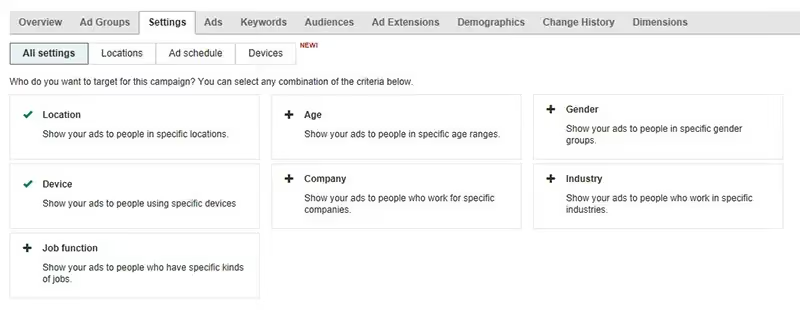
In the Microsoft Ads interface, you can set filters by:
- Job title
- Company name to target specific brands
- Industry
- Company size by number of employees
LinkedIn profile targeting in different types of Bing campaign Ads works via bid adjustments, not exclusions. For example, if the base bid for a keyword is $2.00, an advertiser can set a bid of $2.80 for users with a specific job title. For these particular users, the bid increases to $2.80, while for everyone else, it remains at $2.00. This allows you to prioritize clicks from your target roles while still receiving traffic from other sources.
Audience Campaigns for B2B SaaS
Microsoft Ads' audience campaigns give SaaS companies access to its large-scale advertising network, including platforms such as MSN, Outlook.com, Microsoft Edge, and partner resources.
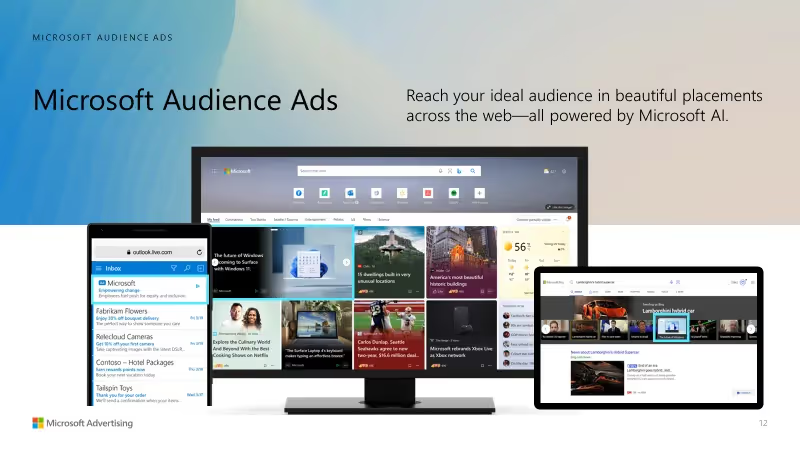
Rather than focusing on active demand, they focus on user interests and professional and behavioral data. This helps you:
- Attract potential customers before they begin searching.
- Re-engage users who have previously interacted with the site.
- Segment audiences with LinkedIn profiles.
Native Ads: Extend your reach with contextual placement
Native advertising on the Microsoft Audience Network operates similarly to Google Display. Native ads blend into the content interface and often resemble articles or recommended content. The only difference is that they are placed on Microsoft's partner sites.
What metrics can you expect from Microsoft Ads Native campaigns for SaaS:
- The average click-through rate (CTR) is 0.4-0.65% in B2B segments
- CPC is 30-50% lower than in search campaigns
Additionally, according to Microsoft, more than 50% of B2B search users are decision makers. Your SaaS company can use native ads to promote an industry guide or comparative study to managers of target companies. This content will be shown to an audience with relevant positions and interests, even if they have not interacted directly with the brand.
Driving Conversions with Targeted B2B Remarketing
Few leads convert on their first visit to a website. This is why remarketing is a crucial channel for bringing back potential customers. Microsoft Ads offers two approaches: standard remarketing and Customer Match.
Standard Remarketing
These functions use a UET tag, similar to a Google tag, to compile information about users who have previously visited the site.
Examples of this data include viewing a product page, a landing page for a demo, a form, or a call-to-action (CTA). You can use this data to build a segment and manage bids and messages for a certain stage of the sales funnel. Microsoft Ads also allows you to remarket to users based on ad impressions. This is useful for a B2B funnel because the sales process is extended and involves many steps.
Customer Match
Upload your own lists of email addresses, for example, from a customer relationship management system or a subscriber database, and reach those users on Microsoft Advertising. The system will match the email addresses with Microsoft profiles ( Outlook, Bing, LinkedIn, etc.) and use them for personalized ad distribution.
For example, Bing Ads helped Kenshoo Skai (B2B SaaS) upload a list of leads who visited the demo but did not complete activation. With their help, the company created a separate ad group emphasizing urgent offers and ROI. The bid for this segment increased by 30%, and the team achieved the following:
- A 35% increase in CTR
- An 18% decrease in CPA
- A 42% increase in demo requests compared to the cold audience
Comparison of Microsoft Ads Campaign Types
Search companies help you tap into existing demand. They show ads to people who are looking for solutions, comparing products, or researching prices. On the other hand, audience campaigns are aimed at expanding reach and gradually warming up and bringing back undecided users. The table below highlights key differences in Search vs Audience campaigns Microsoft Ads and how they are used in practice.
How to Get Started with Microsoft Ads
Do you want to set up the best Microsoft Ads campaigns for SaaS? We can help! At Aimers, we have a proven track record of successfully implementing Microsoft Ads for businesses in a variety of sectors. Learn more and schedule a consultation here.
FAQs
Does Microsoft Ads make sense if we already run Google Ads successfully?

How long does it usually take to see results from Microsoft Ads campaigns?
How does LinkedIn Profile Targeting work in Microsoft Ads Search campaigns?
What metrics should be used to evaluate Microsoft Ads performance in B2B SaaS?
What are the most common mistakes B2B SaaS teams make when launching Microsoft Ads?